Question

moving 80+ TB to Tape using 1 GFS tape job, Takes 3 DAYS TO COMPLETE. is there a better way?


in this configuration we run daily incrementals (Monday thru Friday) to disk (Linux Repository)

on Saturday Morning (just after Midnight) we start our Tape Backups job,(there is only 1 job that looks at the entire repository)  it is a GFS job that Generates synthetic full backups for Weekly / Monthly retention.  the HP Library target contains 2 LT08 Tape drive that are streaming at about 540MB/Sec.  This would probably be acceptable with the exception of one 42 TB file server (starts about 1/3 of the way through the job and grabs one tape drive for 50 Hours+.)   This causes the Overall tape Backup to run up to 76 Hours.  Spilling into the next days incremental Jobs.   I’m considering a change to the Daily’s Backups jobs  to have them Generate Weekly Full backups on the repository, and then use Tape Copy Jobs to move the Full backups to tape?  is it worth the effort?  is it Supported?

14 comments

Chris.Childerhose
Forum|alt.badge.img+21

The other way would be to split the data to separate jobs for backup.  Sending that much via one job would take long as you have shown.


Forum|alt.badge.img+3
  • Experienced User
  • May 12, 2026

Regrettably there is no means to utilize multiple drives for a single backup, so that larger FileServer will tie up one of the drives while it writes. At max drive speed for LTO8 that’s at least 33 hours.

I would advise against the periodic fulls to disk, it won’t meaningfully help here with the tape-out, and in fact, Virtual Full backups for tape are typically faster than direct copies of full backups (and you save storage space as well)

Few suggestions:

  1. Check the bottleneck on the job -- you mention your two drives typically max out at 540 MB/s, but likely you can eke out some more here (360 per drive is max)
    1. If bottleneck is tape drives, then test with a full write test (without compression) with your tape vendor’s native tools, see if they reach closer to peak
    2. If bottleneck is elsewhere, best to investigate with Veeam Support to determine why the bottleneck is happening
  2. You won’t be able to do much easily to fix the initial full backup of the File Server, but subsequent fulls are best served by Virtual Full Backups for Tape
    1. You will still be limited to one drive here, but Virtual Full should reduce if not eliminate source as bottleneck

Outside of that, only thing I can think of is more drastic, and it involves changing how you backup the File Server. If the fileserver has multiple disks that can be backed up independently of each other (i.e., not spanned disks), then you can do the following:

  1. N primary backup jobs for N disks you want to protect, include only the desired disk
    1. Name the jobs appropriately
  2. Add each primary job as a source job to the tape job
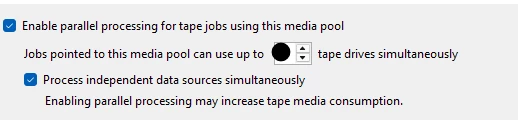
  3. Enable parallel processing in the media pool the tape job will use

This will let you “split” the workload across the two tape drives a bit more easily, but naturally this means recovery is a bit more of a pain since each job only has one disk, so you would only do disk restores or file level restores effectively. In a full DR event for the FileServer, restore the OS disk to a VM, then restore the individual disks from each backup.


Jean.peres.bkp
Forum|alt.badge.img+8

I would do it like this:

1 – Move GFS creation to disk

2 – Use Tape Copy Jobs (not GFS from repository)

3 – Split workloads strategically

4 – Improve tape drive utilization


Current Design Improved Design
1 huge GFS job Multiple Tape Copy Jobs
GFS computed during tape GFS pre-built on disk
Repo-wide scan Job-based processing
Sequential bottlenecks Parallel processing
Long tail (42 TB server) Isolated workload

Forum|alt.badge.img+1
  • Comes here often
  • May 12, 2026

Investing in 10 Gbps L3 switches and setting up trunks that can span across multiple ports.    I would do 40-100 Gbps Trunk.  You will need multiple LTO 9 tape drives to handle that much bandwidth.


Our data center at work has 120 Gbps (12 x 10 Gbps NICs) in a team.   The tape server have 3 LTO 5 tape drives with 6 x 10 Gbps NICs (one on each subnet).   Each tape drive can get 7-8 GB/min backup performance.   You could go to even faster networking.  I have heard of 100 Gbps L3 switches.  Way above our budget.


Chris.Childerhose
Forum|alt.badge.img+21

Investing in 10 Gbps L3 switches and setting up trunks that can span across multiple ports.    I would do 40-100 Gbps Trunk.  You will need multiple LTO 9 tape drives to handle that much bandwidth.


Our data center at work has 120 Gbps (12 x 10 Gbps NICs) in a team.   The tape server have 3 LTO 5 tape drives with 6 x 10 Gbps NICs (one on each subnet).   Each tape drive can get 7-8 GB/min backup performance.   You could go to even faster networking.  I have heard of 100 Gbps L3 switches.  Way above our budget.

Damn that is some speed for tape.  🫪


Forum|alt.badge.img+1
  • Comes here often
  • May 12, 2026

It is all due to the 60 Gbps NICs that are split between subnets.   


AndrePulia
Forum|alt.badge.img+9
  • Veeam Vanguard
  • May 13, 2026

@knorman I would double-check the library itself to verify whether the drives are working properly. Try using the library tools to simulate a workload and check if the library is performing as expected. If you have an HPE library, you can use the Library and Tape Tools (L&TT).


Chris.Childerhose
Forum|alt.badge.img+21

@knorman   -- Were you able to get an answer to your question?  If so, please help the community by posting the answer and then selecting the best answer that helped you achieve this, even if it is your own.


Scott
Forum|alt.badge.img+10
  • Veeam Legend
  • June 11, 2026

LTO8 Should hover between about 300-340MB/s but if you have encryption enabled in Veeam it may slow this down a fair bit. Using hardware encryption on the Tape device if supported helps. (usually found in larger libraries)

2 drives at 540MB seems pretty close, if you have encryption being done at the software level. I have 8 drives and hit 2.3GB/s on one of my libraries using LTO8. 

In the backup job, what is the LOAD for source, proxy, network and target.  for myself, My target is 99% with the others under 3-4%… I know my infrastructure is solid, and those drives are working full time.

Next up.. math. 42TB at 540MB/s is going t o be 25 hours at BEST, if you are not having any slow downs for reads, writes, caching, network bottlenecks etc.  This also means that 42TB would be split over both drives evenly. 

Veeam will backup that server to 1 drive, doubling that, to about 48 hours in theory.  Bang on to what you are seeing at 50+.


I have a few suggestions that I have done, as my jobs take well over 24 hours and have servers even larger. 


1- in your tape jobs, put as many VM’s as you can to use the drives, you want all drives streaming at the same time.

2-  (best option) Edit the job and try and modify the order so the largest servers start first. That way, the longest running VM will be running the entire time. for example. if you had 20 servers, the large VM would start, and the other 19 would grab a drive as a previous VM finishes. Otherwise, if a large VM starts in the middle or near the end, you will have to wait. By doing this my Tape jobs no longer have a long period at the end with a single backup running. 

Tape jobs process backup-to-tape objects in the order they are listed in the job


But Veeam still ultimately optimizes around:

  • available media
  • tape drive readiness
  • data availability in the repository

I had to adjust it a few times and mess around a bit, but it’s been great lately. Also, having very fast repository storage helps. 

On this job, I see the source load and network load effecting the job and the target was less busy. Likely due to other backups/copies running, or other Veeam tasks running. This repo has slower disk so if there were several merges happening, it would be slower. It’s also configured differently and an different OS etc.  If you notice the source, proxy, and network as your bottleneck, you many want to troubleshoot those areas and add capacity, or change times of things if they are conflicting. 

3- Drive layout. Not sure you want to do this, and recommend heavy testing, but you could split the file server backup into 2 jobs selecting different disks for each one.  By doing that, it would split the drives into separate files on the repo. This would allow the monster server to backup using 2 tape drives at once dropping the time in half. This does make restores more of a challenge. instant restore wouldn’t work either. with all the disks and would require additional steps.

4- Switch to weekly full or synthetic full backups on your tape jobs. if it takes 2 days, that’s the time it takes. Data transfer time on a single drive and a server that size is going to take a long time. You can’t change that. ​​​​​​​

5- test with no encryption and see if the speeds improve. it’s minor but worth checking.

6- Add a drive. won’t help with the single server issue, but will still help get jobs done quicker.

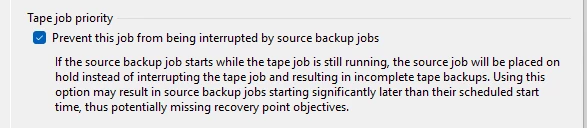
Use this setting for long running jobs. 


Make sure you have this set to use multiple drives, (sounds like you do)


Having daily incremental to a repo. (immutable is best) then running a GFS to tape makes total sense for large environments like yours.  You can set up weekly/monthly/yearly retention on that.  An option could be a separate job so you have daily of smaller servers, but then a file server tape job that is only weekly as well to tape. 

Why not create a few new file servers, use DFS (if you are Windows environment) and try to keep the sizes down. That would solve several issues, and make things more manageable.  If you are virtualized, that seems like a really good option.


Hopefully Veeam will possibly add some feature to break the files up into multiple for tape jobs in the future allowing streaming to multiple tapes at once for a single VM, but we’ll see. It’s much better with per-vm chains, but can still take a while.


Edit - One more idea, there are now S3 appliances, that sit in front of tape. and write to multiple drives. You could get something like that, with a large cache, and turn your Tape into a s3 repository with a copy job. Data would end up on tape, and help with parallel processing.  This does mean added software, license, potential issues troubleshooting, and effect restores. 


Scott
Forum|alt.badge.img+10
  • Veeam Legend
  • June 11, 2026

Investing in 10 Gbps L3 switches and setting up trunks that can span across multiple ports.    I would do 40-100 Gbps Trunk.  You will need multiple LTO 9 tape drives to handle that much bandwidth.


Our data center at work has 120 Gbps (12 x 10 Gbps NICs) in a team.   The tape server have 3 LTO 5 tape drives with 6 x 10 Gbps NICs (one on each subnet).   Each tape drive can get 7-8 GB/min backup performance.   You could go to even faster networking.  I have heard of 100 Gbps L3 switches.  Way above our budget.


LTO 5 max is about 140MB/s so you are pretty close to the max there. 3 of those you are looking at 420MB/s (GB/min is a bit of an interesting choice so i had to convert it)


500 MB/s to Gbps = 4 Gbps.

1000 MB/s to Gbps = 8 Gbps


there likely isn’t a need for 40-100Gbps trunk for that, but it would allow for significant future expansion. 


Ideally, have your tape server and repos on the same subnet, or at least some ports. if you can use LACP it helps to get some pretty extreme bandwidth.  


My 8 LTO8 drives get up to about 3 or 3.2 GB/s  Even that is only between 24 and 26 Gbps.  There is a reason LTO 8 drives still only operate on 8Gb FC as 2 drives wouldn’t even saturate that. LTO 5 would take about 6+


I am a fan of fast equipment though, and fast speeds between the proxies, repos, storage, and tape are never a bad thing. 


Forum|alt.badge.img+1
  • Comes here often
  • June 11, 2026

They are maxed out.  Even Arserve is impressed with the backup performance.   I can do three tape drives concurrently maxed out.  

I don’t use Veeam.  Arcserve goes directly to tape.


Scott
Forum|alt.badge.img+10
  • Veeam Legend
  • June 11, 2026

My first post was directed to OP. as far as maxed out, i am sure you mean the drives, which I would assume to be true. I’m saying the network connection is overkill for the drives as they will always be the bottleneck as 3x  LTO5 drives only really needs 400 to 450MB/s or lets call it 4Gbps worth of band width to max them out. 


Forum|alt.badge.img+3
  • Experienced User
  • June 12, 2026

Edit - One more idea, there are now S3 appliances, that sit in front of tape. and write to multiple drives. You could get something like that, with a large cache, and turn your Tape into a s3 repository with a copy job. Data would end up on tape, and help with parallel processing.  This does mean added software, license, potential issues troubleshooting, and effect restores. 

Please keep in mind, most vendors that provide this only provide it as an archival storage, and it’s recommended only as an Archive Tier target due to the need for the appliances to retrieve data to a landing cache before presenting it over S3 to the application.

Scality and Quantum have appliance solutions that offer this along with normal S3 storage class buckets that are kept on local storage; the expectation for these appliances though is that you’re moving / archiving the data to the archival tier either through native appliance means or through a backup application.

I would not advise it though except if you're ready to use it exclusively at archive tier and use the local storage only for data retrieval, as with Veeam the data path will require data comes out of the appliance S3 normal tier endpoints to the backup server / gateway only to go right back into the appliance, which is of course not optimal.

But as archive tier, direct to archive from a performance tier outside of the appliance makes sense, the performance tier repositories will be used as gateways and you’ll only send data once to the appliance.


3- Drive layout. Not sure you want to do this, and recommend heavy testing, but you could split the file server backup into 2 jobs selecting different disks for each one.  By doing that, it would split the drives into separate files on the repo. This would allow the monster server to backup using 2 tape drives at once dropping the time in half. This does make restores more of a challenge. instant restore wouldn’t work either. with all the disks and would require additional steps.


Correct, but there are multiple Disk Specific Recovery options should this route be chosen; especially if it’s a VMware virtual machine, IR the disk(s) to desired machine and IR to production, but biggest caveat is the volume layout on the original machine, as Windows Dynamic / Spanned disks & anything in LVM / ZFS / whatever will require more work than it’s worth probably. But heavily depends on how original machine is being backed up.

Also, regarding encryption, in the past used to be an issue, but if you’re using OS / hardware made after 2015, I would be surprised if it had significant effect on the tape-out process and would more suspect issue on the Veeam Config DB side more than anything (Tape encryption requires a lot of DB work to keep the encryption keys sync’d up). Similarly, it’s fairly common to offload the encryption workload to the tape hardware, but naturally this depends on if you want to pay for the hardware encryption module for your tape hardware.


Scott
Forum|alt.badge.img+10
  • Veeam Legend
  • June 12, 2026

Edit - One more idea, there are now S3 appliances, that sit in front of tape. and write to multiple drives. You could get something like that, with a large cache, and turn your Tape into a s3 repository with a copy job. Data would end up on tape, and help with parallel processing.  This does mean added software, license, potential issues troubleshooting, and effect restores. 

Please keep in mind, most vendors that provide this only provide it as an archival storage, and it’s recommended only as an Archive Tier target due to the need for the appliances to retrieve data to a landing cache before presenting it over S3 to the application.

Scality and Quantum have appliance solutions that offer this along with normal S3 storage class buckets that are kept on local storage; the expectation for these appliances though is that you’re moving / archiving the data to the archival tier either through native appliance means or through a backup application.

I would not advise it though except if you're ready to use it exclusively at archive tier and use the local storage only for data retrieval, as with Veeam the data path will require data comes out of the appliance S3 normal tier endpoints to the backup server / gateway only to go right back into the appliance, which is of course not optimal.

But as archive tier, direct to archive from a performance tier outside of the appliance makes sense, the performance tier repositories will be used as gateways and you’ll only send data once to the appliance.


3- Drive layout. Not sure you want to do this, and recommend heavy testing, but you could split the file server backup into 2 jobs selecting different disks for each one.  By doing that, it would split the drives into separate files on the repo. This would allow the monster server to backup using 2 tape drives at once dropping the time in half. This does make restores more of a challenge. instant restore wouldn’t work either. with all the disks and would require additional steps.


Correct, but there are multiple Disk Specific Recovery options should this route be chosen; especially if it’s a VMware virtual machine, IR the disk(s) to desired machine and IR to production, but biggest caveat is the volume layout on the original machine, as Windows Dynamic / Spanned disks & anything in LVM / ZFS / whatever will require more work than it’s worth probably. But heavily depends on how original machine is being backed up.

Also, regarding encryption, in the past used to be an issue, but if you’re using OS / hardware made after 2015, I would be surprised if it had significant effect on the tape-out process and would more suspect issue on the Veeam Config DB side more than anything (Tape encryption requires a lot of DB work to keep the encryption keys sync’d up). Similarly, it’s fairly common to offload the encryption workload to the tape hardware, but naturally this depends on if you want to pay for the hardware encryption module for your tape hardware.


I agree with both points. As OP was asking about slow tape jobs, archival tier soundss like it should be fine. Also, thank you for adding that because I mentioned significant testing, and that it was a a lot of work for similar reasons as you mentioned, but this was much more detailed.    If you are using spanned disks or non windows hosts this becomes a challenge to keep data consistent. 


I would recommend OP either create a few smaller file servers instead of one large server, use immutable cloud storage instead of tape, or accept the fact that copying 45TB on something at 290MB/s - 330MB/s is going to take 2 days and skip the daily incremental on that specific job.