


Solved

Issue with install CDP

  • February 20, 2026
  • 15 comments
  • 54 views

kciolek
Forum|alt.badge.img

Hello,


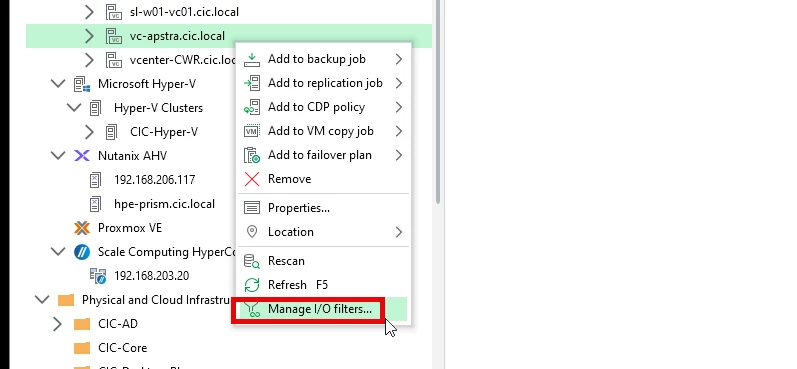
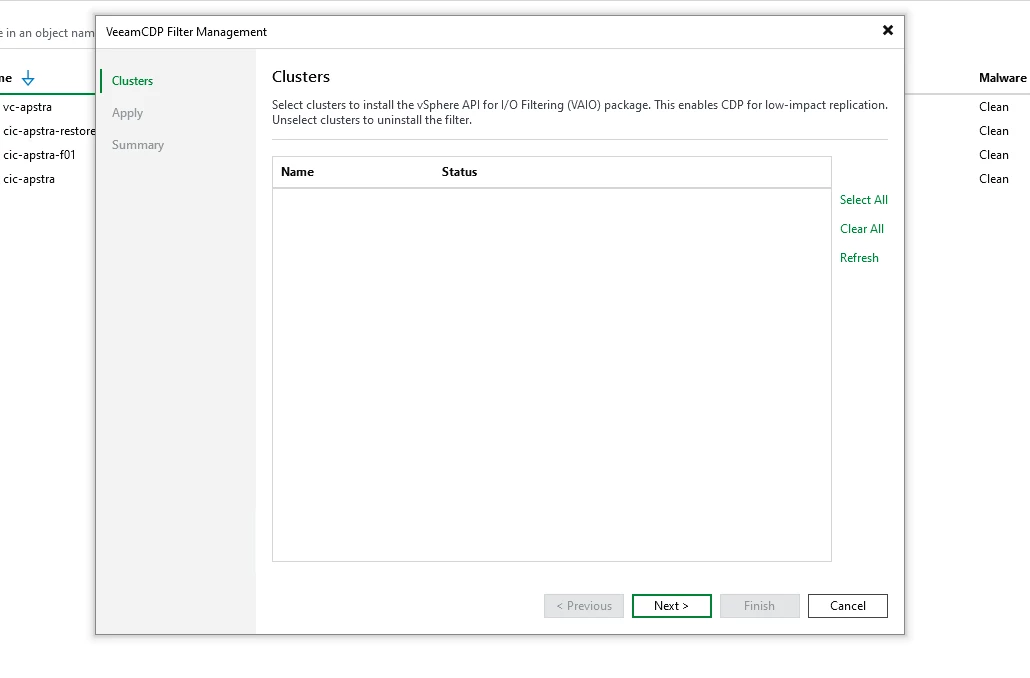
I have a cluster on my Veeam v13 software appliance I’m looking to configure with CDP, however when i go to install the I/O filter the cluster doesn’t show up. What am I missing. I do have CDP configured on Veeam and another cluster is configured with it. Any ideas?
 

Best answer by kciolek

thank you everyone for the help! I figured out the issue. It was one node but wasn’t setup in a VMware cluster, once we did that the option to install the I/O filters came up.

15 comments

Chris.Childerhose
Forum|alt.badge.img+21
  • Veeam Legend, Veeam Vanguard
  • February 20, 2026

What if you click Properties and click through the wizard - does the cluster show up then?  What version is the cluster - maybe unsupported?


kciolek
Forum|alt.badge.img
  • Author
  • Comes here often
  • February 20, 2026

Click properties where?


The cluster is running VMware 8.03


Link State
Forum|alt.badge.img+11
  • Veeam Legend
  • February 20, 2026

Hi ​@kciolek 

  • Do you have  alredy check vCenter Hierarchy & Permissions?

Continuous Data Protection (CDP) - Veeam Backup & Replication Permissions for VMware vSphere

  • Try Rescan the vCenter: Go to Backup Infrastructure > Managed Server ight-click your vCenter, and select Rescan
  • Try to check Permissions: Ensure the account Veeam uses to connect to vCenter has the Host.Config.Storage and Host.Config.AdvancedConfig privileges at the cluster level
  • Enable DRS on the vSphere cluster?
  • Check Firewall/DNSOpen Port 33035; Verify Forward/Reverse DNS.
  • VAIO enabled on all host? check  esxcli software vib list | grep vaio


Maybe you need collect the logs and open case in veeam support.


Chris.Childerhose
Forum|alt.badge.img+21
  • Veeam Legend, Veeam Vanguard
  • February 20, 2026

Click properties where?


The cluster is running VMware 8.03

Where you have the screenshot of the Manage I/O Filter - that dialogue there is Properties.  That will bring up the edit wizard to click through.


AndrePulia
Forum|alt.badge.img+9
  • Veeam Vanguard
  • February 20, 2026

A question for you ​@kciolek is your cluster managed by image or baseline?


kciolek
Forum|alt.badge.img
  • Author
  • Comes here often
  • February 20, 2026

A question for you ​@kciolek is your cluster managed by image or baseline?

it looks like image


kciolek
Forum|alt.badge.img
  • Author
  • Comes here often
  • February 20, 2026

Click properties where?


The cluster is running VMware 8.03

Where you have the screenshot of the Manage I/O Filter - that dialogue there is Properties.  That will bring up the edit wizard to click through.


tried that ...it scans the disks without issue


kciolek
Forum|alt.badge.img
  • Author
  • Comes here often
  • February 20, 2026

Hi ​@kciolek 

  • Do you have  alredy check vCenter Hierarchy & Permissions?

Continuous Data Protection (CDP) - Veeam Backup & Replication Permissions for VMware vSphere

  • Try Rescan the vCenter: Go to Backup Infrastructure > Managed Server ight-click your vCenter, and select Rescan
  • Try to check Permissions: Ensure the account Veeam uses to connect to vCenter has the Host.Config.Storage and Host.Config.AdvancedConfig privileges at the cluster level
  • Enable DRS on the vSphere cluster?
  • Check Firewall/DNSOpen Port 33035; Verify Forward/Reverse DNS.
  • VAIO enabled on all host? check  esxcli software vib list | grep vaio


Maybe you need collect the logs and open case in veeam support.


everything is good. For the last one and VAIO Enabled ..doesn’t Veeam have to install CDP first for that?


AndrePulia
Forum|alt.badge.img+9
  • Veeam Vanguard
  • February 20, 2026

humm, I think you need to follow the following procedure.

Lifecycle Manager

  • Image Depot
  • Actions
  • Add Components
  • Check Compliance
  • Remediate All

the hosts will

  • Enter Maintenance Mode

  • Install the VIB

  • Reboot

  • Exit Maintenance Mode

after reboot, check:

esxcli software vib list | grep -i veeam


Do NOT:

  • Install manually with esxcli software vib install

  • Use legacy baselines

  • Mix image-managed cluster with manual VIB installs

That will break compliance and future remediation.


I don’t have a lab environment at the moment, but I hope to have it back next week. I wish I had it now so I could test this for you.


Chris.Childerhose
Forum|alt.badge.img+21
  • Veeam Legend, Veeam Vanguard
  • February 20, 2026

I wonder if you can have more than one instance of the I/O filters themselves?  More than one cluster I mean within the console.  Not sure about that but might seem that way and of course I could be completely wrong.  😂


Chris.Childerhose
Forum|alt.badge.img+21
  • Veeam Legend, Veeam Vanguard
  • February 20, 2026

It seems you can have it installed on more than one cluster.  So ignore that suggestion from me.


kciolek
Forum|alt.badge.img
  • Author
  • Comes here often
  • Answer
  • February 20, 2026

thank you everyone for the help! I figured out the issue. It was one node but wasn’t setup in a VMware cluster, once we did that the option to install the I/O filters came up.


Chris.Childerhose
Forum|alt.badge.img+21
  • Veeam Legend, Veeam Vanguard
  • February 20, 2026

Glad to hear you figured it out.


AndrePulia
Forum|alt.badge.img+9
  • Veeam Vanguard
  • February 20, 2026

Great! now you can enjoy the weekend with CDP replication :-)


Chris.Childerhose
Forum|alt.badge.img+21
  • Veeam Legend, Veeam Vanguard
  • February 20, 2026

I changed the best answer to this thread as it is the OPs reply above.  Not sure why another answer was marked unless by mistake.





