Question

Failed to update the backup console: Failed to deliver update specification to backup server.

  • March 18, 2026
  • 8 comments
  • 187 views

Hello,

Updating the windows console to 13.0.1.2067 is systematically failing with the error “Failed to update the backup console: Failed to deliver update specification to backup server.”

I’am using a VSA - current build 13.0.1.2067

Even when downloading directly the 13.0.1.2067 ISO, i get the same issue

Anyone had the same problem and could fix it ?

Rgds

JIhad

8 comments

eblack
Forum|alt.badge.img
  • Influencer
  • March 18, 2026

The process currently requires a full local administrator session. Have you attempted to login with a dedicated admin account in Windows and run the install? 


Marcel.K
Forum|alt.badge.img+11
  • Veeam Legend
  • March 20, 2026

i would suggest with right click and “run as administrator”

if not, i will suggest to check ports, because here looks that console is not able to connect VBR- “Failed to deliver update specification to backup serve”

you should find more information in installation log


Hello Veeam community,

I’m trying to update the Windows console to 13.0.1.2067, but it systematically fails with the error:
 

“Failed to update the backup console: Failed to deliver update specification to backup server.”
 

I am using the Windows version 13.0.1.2067 ISO and the same behavior occurs even when updating directly from the ISO.
 

Additional details:

Running the installer as local Administrator.

Port 443 is open between the console and the VBR server.

Veeam Server is 13.0.1.2067 (current build).

Has anyone experienced the same issue and found a resolution? Any guidance would be greatly appreciated.


Thanks.

Cláudio Hipólito


PeteSteven
Forum|alt.badge.img+5
  • Veeam Vanguard
  • March 20, 2026

Have you checked if antivirus is blocking something?

Try to disable UAC for update.

Run the update as adminsitrator.


Otherwise try to uninstall and reinstall the console.


If no soulution could be found this way open a veeam ticket would be the best to fix this problem fast.


Hello PeteSteven,


Thanks for the suggestions.

We have stopped the real-time protection of Windows Defender. Regarding UAC, we can disable it, but when clicking “Run as administrator,” the UAC prompt does not appear. I am logged in with a credential that is a member of the local Administrators group on the workstation.

In parallel, I will also open a support ticket. Any updates, I will share here.


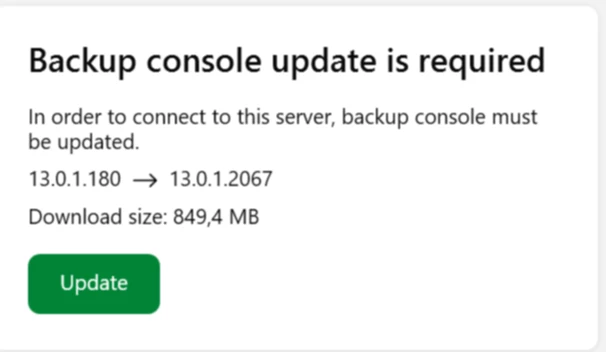
I noticed the latest version of the replication console available for download is 13.0.1.180, if i try to download the console via the VSA web app (version 13.0.1.2067) it also gives me 13.0.1.180.

And yet when trying to connect it tells me it wants to update from .180 to .2067


So it seems to me the latest version of the console has not yet been packaged into their repository.
Perhaps an oversight by veeam?​​​​​


PeteSteven
Forum|alt.badge.img+5
  • Veeam Vanguard
  • March 23, 2026

Hi ​@tibo.gabriels 

i opended a feature request for that. 

(3) Feature request - Update of the Veeam Console download via the VSA/VBR login page

Currently, the installer is not being repackaged. The old version is being made available, which must first be updated; otherwise, you won't be able to log in (console is too old).


Thanks! Will +1