Question

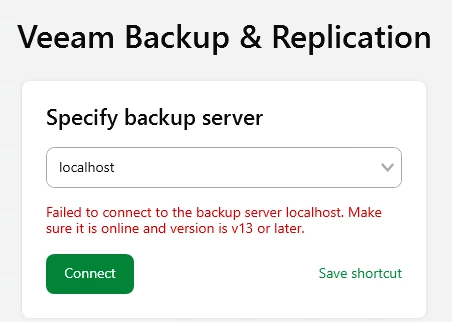
Failed to connect to the backup server localhost.

  • March 16, 2026
  • 28 comments
  • 3204 views

Show first post

28 comments

coolsport00
Forum|alt.badge.img+23
  • Veeam Legend
  • July 3, 2026

Agree with Chris here ​@Riffy . Support is your best bet. There was another thread where the user I believe was trying to login with LOCALHOST but after upgrade, had to use FQDN. LOCALHOST & hostname didn’t work. I would imagine connecting via IP would work too. Regardless, still recommend a Support case to verify everything is installed ok.


Hi everyone, I managed to resolve the issue.

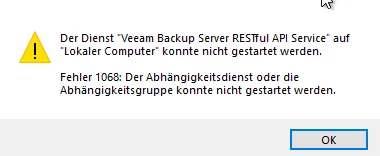
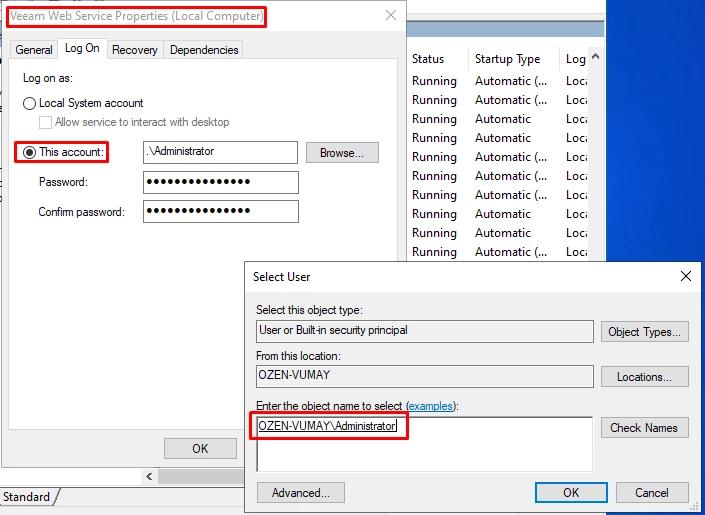
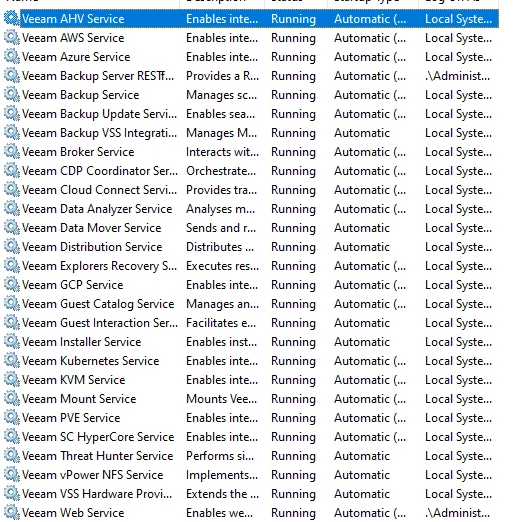
During the Veeam installation, the setup asks which account should be used. Although I selected a local Administrator account, the following two services were still configured to run under the Local System account after the installation.

Changing both services to Log On As → This account and specifying the same Administrator account that was used during the installation immediately resolved the problem. After restarting the services, the installation completed successfully and the console was able to connect without any issues.

I hope this helps anyone experiencing the same problem.


  • New Here
  • July 10, 2026

Agree with Chris here ​@Riffy . Support is your best bet. There was another thread where the user I believe was trying to login with LOCALHOST but after upgrade, had to use FQDN. LOCALHOST & hostname didn’t work. I would imagine connecting via IP would work too. Regardless, still recommend a Support case to verify everything is installed ok.

Support was able to sort out my issue 100% here. 

For me it was that we re-insatlled on a win11workstation system after being on a Server2012R2 system, there is a very niche bug when you make that move. (we were forced to because of a system crash)

https://www.veeam.com/kb4661 « This was the fix for that part tho.