Solved

disable web ui

  • March 24, 2026
  • 14 comments
  • 62 views

Forum|alt.badge.img+1

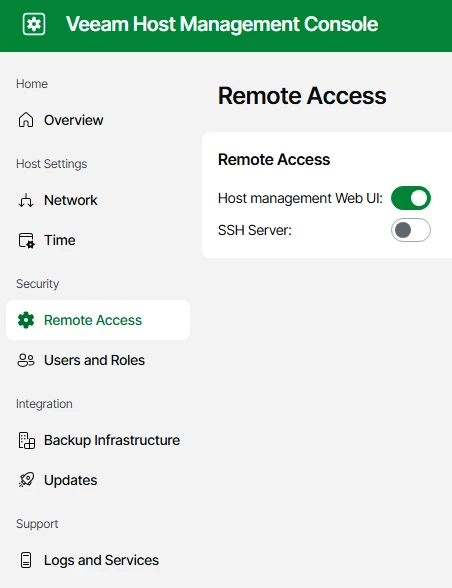
Is it possible to disabled Web UI, without disabling Host Management UI?


Our goal was to disable web ui because we’re not able to install a proper custom cert on it. So it would present an issue during our annual pen test

Best answer by MicoolPaul

Hi,


You’re referring to the VSA correct? If so have you seen:

https://www.veeam.com/kb4813

14 comments

Chris.Childerhose
Forum|alt.badge.img+21

I do not believe you can disable it but would check with Support on that.  Eventually, it will replace the fat client, and I know they are working on SSL stuff to make it easier as well.


MicoolPaul
Forum|alt.badge.img+23
  • Answer
  • March 24, 2026

Hi,


You’re referring to the VSA correct? If so have you seen:

https://www.veeam.com/kb4813


wolff.mateus
Forum|alt.badge.img+11
  • Veeam Vanguard
  • March 24, 2026

Hello there! The only thing that we can do is disable the host management UI:


The web UI is not allow to disable.

The VBR console used 443 port to connect on that interface.


Forum|alt.badge.img+1
  • Author
  • Influencer
  • March 24, 2026

I do not believe you can disable it but would check with Support on that.  Eventually, it will replace the fat client, and I know they are working on SSL stuff to make it easier as well.


Ok , I guess there’s no away around it?


Forum|alt.badge.img+1
  • Author
  • Influencer
  • March 24, 2026

Hi,


You’re referring to the VSA correct? If so have you seen:

https://www.veeam.com/kb4813

Correct VSA


Chris.Childerhose
Forum|alt.badge.img+21

I do not believe you can disable it but would check with Support on that.  Eventually, it will replace the fat client, and I know they are working on SSL stuff to make it easier as well.


Ok , I guess there’s no away around it?

Nope unfortunately there is not.  You can disable the MGMT UI 10443 but just that one.


MicoolPaul
Forum|alt.badge.img+23

Hi,


You’re referring to the VSA correct? If so have you seen:

https://www.veeam.com/kb4813

Correct VSA

Can you not follow the KB and generate another, trusted certificate?


Chris.Childerhose
Forum|alt.badge.img+21

Hi,


You’re referring to the VSA correct? If so have you seen:

https://www.veeam.com/kb4813

Correct VSA

Can you not follow the KB and generate another, trusted certificate?

Even I find this KB difficult to follow and get the SSL right, will be nice if they put something in the TUI interface for this at some point to have it more wizard/UI driven.


eblack
Forum|alt.badge.img
  • Influencer
  • March 24, 2026

Hi,


You’re referring to the VSA correct? If so have you seen:

https://www.veeam.com/kb4813

Correct VSA

Can you not follow the KB and generate another, trusted certificate?

Even I find this KB difficult to follow and get the SSL right, will be nice if they put something in the TUI interface for this at some point to have it more wizard/UI driven.


I just ran through this to see, I agree, it feels very VCD like in process. 


Forum|alt.badge.img+1
  • Author
  • Influencer
  • March 25, 2026

Hi,


You’re referring to the VSA correct? If so have you seen:

https://www.veeam.com/kb4813

Yes, I deployed our custom cert on the host mgmt ui, but apparently it doesn’t apply to the web ui. Or is there a way to deploy cert to web ui also?


Forum|alt.badge.img+1
  • Author
  • Influencer
  • March 25, 2026

Hi,


You’re referring to the VSA correct? If so have you seen:

https://www.veeam.com/kb4813

Yes, I deployed our custom cert on the host mgmt ui, but apparently it doesn’t apply to the web ui. Or is there a way to deploy cert to web ui also?

Please advise


eblack
Forum|alt.badge.img
  • Influencer
  • March 25, 2026

Hi,


You’re referring to the VSA correct? If so have you seen:

https://www.veeam.com/kb4813

Yes, I deployed our custom cert on the host mgmt ui, but apparently it doesn’t apply to the web ui. Or is there a way to deploy cert to web ui also?

Please advise


I’d attempt to update the WebUI (443) from the Windows fat client. One thing to be aware of on the pfx export, use AES256-SHA256 or better. If you use older encryption it will fail. 


Forum|alt.badge.img+1
  • Author
  • Influencer
  • March 25, 2026

Hi,


You’re referring to the VSA correct? If so have you seen:

https://www.veeam.com/kb4813

Yes, I deployed our custom cert on the host mgmt ui, but apparently it doesn’t apply to the web ui. Or is there a way to deploy cert to web ui also?

Please advise


I’d attempt to update the WebUI (443) from the Windows fat client. One thing to be aware of on the pfx export, use AES256-SHA256 or better. If you use older encryption it will fail. 

Thanks eblack. Do we have any KB for doing this deployment ?


eblack
Forum|alt.badge.img
  • Influencer
  • March 25, 2026

Hi,


You’re referring to the VSA correct? If so have you seen:

https://www.veeam.com/kb4813

Yes, I deployed our custom cert on the host mgmt ui, but apparently it doesn’t apply to the web ui. Or is there a way to deploy cert to web ui also?

Please advise


I’d attempt to update the WebUI (443) from the Windows fat client. One thing to be aware of on the pfx export, use AES256-SHA256 or better. If you use older encryption it will fail. 

Thanks eblack. Do we have any KB for doing this deployment ?

You may find this link useful -- https://helpcenter.veeam.com/docs/vbr/userguide/backup_server_certificate.html