

Could you please help with the script in powershell to fetch the backup health check / maintenance schedule for backup jobs and the status or can this be fetched from Veeam ONE ?
- Community
- Community
- Discussion Boards
- Could you please help with the script in powershell to fetch the backup health check / maintenance schedule for backup jobs and the status or can this be fetched from Veeam ONE ?
Question
Could you please help with the script in powershell to fetch the backup health check / maintenance schedule for backup jobs and the status or can this be fetched from Veeam ONE ?
- May 20, 2026
- 8 comments
- 76 views
8 comments

 +23
+23- Veeam Legend, Veeam Vanguard
- May 20, 2026
I am not sure VONE can get this or not. I will check and see otherwise try to help with PS.
Chris Childerhose (Enterprise Architect) - VMCE+ | VMCA | VMCE | VMCE-SP | Veeam Vanguard 8* | Veeam Legend 5* | VUG Canada Leader | vExpert 7* | Toronto VMUG Leader | VCAP-DCV/VCP-DCV/VCP-VVF | Object First Ace | Cisco Champion | Twitter: @cchilderhose | Blog Site – https://just-virtualization.tech

 +23
+23- Veeam Legend
- May 20, 2026
I’ll see if I can research a bit on this in a bit
Shane Williford - Veeam VMCA/VMCE+ | Veeam Legend | VUG Leader | VCP-DCV | Twitter: @coolsport00
 +4
+4- Influencer
- May 20, 2026
I’d think you would need to split the difference on this. Use Veeam ONE for reporting job status, alarms, trends, and failed job visibility. Veeam ONE’s “Latest Job Status” report should do. You can leverage REST API if desired.
Use Veeam Backup & Replication PowerShell for the maintenance / health-check schedule.
I may have a script for this part somewhere, I’ll need to check later today.
In short
Veeam One “last job status” report.
VBR PS module - Get-VBRJob for retrieving jobs, Get-VBRJobScheduleOptions for job scheduling settings, and Get-VBRBackupSession for latest job session status.
+4- Influencer
- May 20, 2026
This should work for you, you’ll need to plug the details in for your use case, I had to sanitize it before posting it.
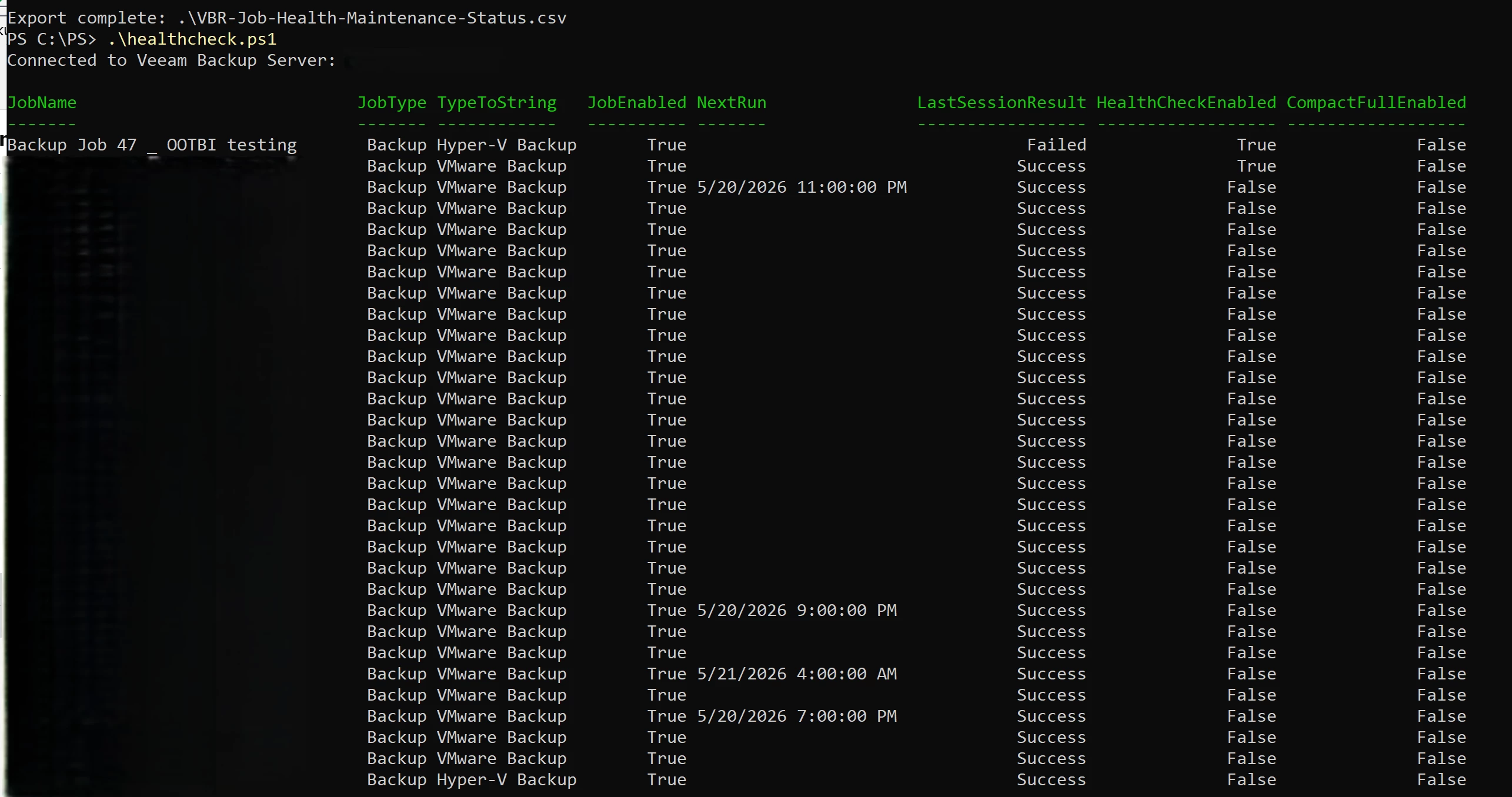
<#
.SYNOPSIS
    Exports Veeam Backup & Replication backup job health check,
    maintenance schedule, and latest job status.

.DESCRIPTION
    This read-only script connects to a Veeam Backup & Replication server and exports:
      - Backup job name and type
      - Enabled / disabled state
      - Next run and latest scheduled run
      - Last session result and state
      - Health check enabled and schedule
      - Compact full enabled and schedule
      - Deleted VM retention settings
      - Full backup integrity check setting

.NOTES
    This is Veeam Backup & Replication PowerShell only.
    It does not query Veeam ONE.

    This script is read-only.
    It does not modify jobs, repositories, schedules, sessions, or VBR configuration.

    Test before using in production.

.EXAMPLE
    .\Get-VBRJobHealthReport.ps1

.EXAMPLE
    .\Get-VBRJobHealthReport.ps1 -VbrServer "vbr01.contoso.local"

.EXAMPLE
    $cred = Get-Credential
    .\Get-VBRJobHealthReport.ps1 -VbrServer "vbr01.contoso.local" -Credential $cred

.EXAMPLE
    .\Get-VBRJobHealthReport.ps1 -VbrServer "vbr01.contoso.local" -AcceptUntrustedCertificate
#>

[CmdletBinding()]
param(
    [string]$VbrServer = "localhost",

    [pscredential]$Credential,

    [string]$CsvPath = ".\VBR-Job-Health-Maintenance-Status.csv",

    [switch]$AcceptUntrustedCertificate
)

function Import-VeeamPowerShell {
    try {
        Import-Module Veeam.Backup.PowerShell `
            -DisableNameChecking `
            -WarningAction SilentlyContinue `
            -ErrorAction Stop
    }
    catch {
        try {
            Add-PSSnapin VeeamPSSnapIn -ErrorAction Stop
        }
        catch {
            throw "Could not load Veeam PowerShell. Run this on the VBR server or install the VBR console."
        }
    }
}

function Get-SafeProperty {
    param(
        [object]$InputObject,
        [string]$PropertyPath
    )

    if ($null -eq $InputObject -or [string]::IsNullOrWhiteSpace($PropertyPath)) {
        return $null
    }

    $current = $InputObject

    foreach ($propertyName in $PropertyPath.Split(".")) {
        if ($null -eq $current) {
            return $null
        }

        $property = $current.PSObject.Properties[$propertyName]

        if ($null -eq $property) {
            return $null
        }

        $current = $property.Value
    }

    return $current
}

function Get-FirstSafeProperty {
    param(
        [object]$InputObject,
        [string[]]$PropertyPaths
    )

    foreach ($path in $PropertyPaths) {
        $value = Get-SafeProperty -InputObject $InputObject -PropertyPath $path

        if ($null -ne $value -and $value.ToString() -ne "") {
            return $value
        }
    }

    return $null
}

function Convert-ValueToText {
    param([object]$Value)

    if ($null -eq $Value) {
        return $null
    }

    if ($Value -is [array]) {
        return (($Value | ForEach-Object { $_.ToString() }) -join ", ")
    }

    return $Value.ToString()
}

function Format-MonthlySchedule {
    param([object]$MonthlyOptions)

    if ($null -eq $MonthlyOptions) {
        return $null
    }

    $dayNumber = Get-SafeProperty -InputObject $MonthlyOptions -PropertyPath "DayNumberInMonth"
    $dayOfWeek = Get-SafeProperty -InputObject $MonthlyOptions -PropertyPath "DayOfWeek"
    $months    = Convert-ValueToText -Value (Get-SafeProperty -InputObject $MonthlyOptions -PropertyPath "Months")

    $dayOfMonth = Get-SafeProperty -InputObject $MonthlyOptions -PropertyPath "DayOfMonth"

    if ($null -ne $dayOfMonth) {
        try {
            $dayOfMonth = $dayOfMonth.Build()
        }
        catch {
            $dayOfMonth = $dayOfMonth.ToString()
        }
    }

    if ($dayNumber -eq "OnDay") {
        return "Monthly on day $dayOfMonth; months: $months"
    }

    return "Monthly on $dayNumber $dayOfWeek; months: $months"
}

function Format-HealthCheckSchedule {
    param([object]$GenerationPolicy)

    $kind = Get-SafeProperty -InputObject $GenerationPolicy -PropertyPath "RecheckScheduleKind"

    switch -Regex ($kind) {
        "Weekly" {
            $days = Convert-ValueToText -Value (Get-SafeProperty -InputObject $GenerationPolicy -PropertyPath "RecheckDays")
            return "Weekly: $days"
        }
        "Monthly" {
            $monthly = Get-SafeProperty -InputObject $GenerationPolicy -PropertyPath "RecheckBackupMonthlyScheduleOptions"
            return Format-MonthlySchedule -MonthlyOptions $monthly
        }
        default {
            return $kind
        }
    }
}

function Format-CompactFullSchedule {
    param([object]$GenerationPolicy)

    $kind = Get-SafeProperty -InputObject $GenerationPolicy -PropertyPath "CompactFullBackupScheduleKind"

    switch -Regex ($kind) {
        "Weekly" {
            $days = Convert-ValueToText -Value (Get-SafeProperty -InputObject $GenerationPolicy -PropertyPath "CompactFullBackupDays")
            return "Weekly: $days"
        }
        "Monthly" {
            $monthly = Get-SafeProperty -InputObject $GenerationPolicy -PropertyPath "CompactFullBackupMonthlyScheduleOptions"
            return Format-MonthlySchedule -MonthlyOptions $monthly
        }
        default {
            return $kind
        }
    }
}

function Get-LatestJobSession {
    param(
        [object]$Job
    )

    try {
        $latestSession = Get-VBRSession `
            -Job $Job `
            -Last `
            -WarningAction SilentlyContinue `
            -ErrorAction Stop

        return $latestSession
    }
    catch {
        # Some VBR versions or job types may not behave cleanly with Get-VBRSession -Job -Last.
        # Fall back to Get-VBRBackupSession only if needed.
    }

    try {
        $jobId = $Job.Id
        $jobGuid = $null

        if ($null -ne $Job.Id -and $null -ne $Job.Id.Guid) {
            $jobGuid = $Job.Id.Guid
        }

        $latestSession = Get-VBRBackupSession `
            -WarningAction SilentlyContinue `
            -ErrorAction Stop |
            Where-Object {
                $_.JobId -eq $jobId -or
                $_.JobId -eq $jobGuid
            } |
            Sort-Object EndTimeUTC -Descending |
            Select-Object -First 1

        return $latestSession
    }
    catch {
        return $null
    }
}

Import-VeeamPowerShell

try {
    # Clean up any existing local PowerShell Toolkit connection.
    # This only disconnects this PowerShell session.
    # It does not stop jobs or modify VBR configuration.
    try {
        Disconnect-VBRServer -ErrorAction SilentlyContinue | Out-Null
    }
    catch {
        # No existing session is fine.
    }

    $connectParams = @{
        Server      = $VbrServer
        ErrorAction = "Stop"
    }

    if ($Credential) {
        $connectParams.Credential = $Credential
    }

    if ($AcceptUntrustedCertificate) {
        $connectParams.ForceAcceptTlsCertificate = $true
    }

    Connect-VBRServer @connectParams | Out-Null

    Write-Host "Connected to Veeam Backup Server: $VbrServer"
}
catch {
    $errorMessage = $_.Exception.Message

    if ($errorMessage -match "already connected") {
        Write-Host "Already connected to Veeam Backup Server: $VbrServer"
    }
    else {
        Write-Error @"
Failed to connect to Veeam Backup & Replication server [$VbrServer].

Possible causes:
- The account is MFA-enabled.
- The account does not have enough Veeam permissions.
- The server name is incorrect or unreachable.
- The Veeam PowerShell module is installed but cannot authenticate to this VBR server.
- The VBR server certificate is not trusted. Try -AcceptUntrustedCertificate if appropriate.

Example:
  `$cred = Get-Credential
  .\Get-VBRJobHealthReport.ps1 -VbrServer "$VbrServer" -Credential `$cred -AcceptUntrustedCertificate

Original error:
$errorMessage
"@
        exit 1
    }
}

try {
    $allJobs = Get-VBRJob `
        -WarningAction SilentlyContinue `
        -ErrorAction Stop
}
catch {
    Write-Error "Connected to [$VbrServer], but failed to retrieve VBR jobs. Error: $($_.Exception.Message)"
    exit 1
}

$jobs = $allJobs | Where-Object {
    (
        $_.JobType -eq "Backup" -or
        $_.TypeToString -eq "VMware Backup" -or
        $_.TypeToString -eq "Hyper-V Backup"
    ) -and
    $_.TypeToString -notmatch "Copy"
}

if (-not $jobs) {
    Write-Host "No standard VBR backup jobs were found on $VbrServer. No CSV will be exported."
    Write-Host "If this is a Cloud Connect server or an Agent-only deployment, this may be expected."
    exit 0
}

$report = foreach ($job in $jobs) {
    $jobOptions = $null
    $scheduleOptions = $null
    $latestSession = $null

    try {
        $jobOptions = $job.GetOptions()
    }
    catch {
        Write-Host "Could not read advanced options for job: $($job.Name)"
    }

    try {
        $scheduleOptions = Get-VBRJobScheduleOptions `
            -Job $job `
            -WarningAction SilentlyContinue `
            -ErrorAction Stop
    }
    catch {
        Write-Host "Could not read schedule options for job: $($job.Name)"
    }

    $latestSession = Get-LatestJobSession -Job $job

    $generationPolicy = Get-SafeProperty -InputObject $jobOptions -PropertyPath "GenerationPolicy"
    $storageOptions   = Get-SafeProperty -InputObject $jobOptions -PropertyPath "BackupStorageOptions"

    [pscustomobject]@{
        JobName                     = $job.Name
        JobType                     = $job.JobType
        TypeToString                = $job.TypeToString
        JobEnabled                  = $job.IsScheduleEnabled

        NextRun                     = Get-SafeProperty -InputObject $scheduleOptions -PropertyPath "NextRun"
        LatestRunLocal              = Get-SafeProperty -InputObject $scheduleOptions -PropertyPath "LatestRunLocal"

        LastSessionResult           = Get-SafeProperty -InputObject $latestSession -PropertyPath "Result"
        LastSessionState            = Get-SafeProperty -InputObject $latestSession -PropertyPath "State"
        LastSessionStart            = Get-SafeProperty -InputObject $latestSession -PropertyPath "CreationTime"
        LastSessionEnd              = Get-SafeProperty -InputObject $latestSession -PropertyPath "EndTime"
        LastSessionEndUTC           = Get-SafeProperty -InputObject $latestSession -PropertyPath "EndTimeUTC"

        HealthCheckEnabled          = Get-FirstSafeProperty -InputObject $generationPolicy -PropertyPaths @(
            "EnableRechek",
            "EnableRecheck",
            "EnableBackupHealthCheck",
            "EnableHealthCheck"
        )
        HealthCheckScheduleType     = Get-SafeProperty -InputObject $generationPolicy -PropertyPath "RecheckScheduleKind"
        HealthCheckSchedule         = Format-HealthCheckSchedule -GenerationPolicy $generationPolicy

        CompactFullEnabled          = Get-FirstSafeProperty -InputObject $generationPolicy -PropertyPaths @(
            "EnableCompactFull",
            "EnableCompactFullBackup",
            "EnableCompact"
        )
        CompactFullScheduleType     = Get-SafeProperty -InputObject $generationPolicy -PropertyPath "CompactFullBackupScheduleKind"
        CompactFullSchedule         = Format-CompactFullSchedule -GenerationPolicy $generationPolicy

        DeletedVmRetentionEnabled   = Get-FirstSafeProperty -InputObject $generationPolicy -PropertyPaths @(
            "EnableDeletedVmDataRetention",
            "EnableDeletedVmsDataRetention"
        )
        DeletedVmRetentionDays      = Get-FirstSafeProperty -InputObject $generationPolicy -PropertyPaths @(
            "DeletedVmsDataRetentionPeriodDays",
            "DeletedVmDataRetentionPeriodDays"
        )

        FullBackupIntegrityCheck    = Get-FirstSafeProperty -InputObject $storageOptions -PropertyPaths @(
            "EnableIntegrityChecks",
            "EnableFullBackupIntegrityChecks",
            "EnableStorageLevelCorruptionGuard"
        )
    }
}

if (-not $report) {
    Write-Host "No report rows were generated. No CSV will be exported."
    exit 0
}

$sortedReport = $report | Sort-Object JobName

$sortedReport |
    Select-Object `
        JobName,
        JobType,
        TypeToString,
        JobEnabled,
        NextRun,
        LastSessionResult,
        HealthCheckEnabled,
        CompactFullEnabled |
    Format-Table -AutoSize

$sortedReport |
    Export-Csv -Path $CsvPath -NoTypeInformation -Encoding UTF8

Write-Host ""
Write-Host "Export complete: $CsvPath"

Write-Host ""
Write-Host "Useful review commands:"
Write-Host 'Import-Csv .\VBR-Job-Health-Maintenance-Status.csv | Where-Object { -not [string]::IsNullOrWhiteSpace($_.LastSessionResult) -and $_.LastSessionResult -ne "Success" } | Select-Object JobName, LastSessionResult, LastSessionState, LastSessionStart, LastSessionEnd | Format-Table -AutoSize'
Write-Host 'Import-Csv .\VBR-Job-Health-Maintenance-Status.csv | Where-Object { $_.HealthCheckEnabled -eq "True" } | Select-Object JobName, HealthCheckEnabled, HealthCheckSchedule | Format-Table -AutoSize'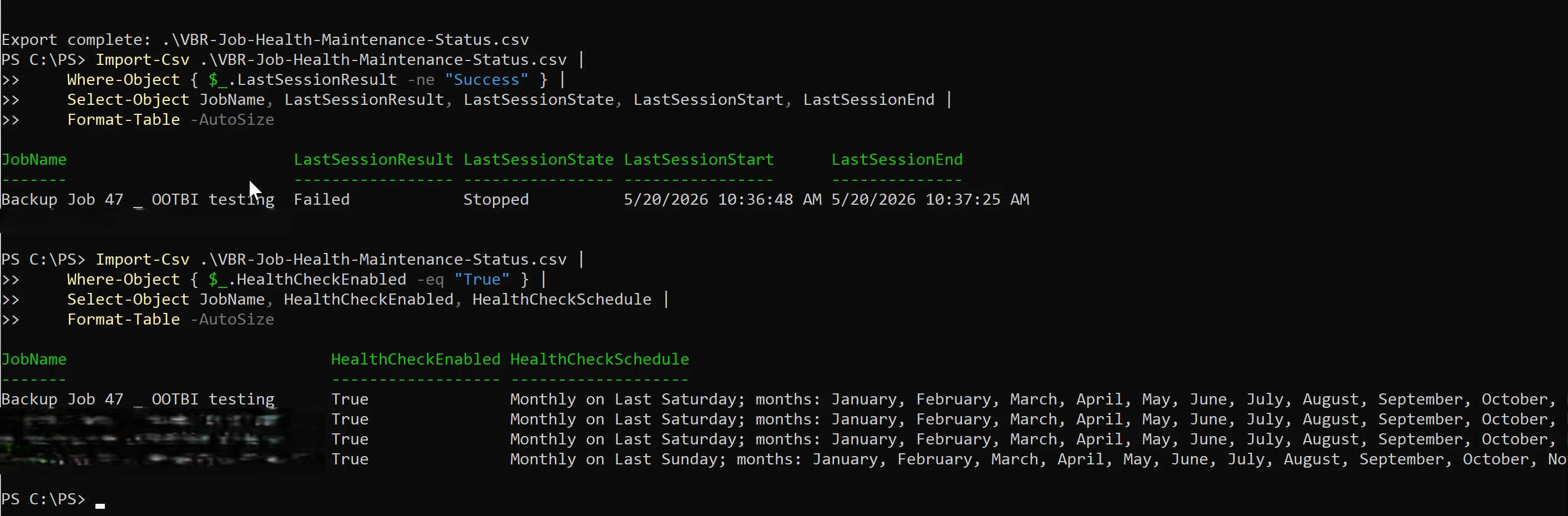
Import-Csv .\VBR-Job-Health-Maintenance-Status.csv |
    Where-Object { $_.LastSessionResult -ne "Success" } |
    Select-Object JobName, LastSessionResult, LastSessionState, LastSessionStart, LastSessionEnd |
    Format-Table -AutoSize
Import-Csv .\VBR-Job-Health-Maintenance-Status.csv |
Where-Object { $_.HealthCheckEnabled -eq "True" } |
Select-Object JobName, HealthCheckEnabled, HealthCheckSchedule |
Format-Table -AutoSize
+23- Veeam Legend, Veeam Vanguard
- May 20, 2026
Further to Eric’s script, here is one that checks just the health check and advanced settings for a backup job with a CSV report.
#Requires -PSSnapin VeeamPSSnapIn -Version 13.0
<#
.SYNOPSIS
    Retrieves Health Check and Maintenance schedule settings for all Veeam Backup jobs.

.DESCRIPTION
    Queries each backup job's GenerationPolicy to report:
      - Periodic Health Check (schedule, day/month config, time)
      - Compact Full Backup / Defragment & Compact (schedule)
      - Storage-Level Corruption Guard (enabled state)
      - Deleted VM Data Retention (enabled state & period)

.NOTES
    Author  : Chris Childerhose
    Version : 2.0
    Requires: Veeam Backup & Replication v13 PowerShell module
#>

# ── Connect to VBR (localhost default) ──────────────────────────────
try {
    if (-not (Get-VBRServerSession)) {
        Connect-VBRServer -Server localhost
    }
}
catch {
    Write-Warning "No active VBR session. Connecting to localhost..."
    Connect-VBRServer -Server localhost
}

# ── Helper: Format a TimeSpan or DateTime as 12-hour time string ────
function Format-ScheduleTime {
    param ([object]$Value)
    if ($null -eq $Value) { return '' }
    if ($Value -is [timespan]) {
        return " at $(([datetime]::Today + $Value).ToString('h:mm tt'))"
    }
    if ($Value -is [datetime]) {
        return " at $($Value.ToString('h:mm tt'))"
    }
    $parsed = [datetime]::MinValue
    if ([datetime]::TryParse($Value.ToString(), [ref]$parsed)) {
        return " at $($parsed.ToString('h:mm tt'))"
    }
    return " at $Value"
}

# ── Get backup jobs ─────────────────────────────────────────────────
$jobs = Get-VBRJob -WarningAction SilentlyContinue | Where-Object {
    $_.JobType -eq 'Backup'
}

if (-not $jobs) {
    Write-Warning "No backup jobs found on this VBR server."
    Disconnect-VBRServer
    return
}

# ── Property discovery (diagnostics) ────────────────────────────────
$sampleGP = ($jobs | Select-Object -First 1).Options.GenerationPolicy
$gpProps  = ($sampleGP | Get-Member -MemberType Property).Name
Write-Host "`n── GenerationPolicy properties ──" -ForegroundColor DarkGray
Write-Host "  $($gpProps -join ', ')" -ForegroundColor DarkGray
Write-Host ""

# ── Collect job maintenance data ────────────────────────────────────
$results = foreach ($job in $jobs) {
    $gp = $job.Options.GenerationPolicy

    # ── Health Check ──
    $hcEnabled = $gp.EnableRecheck

    $hcSchedule = 'N/A'
    if ($hcEnabled) {
        $kind    = [string]$gp.RecheckScheduleKind
        $days    = $gp.RecheckDays
        $monthly = $gp.RecheckBackupMonthlyScheduleOptions
        $time    = Format-ScheduleTime -Value $gp.RecheckTime

        switch ($kind) {
            'Daily' {
                if ($days -and $days.Count -gt 0) {
                    $hcSchedule = "Every $($days -join ', ')$time"
                }
                else {
                    $hcSchedule = "Daily$time"
                }
            }
            'Weekly' {
                if ($days -and $days.Count -gt 0) {
                    $hcSchedule = "Weekly on $($days -join ', ')$time"
                }
                else {
                    $hcSchedule = "Weekly$time"
                }
            }
            'Monthly' {
                if ($monthly) {
                    $dow    = $monthly.DayOfWeek
                    $num    = $monthly.DayNumberInMonth
                    $months = $monthly.Months -join ', '
                    $hcSchedule = "Monthly - $num $dow ($months)$time"
                }
                else {
                    $hcSchedule = "Monthly$time"
                }
            }
            default {
                # Fallback: infer from available data
                Write-Host "  [Debug] Job '$($job.Name)' - RecheckScheduleKind='$kind'" -ForegroundColor DarkYellow
                if ($days -and $days.Count -gt 0) {
                    $hcSchedule = "Every $($days -join ', ')$time"
                }
                elseif ($monthly) {
                    $dow    = $monthly.DayOfWeek
                    $num    = $monthly.DayNumberInMonth
                    $months = $monthly.Months -join ', '
                    $hcSchedule = "Monthly - $num $dow ($months)$time"
                }
                else {
                    $hcSchedule = "Enabled (schedule not resolved)$time"
                }
            }
        }
    }

    # ── Compact Full / Defragment & Compact ──
    $cfEnabled  = [bool]$gp.EnableCompactFull
    $cfSchedule = 'N/A'
    if ($cfEnabled) {
        $cfKind    = [string]$gp.CompactFullBackupScheduleKind
        $cfDays    = $gp.CompactFullBackupDays
        $cfMonthly = $gp.CompactFullBackupMonthlyScheduleOptions

        switch ($cfKind) {
            'Daily' {
                if ($cfDays -and $cfDays.Count -gt 0) {
                    $cfSchedule = "Every $($cfDays -join ', ')"
                } else { $cfSchedule = 'Daily' }
            }
            'Weekly' {
                if ($cfDays -and $cfDays.Count -gt 0) {
                    $cfSchedule = "Weekly on $($cfDays -join ', ')"
                } else { $cfSchedule = 'Weekly' }
            }
            'Monthly' {
                if ($cfMonthly) {
                    $cfSchedule = "Monthly - $($cfMonthly.DayNumberInMonth) $($cfMonthly.DayOfWeek) ($($cfMonthly.Months -join ', '))"
                } else { $cfSchedule = 'Monthly' }
            }
            default { $cfSchedule = "Enabled ($cfKind)" }
        }
    }

    # ── Storage-Level Corruption Guard ──
    $corruptionGuard = [bool]$gp.EnableCompact

    # If property didn't exist (returns $null -> $false), try BackupStorageOptions
    if (-not $corruptionGuard) {
        $corruptionGuard = [bool]$job.Options.BackupStorageOptions.EnableIntegrityChecks
    }

    # ── Deleted VM Retention ──
    $deletedVmRetention = [bool]$gp.EnableDeletedVmDataRetention
    $deletedVmDays      = if ($deletedVmRetention) { $gp.DeletedVmsDataRetentionPeriodDays } else { 'N/A' }

    [PSCustomObject]@{
        JobName                    = $job.Name
        HealthCheckEnabled         = [bool]$hcEnabled
        HealthCheckSchedule        = $hcSchedule
        CompactFullEnabled         = $cfEnabled
        CompactFullSchedule        = $cfSchedule
        StorageCorruptionGuard     = $corruptionGuard
        DeletedVmRetentionEnabled  = $deletedVmRetention
        DeletedVmRetentionDays     = $deletedVmDays
    }
}

# ── Console output ──────────────────────────────────────────────────
Write-Host "`n===== Backup Job Health Check & Maintenance Schedule =====`n" -ForegroundColor Cyan

foreach ($r in $results) {
    Write-Host "Job: $($r.JobName)" -ForegroundColor Green
    Write-Host "  Health Check .............. : $(if ($r.HealthCheckEnabled) { "Enabled - $($r.HealthCheckSchedule)" } else { 'Disabled' })"
    Write-Host "  Defragment & Compact ...... : $(if ($r.CompactFullEnabled)  { "Enabled - $($r.CompactFullSchedule)" } else { 'Disabled' })"
    Write-Host "  Storage Corruption Guard .. : $(if ($r.StorageCorruptionGuard) { 'Enabled' } else { 'Disabled' })"
    Write-Host "  Deleted VM Retention ...... : $(if ($r.DeletedVmRetentionEnabled) { "Enabled - $($r.DeletedVmDays) days" } else { 'Disabled' })"
    Write-Host ""
}

# ── Export to CSV ───────────────────────────────────────────────────
$exportPath = Join-Path -Path $PSScriptRoot -ChildPath "VBR_MaintenanceSchedule_$(Get-Date -Format 'yyyyMMdd_HHmmss').csv"
$results | Export-Csv -Path $exportPath -NoTypeInformation -Encoding UTF8
Write-Host "CSV exported to: $exportPath" -ForegroundColor Yellow

Disconnect-VBRServer
Chris Childerhose (Enterprise Architect) - VMCE+ | VMCA | VMCE | VMCE-SP | Veeam Vanguard 8* | Veeam Legend 5* | VUG Canada Leader | vExpert 7* | Toronto VMUG Leader | VCAP-DCV/VCP-DCV/VCP-VVF | Object First Ace | Cisco Champion | Twitter: @cchilderhose | Blog Site – https://just-virtualization.tech
+23- Veeam Legend
- May 20, 2026
Thanks for sharing
Shane Williford - Veeam VMCA/VMCE+ | Veeam Legend | VUG Leader | VCP-DCV | Twitter: @coolsport00
+23- Veeam Legend, Veeam Vanguard
- May 20, 2026
Not a problem. Love this kind of things and using Claude AI. 😎
Chris Childerhose (Enterprise Architect) - VMCE+ | VMCA | VMCE | VMCE-SP | Veeam Vanguard 8* | Veeam Legend 5* | VUG Canada Leader | vExpert 7* | Toronto VMUG Leader | VCAP-DCV/VCP-DCV/VCP-VVF | Object First Ace | Cisco Champion | Twitter: @cchilderhose | Blog Site – https://just-virtualization.tech
+23- Veeam Legend, Veeam Vanguard
- June 15, 2026
Chris Childerhose (Enterprise Architect) - VMCE+ | VMCA | VMCE | VMCE-SP | Veeam Vanguard 8* | Veeam Legend 5* | VUG Canada Leader | vExpert 7* | Toronto VMUG Leader | VCAP-DCV/VCP-DCV/VCP-VVF | Object First Ace | Cisco Champion | Twitter: @cchilderhose | Blog Site – https://just-virtualization.tech
Enter your E-mail address. We'll send you an e-mail with instructions to reset your password.