Microsoft has announced that after 15 years, the Secure Boot certificates built into Windows systems are starting to expire. To stay protected and keep devices running smoothly, new certificates will need to be installed. These certificates form the foundation of trust for the operating system.
So, what exactly is Secure Boot?
Secure Boot is a security feature built into UEFI (Unified Extensible Firmware Interface) that ensures only trusted software is allowed to run when your computer starts up. It does this by checking the digital signature of each piece of boot software like drivers and the operating system against a list of trusted keys stored in the system’s firmware.
As an industry standard, Secure Boot defines how firmware manages these certificates, verifies firmware integrity, and how the operating system interacts with this process.
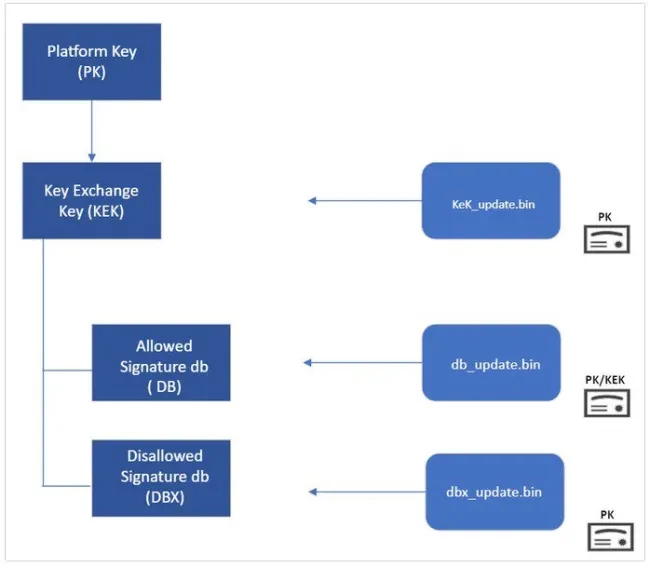
This whole trust system is based on Public Key Infrastructure (PKI), which uses Certificate Authorities (CAs) to manage and store digital certificates. These CAs which could be Microsoft, OEMs (Original Equipment Manufacturers), or their partners create the key pairs that act as the root of trust for the device, as shown in the diagram below.
To continue running Windows and receiving regular updates for your Secure Boot configuration, you will need to update these certificates.
- KEK: Key Enrollment Key
- CA: Certificate Authority
- DB: Secure Boot Signature Database
- DBX: Secure Boot Revoked Signature Database!

During the renewal of the Microsoft Corporation UEFI CA 2011 certificate, Microsoft introduced two separate certificates. One for bootloader signing and another for option ROM signing. This separation provides more granular control over what the system trusts during the boot process.
The key takeaway from my blog post is that I have done the heavy lifting by reviewing numerous Microsoft articles in order to help you clearly understand and correctly implement this safeguard.
In the following referenced article, you would learn all what you need to stay protected: Enable Secure Boot: Fix Secure Boot certificates expiration - TechDirectArchive
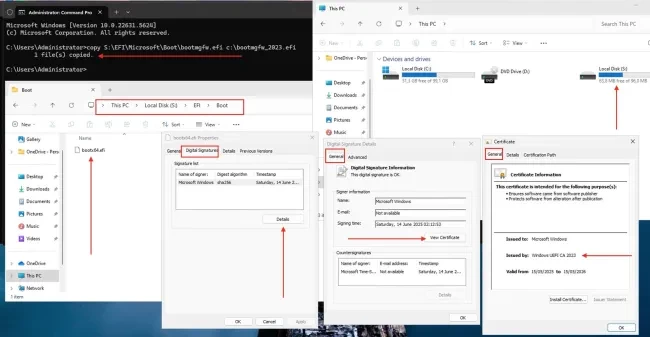
As you can see from the formal DB update I have performed, the certificate chain includes the new Windows UEFI CA 2023