


What is this about?
In the good old days of the initial VMCA (aka ADO) training, it was always told to size backups for either fulls or increments. Both calculations were given with the one for fulls being easier (total bandwidth [MB/s] /100 = proxy cores).
I very much appreciate the current calculator being offered by Veeam: Calculator - VM
Unfortunately, it only has the option to size for incremental backups as the backup window is always calculated to fulfill only the requirements of the incremental run:
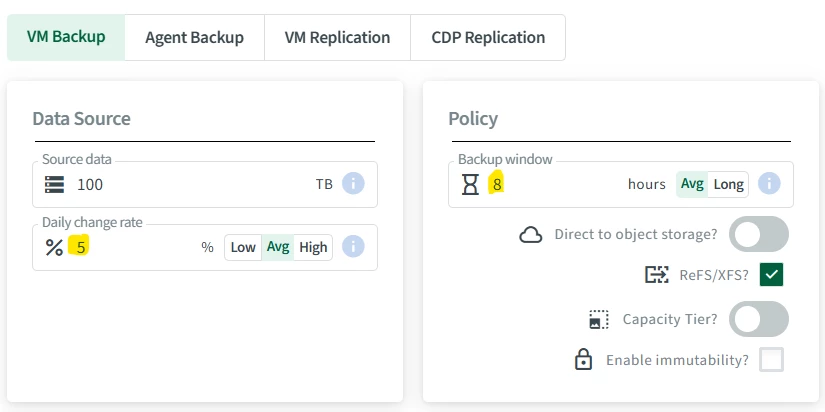
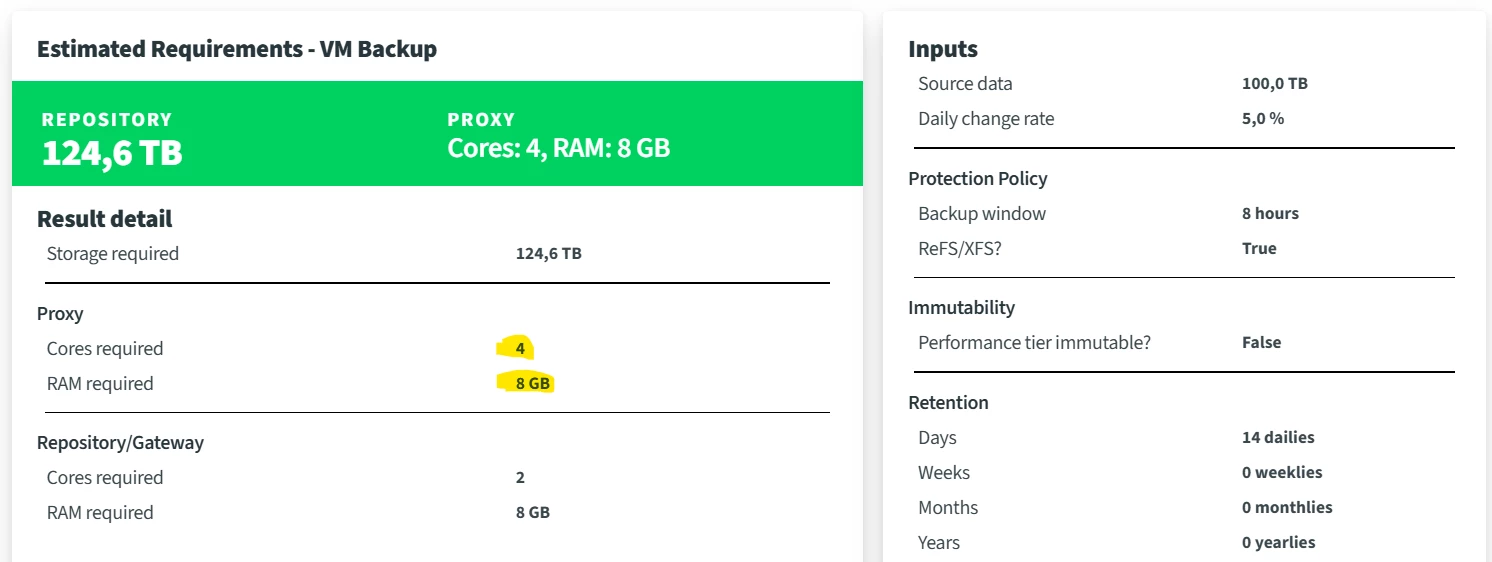
In my projects, I most of the time size for full backups still. Why would I?
Why should I go for a full anyways?
First of all, there are occasions that demand for a full backup every once in a while for many different reasons. Here a list of possible reasons:
-
Break dependency chain: Creates a new independent full backup without relying on previous restore points.
-
Suspected backup chain corruption: Useful if incremental chain integrity is questionable.
-
After storage or repository issues: Recommended after disk, filesystem, ReFS/XFS, deduplication appliance, or object storage problems.
-
After failed synthetic full operations: Rebuilds a clean full backup instead of relying on synthetic processing.
-
After major infrastructure changes: Useful after moving jobs, changing repositories, proxies, extents, or backup modes.
-
Before decommissioning old backup storage: Creates a clean full on the new target before removing old data.
-
After restore point manipulation: Useful after manual deletion, unsupported cleanup, or inconsistent retention state.
-
Compliance requirement: Some policies explicitly require periodic real full backups.
-
Long incremental chains: Reduces risk and complexity in very long forever-forward or forward incremental chains.
-
Performance troubleshooting: Helps isolate whether issues are caused by chain fragmentation or synthetic full processing.
-
Encryption or password change strategy: Can be used to start a new chain under updated encryption settings.
-
Backup copy or tape export baseline: Provides a clean, complete source restore point for downstream copy or tape workflows.
-
Deduplication appliance considerations: Some appliances may perform better with periodic active fulls, depending on vendor design.
-
After malware or ransomware concern: Starts a new known-good chain, assuming production data has been validated first.
-
Support recommendation: Veeam Support may request an active full to reset the chain after specific issues.
But if you only size for increments, it might happen that your occasional full backups take several days which is not acceptable in my opinion.
And my most important reason is: Once you have to do a full recovery, for whatever reason, you will be facing the same increase for your recovery.
Most people think, if your backups - incremental of course - finish daily within 2-3 hours, your recoveries will also. But a VM recovery is most of the time a full recovery.
How to size for full backups - simplified approach
First approach is quite easy: Just set your change rate to 100%.
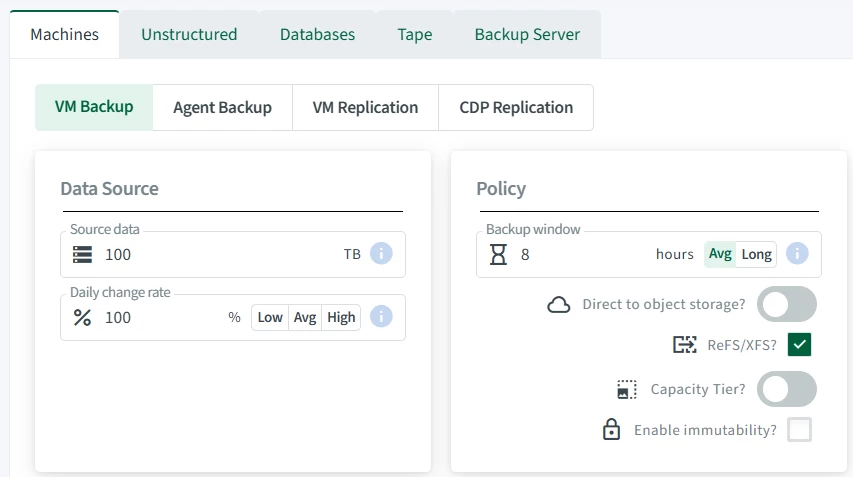
Then, you will be given the amount of cores needed for your full backups. Just ignore the repository storage consumption now. This will be shown as way too high now as it assumes a full backup in every run - which is not the case as we of yourse still want to do incrementals. We just want to have enough proxy and repo cores in the stack to do a full occasionally in the same window.
You might of course consider to have the windows for the full set to e.g. 12h or even 24h to reduce the amount of cores. But 46 cores with modern CPUs should not be too hard to reach.
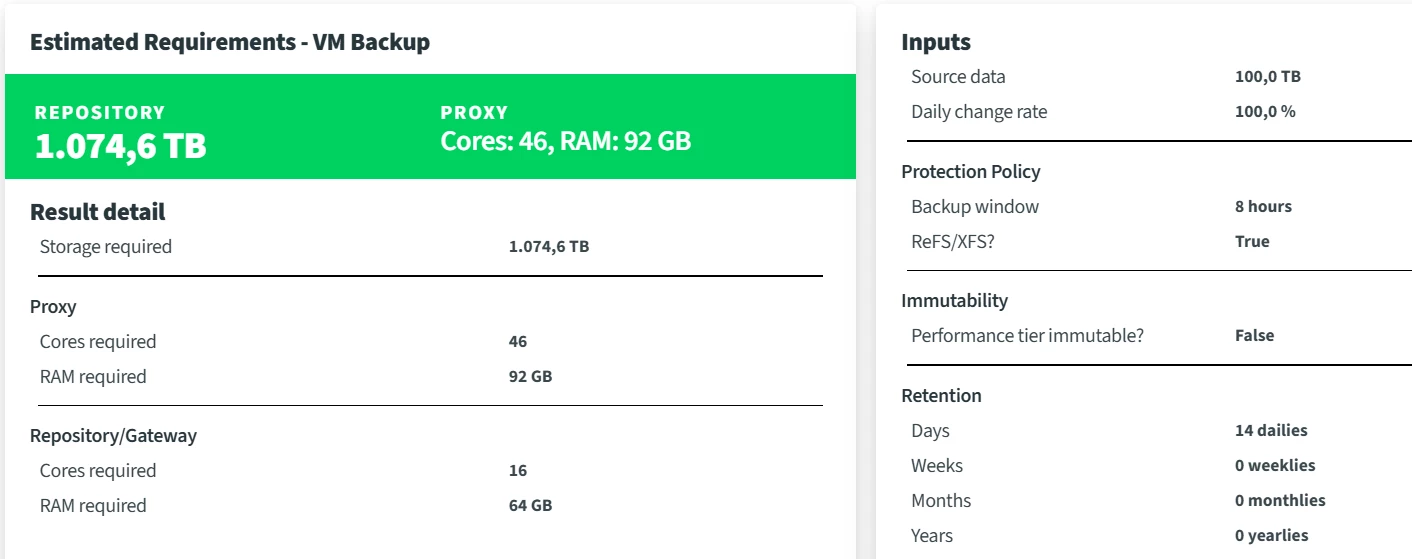
Being a trainer myself and having delivered the VMCA course many times, I of course know that we have just done a mistake in this calculation. There is a penalty for incrementals in the old calculation and I assume this will have an influence here as well. So, the result will be a bit too high. If you can live with buying more hardware than needed, just skip the next part and celebrate your proxy and repo resources.
If you want to know exactly how it works, read on…
How to size for fulls - the real deal
The old calculation (VMCA/ADO v1) for the proxy was as follows:
Bandwidth = Data(full footprint in storage) [MB] / backup window [s]
For our example, we have 100 TB equals 100 * 1,024 * 1,024 = 104,857,600.00 MB
Out backup window equals 8h = 28.800 s.
So, our bandwidth for the backup is 3640,89 MB/s.
More about this bandwidth, not related to CPU/RAM sizing...
And now comes the math for the full backup. Just divide this number by 100 and you have the number of proxy threads needed for a full.
3640,89 MB/s / 100 = 36 proxy threads
In our case, this would be 36 threads and therefore also cores in the old v8 → v10 days.
With V11 we got a “magic” reduction to 50% in the core consumption which was also told in the VMCA 2022 training in saying that each core can now drive two backup threads instead of one.
I assume the calculation was always a bit conservative and with increasing CPU performance they decided to split the calculation to halves. Therefore, the 36 cores become just 18 cores now for the full in the manual calculation. As each core needs 2GB of RAM, calculate for 36 GB of RAM with it.
So, we have 18 and not the 46 the calculator was giving us in my “easy” approach.
This was the penalty of the increment I was talking about. Quite a big one, actually. We need less than half the amount of proxy cores as the calculator gave us. It’s worthwhile doing the real math or at least you might just half the amount of cores the calculator gave you for your fulls for an approximation.
The incremental on the other hand is calculated by multiplying the bandwidth by your change rate (5% in our example) and then dividing it by a constant of 25 instead of 100 for the full.
3640.89 [MB/s] * 5% = 182.04
182.04 / 25 = 7.28 → ~8 threads (rounded up)
With the new calculation of 2 threads per CPU core, we finally proofed the result the calculator has given us in the first place → 4 CPU cores, 8 GB RAM (see first screenshot above).
Let’s wrap things up with a feature request 😉
So, I hope I could shed some light into the topic and give some helpful advise. Also, I would like to file a feature request here: Please add some functionality to calculate for the full into the calculator or maybe always show it optionally in the report.






