

Veeam VSA HA cluster monitoring with Veeam ONE and Failover Automation

  • January 22, 2026
  • 10 comments
  • 108 views

olivier.rossi
Forum|alt.badge.img+3

Introduction

The Veeam Software Appliance (VSA) v13 comes packed with a lot of new features and one of my favorite, is the ability to enable High Availability for the Veeam Backup and Replication server.

The business outcomes for our customers are huge:

  • Reduced Business Disruption
  • Faster, More Predictable Recoveries
  • Operational Confidence
  • SLA Protection

In this article, we walk through how Veeam ONE acts as a Cluster Witness, how automated remediation enables hands‑off failover, and what operators should expect during failure, recovery, and cluster rebuild scenarios.

HA Cluster Failover automation is one of these capabilities that made it late into the release and probably went unnoticed for most.


I won’t go into the setup details as they can be found in the user guide and community members have covered that topic extensively (see Marvin’s or Leaha’s posts for instance).

We will focus on the steps to automate VSA HA Cluster Failover by leveraging Veeam ONE’s remediation actions. Let’s dive into it!
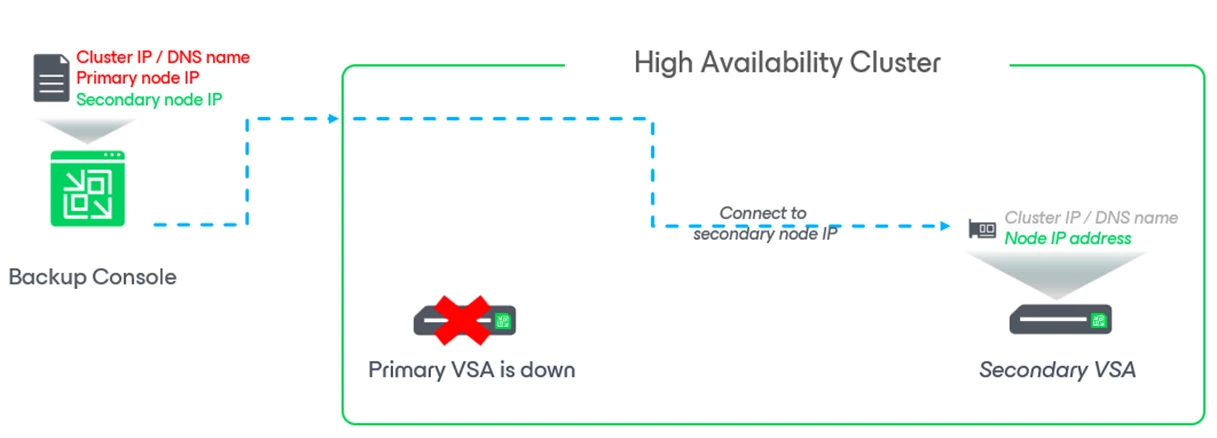


HA cluster monitoring with Veeam ONE

Veeam ONE comes with “HA Cluster” pre-defined alarms:

  • Veeam Backup & Replication HA cluster created
  • Veeam Backup & Replication HA cluster disassembled
  • Veeam Backup & Replication HA cluster primary node state
  • Veeam Backup & Replication HA cluster secondary node state
  • Veeam Backup & Replication HA cluster failover state
  • Veeam Backup & Replication HA cluster switchover state

Now that we understand the available HA alarms, let’s look at how Veeam ONE uses them to automate failover.

By leveraging these alarms, Veeam ONE can be used as a “Cluster Witness” and coupled with the right remediation action, it permits for HA Cluster Failover Automation.

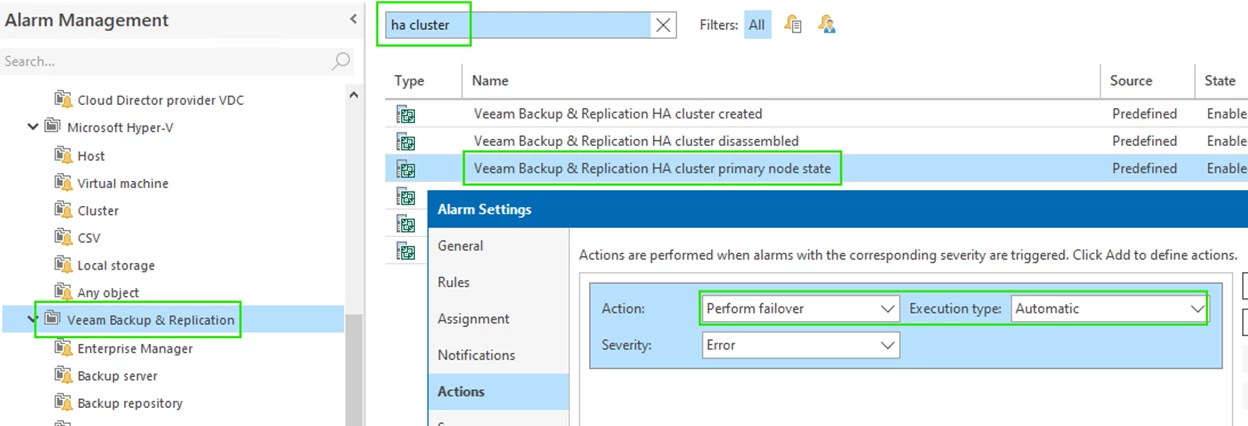
We are particularly interested in the Failover remediation action associated with “Veeam Backup & Replication HA cluster primary node state”.



Configuring Automated Failover with Veeam ONE

Setting Automated Failover in case of Primary Node Failure is a very simple 2-steps process:

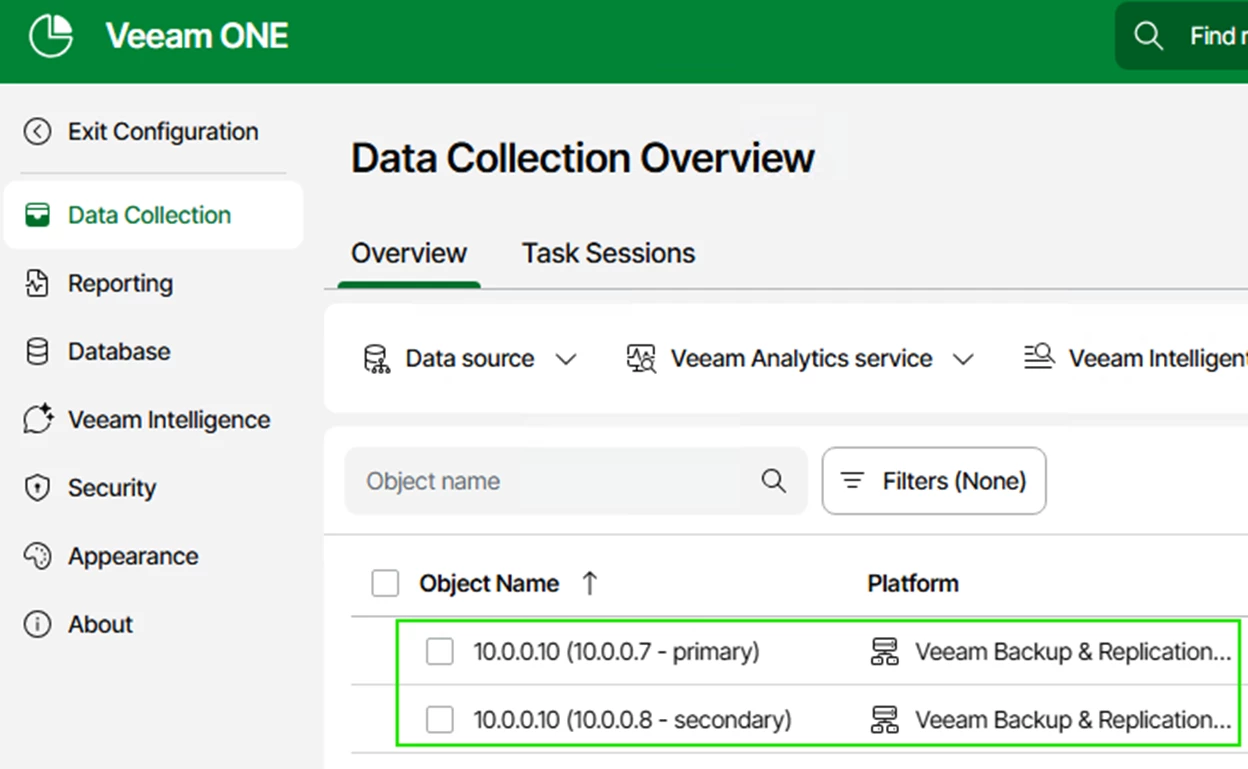
  • Use the Veeam ONE Web Client to connect to the Veeam Backup & Replication server.


  • Use the Veeam ONE monitor client to configure the remediation action.
 

That’s it! We are now ready to survive a complete site failure (at least from a Veeam Backup and Replication server perspective).


Failover Event Walkthrough

Initial state before failure


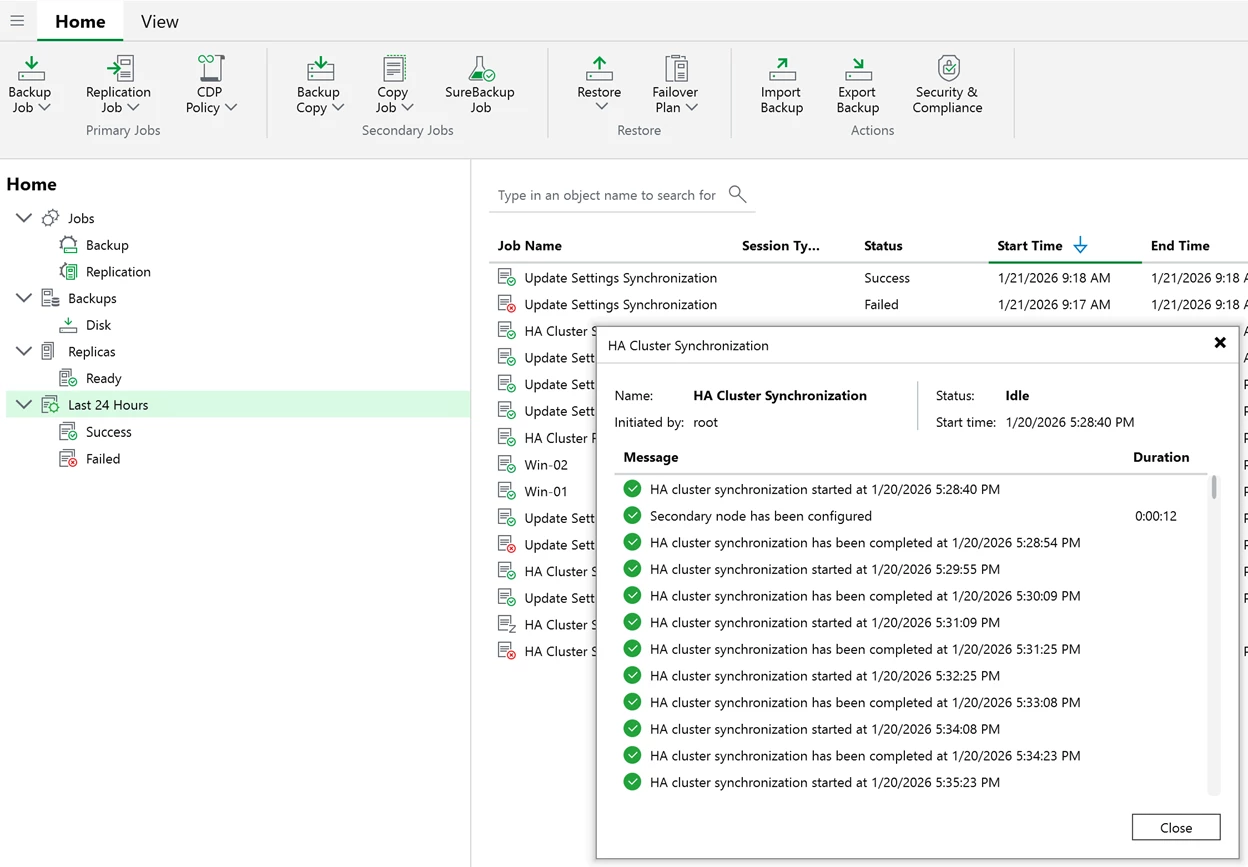
VSA-01 is the “primary” backup server.
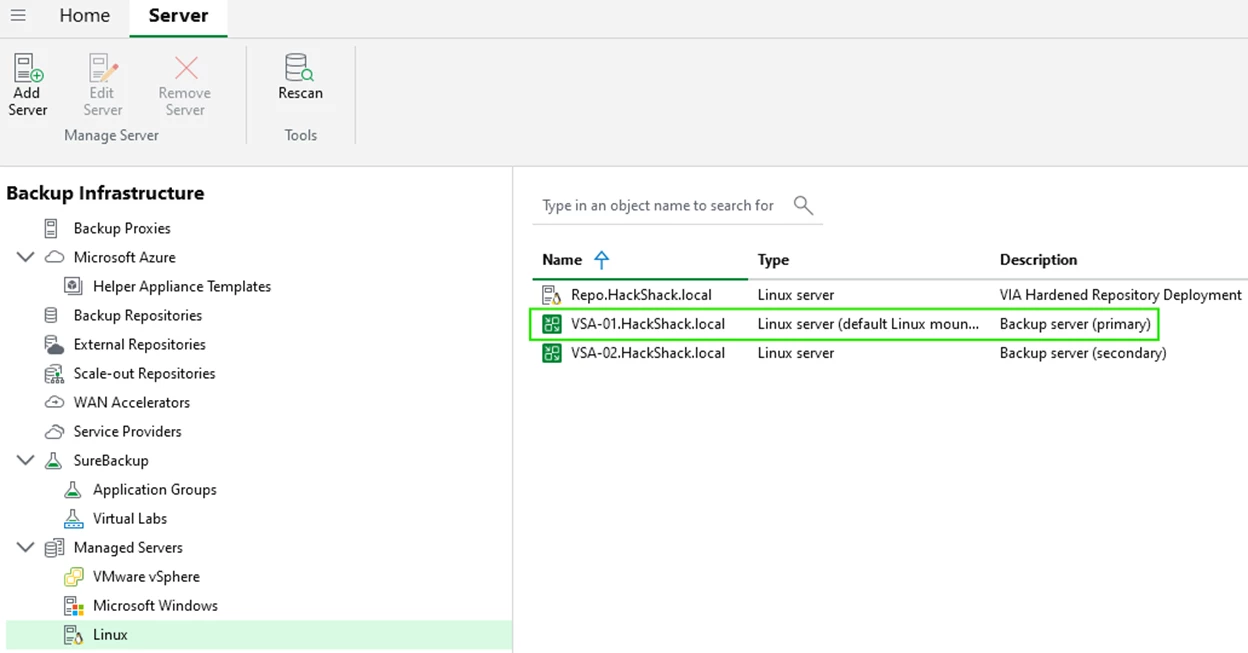
 

You can observe cluster synchronization tasks.
 

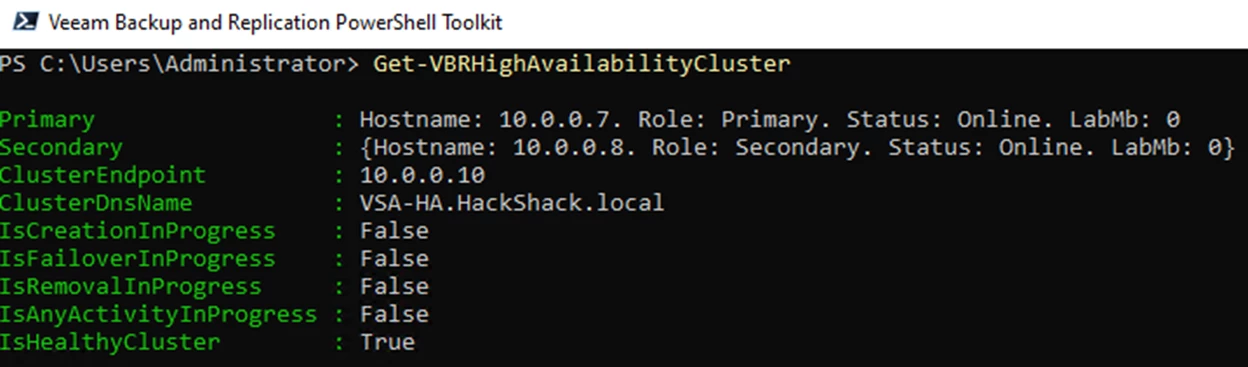
You can use the powershell Get-VBRHighAvailabilityCluster command for more details on the HA cluster status.
 

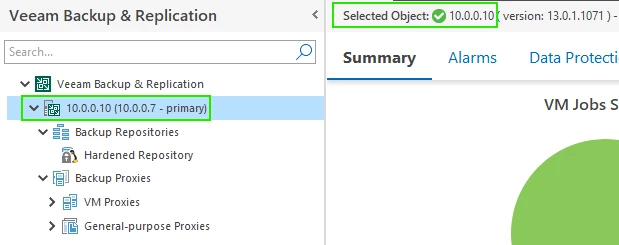
In the Veeam ONE monitor client we can see that we are connected to the primary node.
 

Failover state

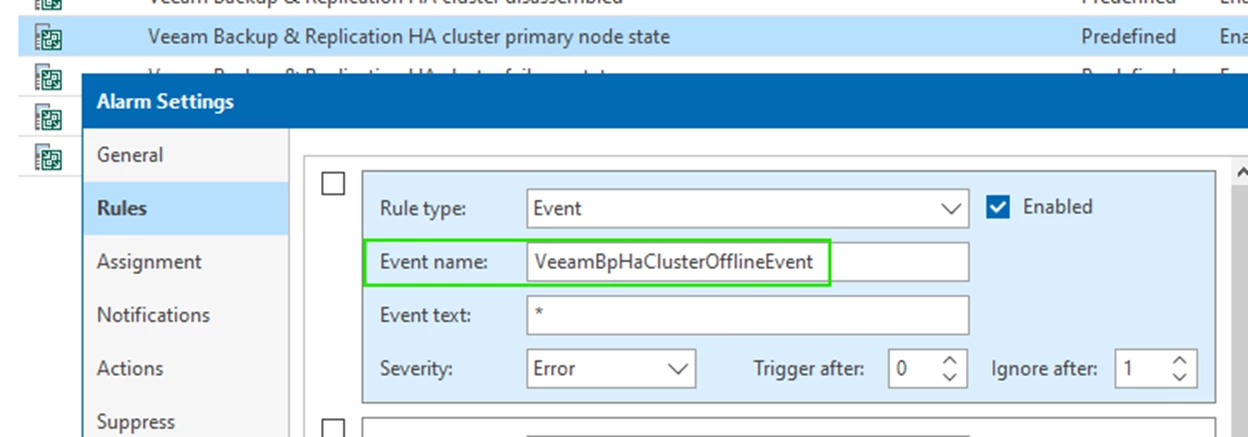
After a Failure and the “Cluster Offline Threshold” has been reached (currently 10 mins), the following event will be raised: VeeamBpHaClusterOfflineEvent


What you will observe in VeeamONE are the following alarms:

  • Veeam Backup & Replication HA cluster primary node state: We lose connectivity to the primary VSA node.
  • Veeam Analytics service on the remote server is not running: Since we lost connectivity, we cannot reach the analytics service.


The remediation action for the “Veeam Backup & Replication HA cluster primary node state” performs the failover.

It is unlikely you will be present to witness a site failure live, but if you happen to catch the failover process, you may see the remediation action. It looks like this:
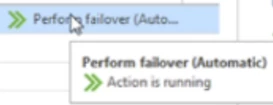


Once the failover is complete, VeeamONE will point to the second VSA node.
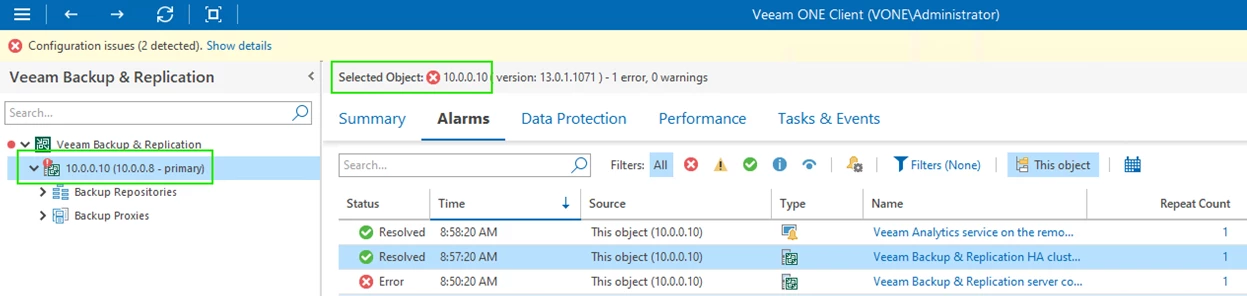
 

Eventually all alarms will be resolved.


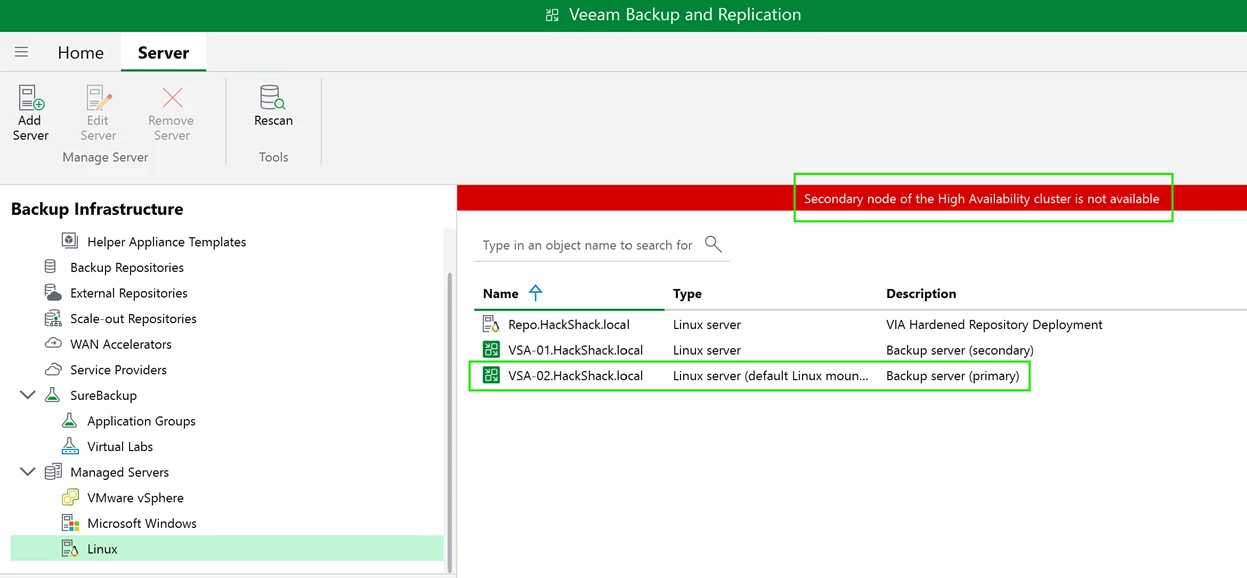
The Veeam Backup & Replication console may get disconnected but once you reconnect, you will observe that the “old” secondary node is now primary.

You will also observe a red banner stating the cluster’s degraded state.
 

Veeam HA cluster logs

For troubleshooting or learning purposes, you can access the High Availability (HA) logs directly on the Veeam Software Appliance (VSA). These logs provide visibility into cluster state transitions, synchronization activity, node promotion, failover decisions, and error conditions.

To access the logs:

  • Open the Host Management Console (TUI)
  • Enter the shell
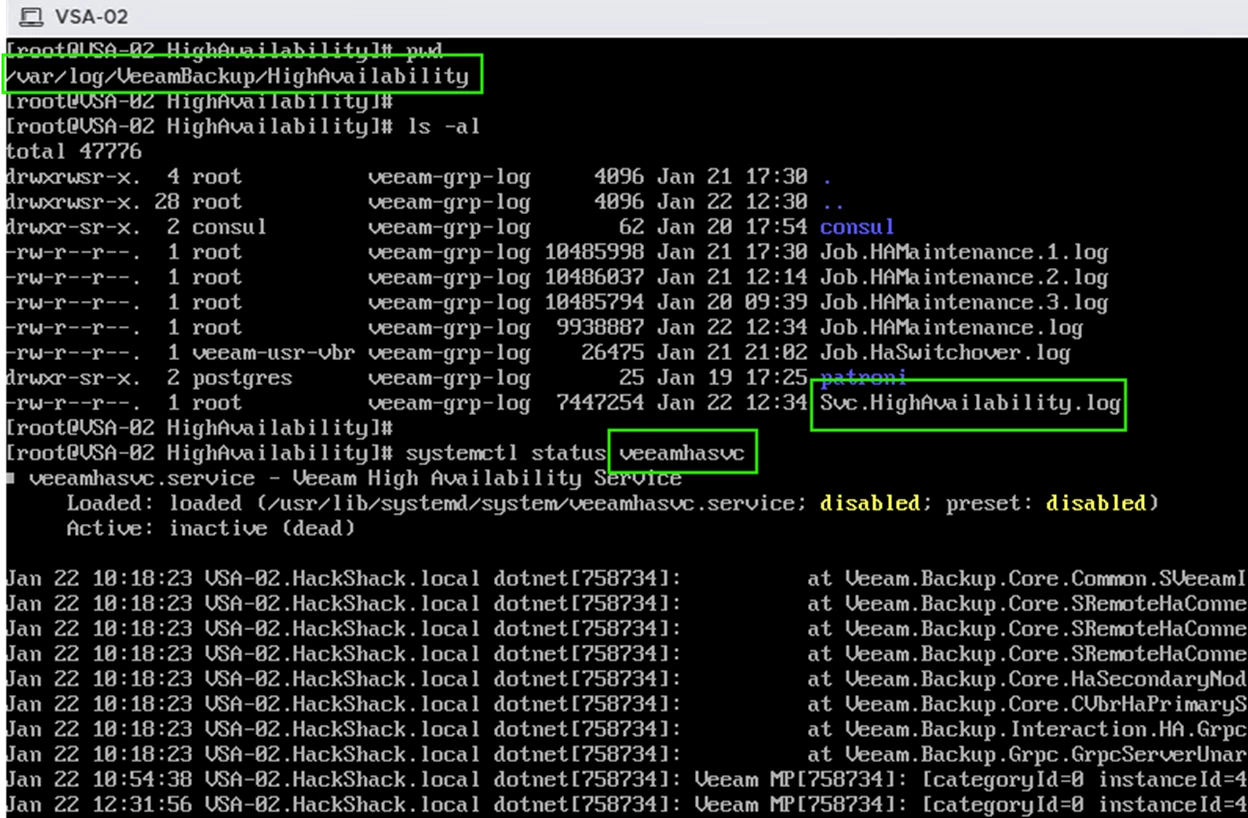
  • Navigate to the HA log directory: /var/log/VeeamBackup/HighAvailability


The primary log file is: Svc.HighAvailability.log


This log is produced by the veeamhasvc service, which orchestrates HA operations such as cluster creation, synchronization, failover/switchover actions, etc..

You will also find related logs for other supporting services in subdirectories. These can be helpful when troubleshooting node unavailability, replication delays, or transaction‑log synchronization issues.
 

Important:

For any issue in a production environment, always open a case with Veeam Support, as log interpretation requires detailed knowledge of HA internals.


Re-establishing HA

If you are lucky enough to experience a site failure that is nondestructive, restarting your original primary VSA will resolve HA clustering on its own.

Else, other scenarios involve deploying a new VSA and recreating the cluster.


Restarting the original primary node – resolving HA cluster split brain

After restarting the abruptly failed VSA node, it does not know it is no longer the “primary”. This is known as a split-brain situation.

The starting node knows it is just restarting and will communicate with the other node to check status before acting as the “primary”.

The other node informs the starting node that he is no longer primary and HA clustering resumes as the “old” primary node assumes the role of secondary.
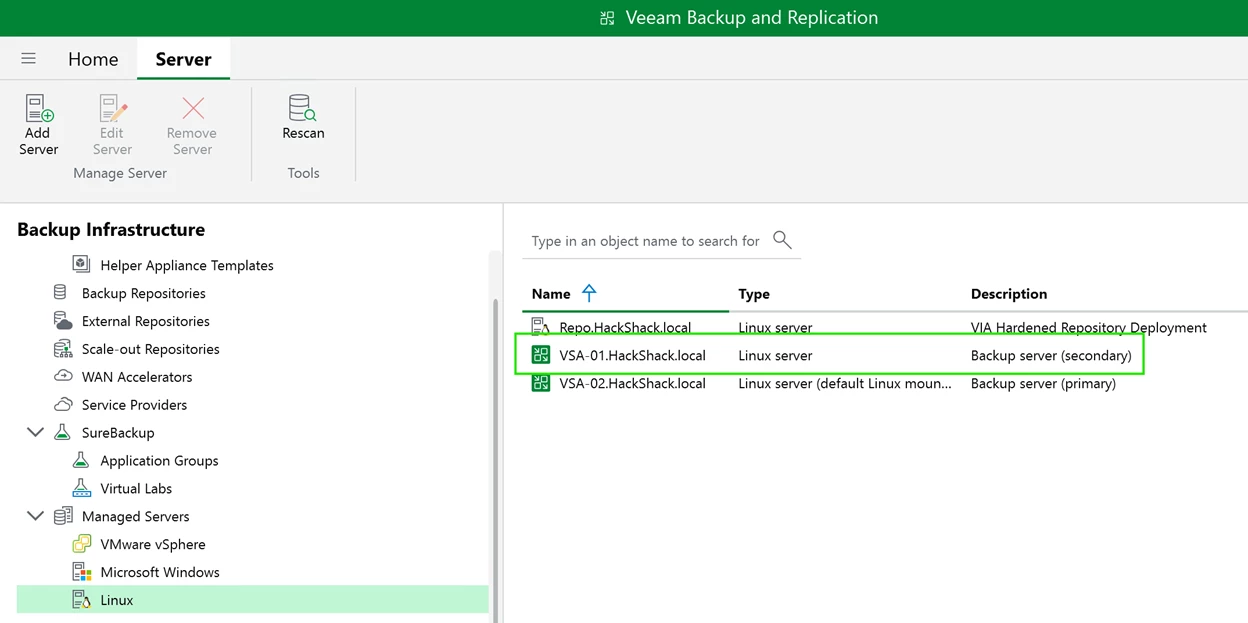


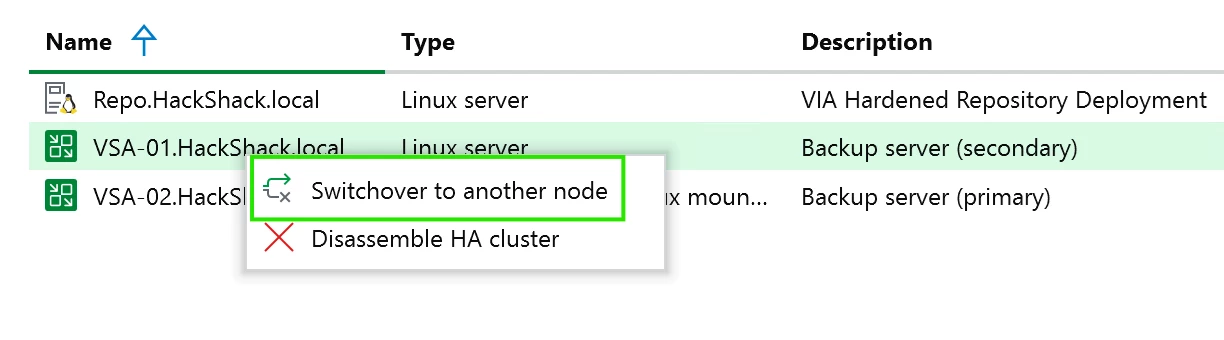
Note that there is no automated failback to the old primary state but it is always possible to perform a manual “switchover”.
 

Recreating the HA cluster

In the event of a destructive failure, once you have designated a new replacement site and deployed a new VSA, you may want to re-establish HA clustering.

You must first disassemble the HA cluster before you can add the new VSA node.
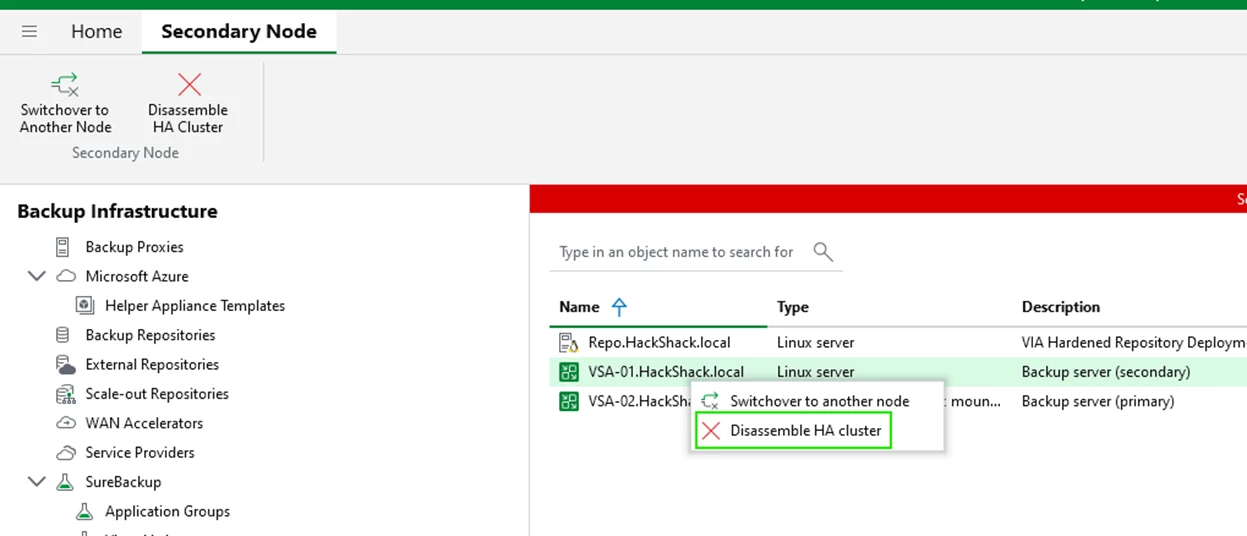


The cluster will disassemble and you will lose console connectivity as it points to the disassembled Cluster DNS name (OR Cluster Virtual IP).
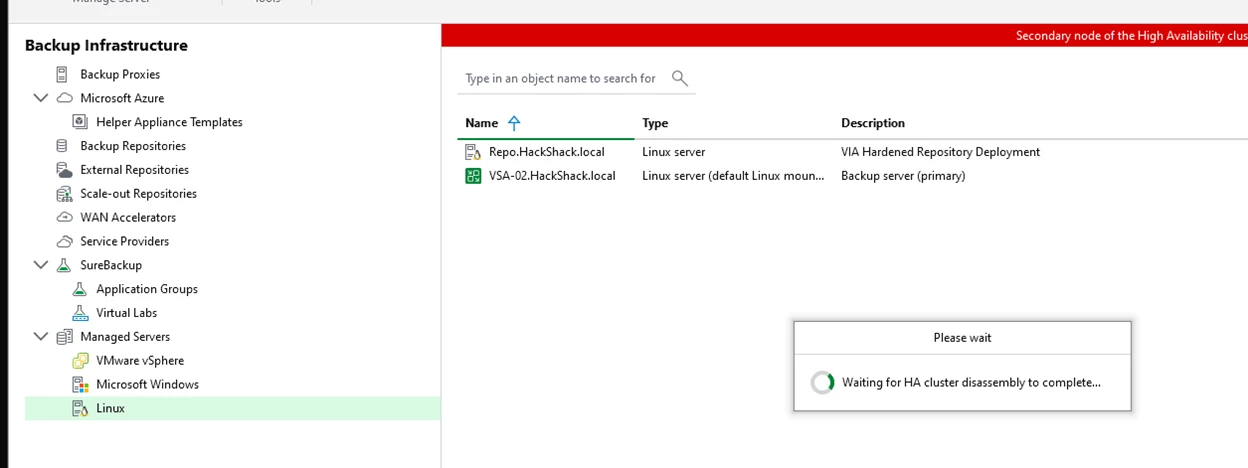
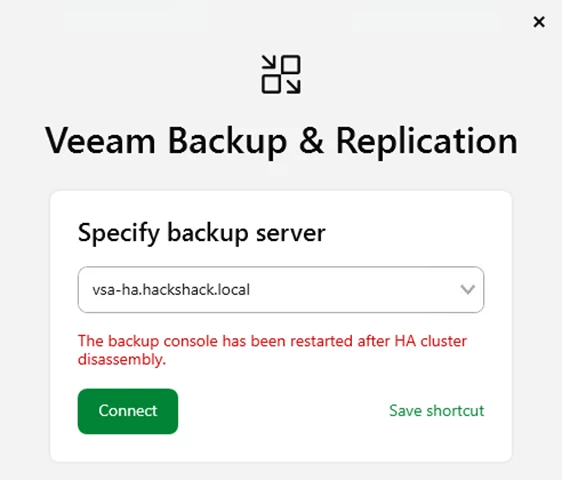


You can now point the console to remaining node to access your Veeam Backup and Replication VSA.
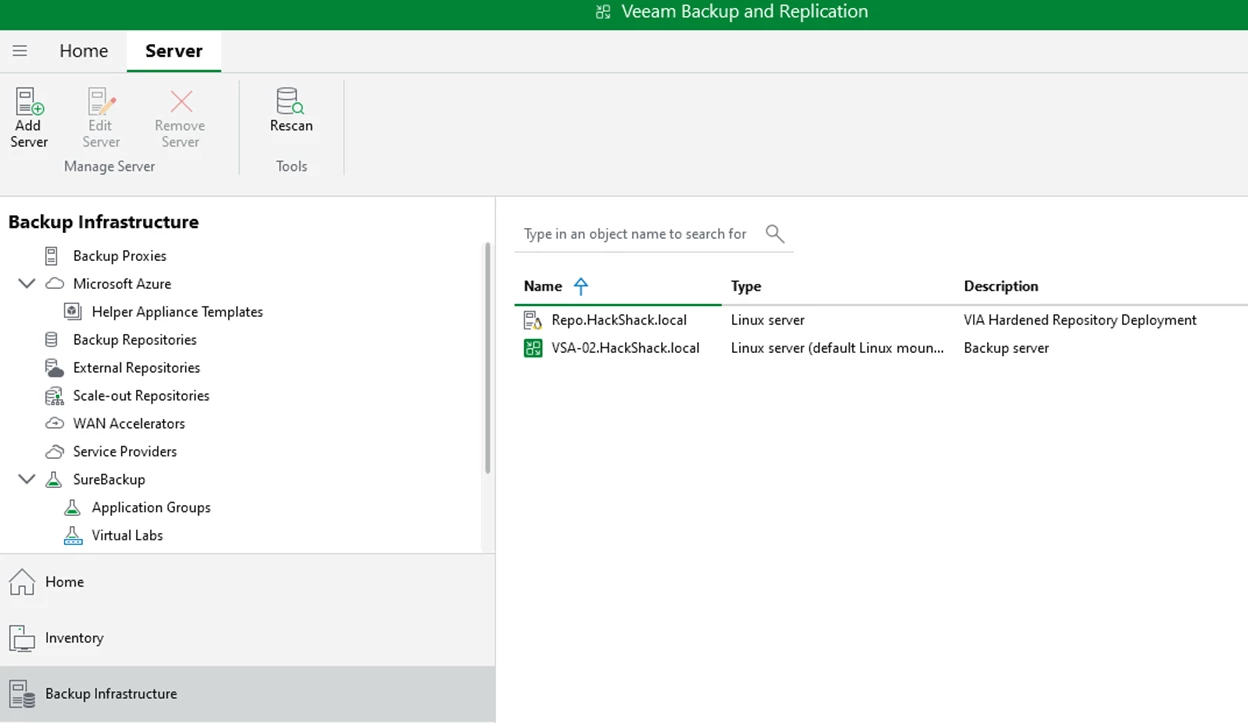


Note: You will need to re-establish VeeamONE monitoring by pointing to the remaining node.

Once you have your new site setup and have deployed a new VSA, recreating the cluster is straight forward.


Conclusion

High Availability in Veeam Backup & Replication v13 delivers meaningful resilience improvements for the VSA by pairing the HA cluster with Veeam ONE’s monitoring and automated remediation. This combination reduces disruption, accelerates recovery, and strengthens operational confidence during unexpected failures.

While this is the first major iteration of VSA HA, it already provides strong failover capabilities and clear cluster visibility. Future v13 updates will continue to enhance reliability and automation, further solidifying Veeam’s HA foundation.

Implementing VSA HA with Veeam ONE gives organizations a more robust, self‑healing backup infrastructure—one designed to protect SLAs and maintain continuity even when failures occur.


10 comments

Chris.Childerhose
Forum|alt.badge.img+21
  • Veeam Legend, Veeam Vanguard
  • January 22, 2026

This is a great alert and monitor as I have it set up.  I have found though using VEM seems to work better as adding the cluster to VONE does not work too well which support is working on for me.


coolsport00
Forum|alt.badge.img+21
  • Veeam Legend
  • January 23, 2026

GREAT walkthrough ​@olivier.rossi !! I won’t be updating my VONE for a bit, but this is a good reference to use when I do.

Good to know about ​@Chris.Childerhose . Thanks for the head’s up!


StephenM
Forum|alt.badge.img+2
  • Comes here often
  • January 23, 2026

If you ask for it, Veeam will deliver.  VSA and HA were at the top of my wish list for over 10 years!


Brad
Forum|alt.badge.img+2
  • Veeam MVP
  • January 23, 2026

I want to add some fun experience on to this after playing with split brain resolution scenarios. 

Lets say for example…. you had your two HA Cluster nodes (VSA-01 as the primary and VSA-02 as the secondary) and those made up your Cluster (VSA-HA). You place your nodes on physically separate hardware, and then put vONE in a position to witness the secondary node in the event of hardware failure for where VSA-01 lives. 


Okay… now lets separate that hardware between a layer 2 connection. 


Finally, I went ahead and killed the network connection between these two VSAs and vONE, and waited for vONE to automate failover to VSA-02. 


Now, what do we think will happen when we reestablish the network connection between the hardware? Remember, VSA-01 was never actually offline, it just wasn’t reachable and was the original primary node. Well, from my testing it doesn’t matter. It follows the same method for split brain resolution as Olivier described above. 

With that said, more testing is needed beyond my little lab setting. An actual stretch layer 2 implementation with the HA nodes separated, followed up with having jobs run successfully on the primary node (VSA-01 in this setup) would be one example. The other thing to consider would be Jobs running successfully on the VSA-01 and the VSA-02 during that time frame. Think an active - active approach where production systems are on both sides and components exist to run jobs on both side.


My test was a bit limited because of what I have access to and I did this test by just disabling a nic on an ESXi host for example. 


I think in the current implementation of HA the split brain resolution will always resolve to VSA-02 becoming the primary after reestablishing the network connection in this scenario. 


Chris.Childerhose
Forum|alt.badge.img+21

Once you have your new site setup and have deployed a new VSA, recreating the cluster is straight forward.

I have to disagree with this as I have had challenges with recreating clusters.  I have disassembled an HA Cluster for testing then upon trying to reassemble it something happens within the database and the stored SSL for the node.  I have found that I need to re-IP my secondary node being used for the cluster in order to get the cluster to create.  So there is a bug or enhancement required to address this issue.

Happy to discuss this more as I have done extensive testing with HA Clusters and VONE too. 😁


Brad
Forum|alt.badge.img+2
  • Veeam MVP
  • January 23, 2026

Once you have your new site setup and have deployed a new VSA, recreating the cluster is straight forward.

I have to disagree with this as I have had challenges with recreating clusters.  I have disassembled an HA Cluster for testing then upon trying to reassemble it something happens within the database and the stored SSL for the node.  I have found that I need to re-IP my secondary node being used for the cluster in order to get the cluster to create.  So there is a bug or enhancement required to address this issue.

Happy to discuss this more as I have done extensive testing with HA Clusters and VONE too. 😁

That uh…. sounds like a bug on the surface level. I’m not sure of all the context of what you were doing and what had to be done to get it functioning. As I understand it, that secondary node should be able to be utilized with recreation of the HA cluster as it should still contain the configuration details and certificates necessary for recreating that cluster, and it should only be able to be used with that specific HA cluster pairing between those VSAs. 

Also, the challenges you’ve had might be a bit different than doing an HA cluster that is net-new vs reassembling a disassembled cluster. 


Brad
Forum|alt.badge.img+2
  • Veeam MVP
  • January 23, 2026

Once you have your new site setup and have deployed a new VSA, recreating the cluster is straight forward.

I have to disagree with this as I have had challenges with recreating clusters.  I have disassembled an HA Cluster for testing then upon trying to reassemble it something happens within the database and the stored SSL for the node.  I have found that I need to re-IP my secondary node being used for the cluster in order to get the cluster to create.  So there is a bug or enhancement required to address this issue.

Happy to discuss this more as I have done extensive testing with HA Clusters and VONE too. 😁

So I would recommend opening a support case on it for investigation


Chris.Childerhose
Forum|alt.badge.img+21

Once you have your new site setup and have deployed a new VSA, recreating the cluster is straight forward.

I have to disagree with this as I have had challenges with recreating clusters.  I have disassembled an HA Cluster for testing then upon trying to reassemble it something happens within the database and the stored SSL for the node.  I have found that I need to re-IP my secondary node being used for the cluster in order to get the cluster to create.  So there is a bug or enhancement required to address this issue.

Happy to discuss this more as I have done extensive testing with HA Clusters and VONE too. 😁

That uh…. sounds like a bug on the surface level. I’m not sure of all the context of what you were doing and what had to be done to get it functioning. As I understand it, that secondary node should be able to be utilized with recreation of the HA cluster as it should still contain the configuration details and certificates necessary for recreating that cluster, and it should only be able to be used with that specific HA cluster pairing between those VSAs. 

Also, the challenges you’ve had might be a bit different than doing an HA cluster that is net-new vs reassembling a disassembled cluster. 

It was during a Disassemble / Reassemble of a cluster.  Nothing with the nodes changed just removed the cluster and on trying to recreate it that is when I had the problem as it came up saying it could not reach the node which was secondary in the cluster previously and that is when I change IPs which seems to fix it.  I think I opened a case about this but if not I will again. 😁


Brad
Forum|alt.badge.img+2
  • Veeam MVP
  • January 23, 2026

Once you have your new site setup and have deployed a new VSA, recreating the cluster is straight forward.

I have to disagree with this as I have had challenges with recreating clusters.  I have disassembled an HA Cluster for testing then upon trying to reassemble it something happens within the database and the stored SSL for the node.  I have found that I need to re-IP my secondary node being used for the cluster in order to get the cluster to create.  So there is a bug or enhancement required to address this issue.

Happy to discuss this more as I have done extensive testing with HA Clusters and VONE too. 😁

That uh…. sounds like a bug on the surface level. I’m not sure of all the context of what you were doing and what had to be done to get it functioning. As I understand it, that secondary node should be able to be utilized with recreation of the HA cluster as it should still contain the configuration details and certificates necessary for recreating that cluster, and it should only be able to be used with that specific HA cluster pairing between those VSAs. 

Also, the challenges you’ve had might be a bit different than doing an HA cluster that is net-new vs reassembling a disassembled cluster. 

It was during a Disassemble / Reassemble of a cluster.  Nothing with the nodes changed just removed the cluster and on trying to recreate it that is when I had the problem as it came up saying it could not reach the node which was secondary in the cluster previously and that is when I change IPs which seems to fix it.  I think I opened a case about this but if not I will again. 😁

Yeah, it would 100% depend on if it was a reoccurring issue/behavior. Hopefully it was a one of, but you never know with initial releases of features and letting support know is the best way to get things like this resolved for future iterations and releases. 


Chris.Childerhose
Forum|alt.badge.img+21

Once you have your new site setup and have deployed a new VSA, recreating the cluster is straight forward.

I have to disagree with this as I have had challenges with recreating clusters.  I have disassembled an HA Cluster for testing then upon trying to reassemble it something happens within the database and the stored SSL for the node.  I have found that I need to re-IP my secondary node being used for the cluster in order to get the cluster to create.  So there is a bug or enhancement required to address this issue.

Happy to discuss this more as I have done extensive testing with HA Clusters and VONE too. 😁

That uh…. sounds like a bug on the surface level. I’m not sure of all the context of what you were doing and what had to be done to get it functioning. As I understand it, that secondary node should be able to be utilized with recreation of the HA cluster as it should still contain the configuration details and certificates necessary for recreating that cluster, and it should only be able to be used with that specific HA cluster pairing between those VSAs. 

Also, the challenges you’ve had might be a bit different than doing an HA cluster that is net-new vs reassembling a disassembled cluster. 

It was during a Disassemble / Reassemble of a cluster.  Nothing with the nodes changed just removed the cluster and on trying to recreate it that is when I had the problem as it came up saying it could not reach the node which was secondary in the cluster previously and that is when I change IPs which seems to fix it.  I think I opened a case about this but if not I will again. 😁

Yeah, it would 100% depend on if it was a reoccurring issue/behavior. Hopefully it was a one of, but you never know with initial releases of features and letting support know is the best way to get things like this resolved for future iterations and releases. 

It has happened every time I have gone through this exercise so I will let them know.