Upgrades - at least with Veeam - usually go smoothly. But every now and then, one catches you off guard. After upgrading Veeam Backup & Replication (VBR) to version 13, we ran into an issue that completely blocked access to the VBR console.
I’m sharing this here in case it helps others who might hit the same problem.
The Problem: No Console Access After Upgrade
Immediately after the upgrade to VBR v13, the Veeam Backup & Replication console refused to connect to the VBR server.
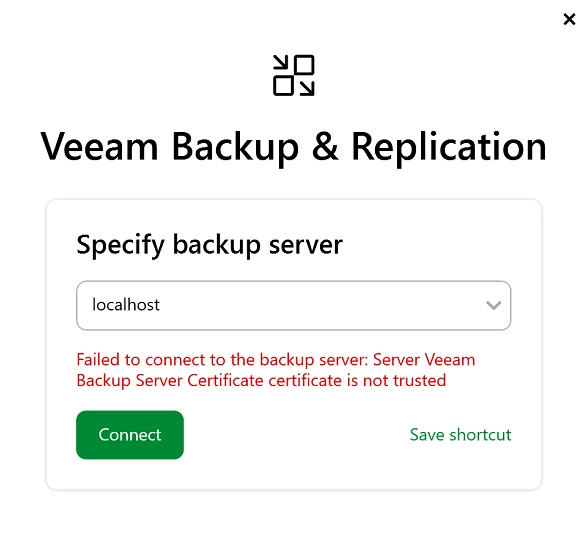
Instead of the expected login screen, we were greeted with a certificate error. What made troubleshooting especially confusing was that the error occurred regardless of how we tried to connect:
-
localhost
-
server IP address
- fully qualified domain name (FQDN)
All resulted in the same error. From a Veeam perspective, everything on the server side looked healthy, services were running, and nothing in the upgrade logs indicated a failure. Before the upgrade with V12, we did not have any issues here.
Root Cause: Sophos Web Inspection
After ruling out the usual suspects (certificates, services, DNS, firewall rules), the real cause turned out to be Sophos Web Inspection.
Once web inspection was disabled, the VBR console immediately connected without any issues.
What’s Going On Under the Hood?
With VBR v13, communication between the VBR console and the VBR server seems to rely more heavily on certificate‑based security than in previous versions.
Sophos Web Inspection essentially performs TLS interception (man‑in‑the‑middle inspection) by re‑signing certificates on the fly. While this works for many applications, it appears to break the certificate trust chain used by the VBR console in v13.
As a result:
- The Veeam console no longer trusts the server certificate
- Certificate validation fails
- Connection is blocked, even locally
This explains why switching between hostname, IP, and FQDN made no difference—the inspection layer interfered every time as it exchanged Veeam’s self-signed cert with some random Sophos cert.
Resolution & Recommendations
What worked for us: Disable Sophos Web Inspection for the VBR communication path
Recommended next steps:
- Create a Sophos Web Inspection exception for:
- The VBR server
- The VBR console
- Relevant local or internal communication
- Review TLS inspection policies after major application upgrades
- Consider excluding backup infrastructure components from HTTPS inspection where possible
Takeaway
If you upgrade to Veeam Backup & Replication v13 and suddenly lose console access due to certificate errors, check your security stack—especially HTTPS/TLS inspection features.
This issue wasn’t caused by Veeam misconfiguration or a broken upgrade, but by tighter certificate validation colliding with security inspection.
Hopefully this saves someone else a few hours of head‑scratching.