Using Veeam Explorer for Active Directory to Restore A Deleted Account for Forensics - World Backup Day 2026

  • March 30, 2026
  • 9 comments
  • 63 views

coolsport00
Forum|alt.badge.img+21

Recently, ​@Madi.Cristil created a post asking members of the Veeam Community who have been "heroes" in performing their backup duties to share their stories. If you haven't yet seen her post, you can read it below:

https://community.veeam.com/discussion-boards-66/backup-heroes-wanted-join-the-world-backup-day-contest-2026-12918?postid=90737#post90737

World Backup Day is coming and, like they've done the past few years, Veeam is asking for the Community to share posts about how Veeam Data Platform has been used to meet a need at your organization, or even home!  My story isn't too extravagant, but it did meet a crucial need at my organization.

We had an employee get terminated a while back for potentially suspect activity with a vendor. Upon being informed of this activity, senior administrators were tasked to look into any network accounts which could have access to our environment. After meticulously skimming through our Active Directory environment, we came across a couple accounts which could potentially be used to gain access to our environment. Without hesitation, a co-worker removed these accounts.

Fast forward 6 months →  Organizational administrators had need to see activity history from one of these removed accounts, but of course it had been deleted from AD. Veeam to the rescue! 🙌🏻 Using the Veeam Backup Job which backs up our domain controllers, and perusing GFS restore points and Veeam's Active Directory Explorer, we were able to do an Active Directory "compare" with our production AD environment to quickly locate and recover the needed AD account.
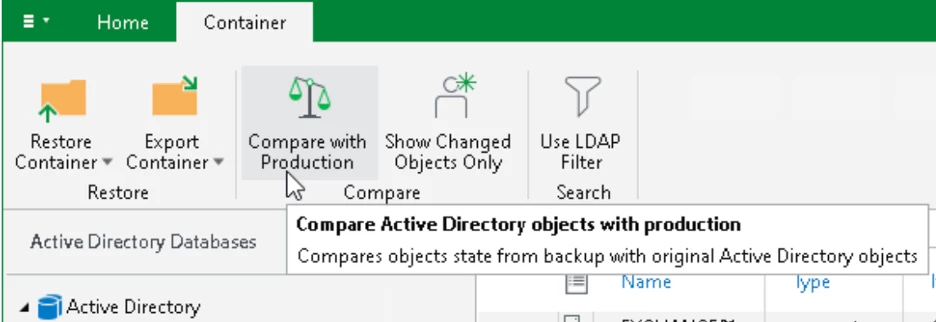
Veeam Active Directory Explorer - Compare

Forensics of the account in question was then able to be completed as requested by our Administration. And thankfully, no malicious activity was found. Those Veeam Explorers are invaluable!


@safiya 


9 comments

wolff.mateus
Forum|alt.badge.img+11
  • Veeam Vanguard
  • March 30, 2026

This explorer of Active Directory is fantastic.

It already help me to save and recover from some situations that it would be stressful to recover without Veeam.


kciolek
Forum|alt.badge.img+3
  • Influencer
  • March 30, 2026

the AD explorer is good! Actually, all of the explorers are good! make restores so much easier. Customers love it!


matheusgiovanini
Forum|alt.badge.img+8

Really great post Shane!

This is a perfect example of how Veeam Explorer for AD goes beyond simple restores. 


coolsport00
Forum|alt.badge.img+21
  • Author
  • Veeam Legend
  • March 30, 2026

Thanks Matheus! 😊


eblack
Forum|alt.badge.img+1
  • Influencer
  • March 30, 2026

I need to explore this one more. Thanks for the nudge. 


MarcoLuvisi
Forum|alt.badge.img+6
  • VUG Leader
  • March 31, 2026

Very interesting features ​@coolsport00 thanks !


coolsport00
Forum|alt.badge.img+21
  • Author
  • Veeam Legend
  • March 31, 2026

Thanks guys!


Iams3le
Forum|alt.badge.img+12
  • March 31, 2026

I agree, the story is indeed not extravagant but very crucial as the recovery was possible 😊


coolsport00
Forum|alt.badge.img+21
  • Author
  • Veeam Legend
  • March 31, 2026

I agree, the story is indeed not extravagant but very crucial as the recovery was possible 😊

hahaha...thanks for the honesty Christian 😂