

We recently upgraded a customer environment to Veeam Backup & Replication 13.1.1.18. The environment used a distributed repository architecture with a combination of Ubuntu Hardened Repositories and repositories deployed using Veeam Hardened Repository ISO v2.
The VBR upgrade itself went smoothly, but upgrading the remote components and reconnecting to the repositories presented a few challenges. One of them turned out to be a DNS firewall rule that we had not initially considered.
Here are some lessons learned from the upgrade.
1. Preparation is key
Before starting any Veeam Backup & Replication upgrade, I always verify that the configuration backup is available and usable.
If something goes wrong during the installation and a full reinstall becomes necessary, having a verified configuration backup makes it much easier to restore the environment to its original state.
During the installation, the setup wizard runs a configuration check to validate the existing environment and identify any actions that need to be completed before the upgrade can proceed.
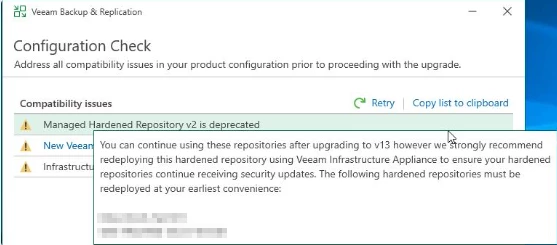
In our case, this highlighted some considerations for the hardened repositories.
One important recommendation: Verify that you have physical or out-of-band console access to your repository servers before starting the upgrade.
Depending on the repository type and the issues encountered, you may need console access to troubleshoot, update, or reconfigure the servers. We had verified access to the servers' management interfaces before the upgrade, which proved valuable later.
From a security perspective, I also recommend keeping management interfaces such as HPE iLO, Dell iDRAC, and IBM IMM disconnected from the backup repository network and inaccessible through unnecessary network paths. These interfaces can provide powerful control over physical servers, so restricting access helps reduce the potential attack surface.
2. Upgrading the remote components
After upgrading Veeam Backup & Replication and starting the console, we were prompted to upgrade the remote components.
Although it is possible to initiate this process during the installation, I prefer to perform it afterwards. This gives me greater control over the upgrade process and makes it easier to identify and troubleshoot individual component failures.
As expected, we encountered a few errors during the remote component upgrade.
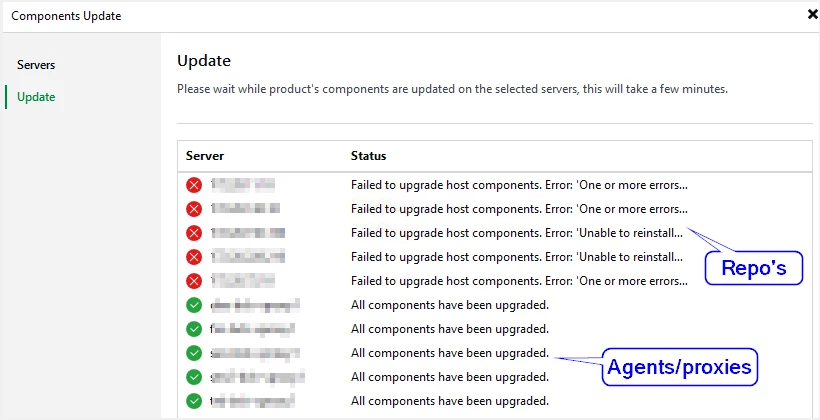
Ubuntu Hardened Repositories
Some of the Ubuntu Hardened Repositories failed to upgrade their host components.
The solution was to temporarily remove the hardened configuration through the appropriate Veeam management workflow, update the required certificates and agent components, and then apply the hardened configuration again.
The important point is to ensure that the repositories are properly hardened again after the maintenance is complete.
Veeam Hardened Repository ISO v2
For repositories deployed using Veeam Hardened Repository ISO v2, the upgrade process reported that it was unable to reinstall the required components.
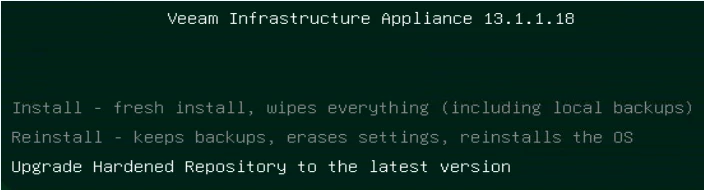
Fortunately, Veeam provides a procedure specifically for upgrading repositories deployed with this ISO.
The following documentation describes the procedure:
Reference: Upgrading Hardened Repository Deployed with Veeam Hardened Repository ISO — Veeam Backup & Replication User Guide.
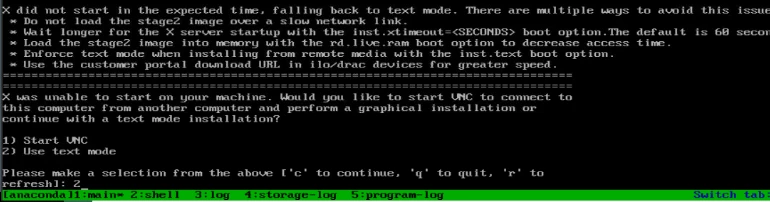
This procedure worked well in our environment, although it also required console access to the repository server.
This is another reason why I recommend verifying out-of-band access before starting an upgrade.
3. Repository connectivity issues after the upgrade
After the component upgrades were complete, we still had problems connecting to the repositories.
My first thought was that new firewall requirements might have been introduced with the latest version. We reviewed the required ports and asked the customer to open the necessary rules and monitor the firewall logs for any additional blocked traffic.
Reference: Ports — Veeam Backup & Replication User Guide
The initial feedback was that everything looked good from a firewall perspective. However, the repositories were still not working as expected.
I logged on to the console, started reviewing the logs, and opened a Veeam Support case to help analyse the communication errors.
The error messages indicated a communication problem, but the firewall logs appeared to show that the traffic was allowed.
After some additional troubleshooting, we discovered that the firewall logs were not being forwarded as expected. This meant that we could not rely entirely on the available logs to confirm that all relevant traffic was passing through the firewall.
We also tested connectivity to port 443 directly from the repository server:
curl -vk https://x.x.x.x:443/
The connection test succeeded, indicating that TCP connectivity to port 443 was working. However, the repository communication issue remained.
This was an important clue: a successful connection to port 443 did not prove that all the communication required by Veeam was working correctly.
4. The unexpected culprit: DNS blocked in the firewall
At this point, I started looking more closely at DNS.
As a test, I added an entry to the repository server's local hosts file, mapping the Veeam Backup & Replication server's IP address to its hostname.
After making this change, the repository connection started working.
That gave us a strong indication that name resolution was involved.
I took this finding back to the networking team and asked them to check whether DNS traffic was also being blocked by the firewall.
It was.
Once the DNS firewall rules were addressed, the repository communication worked as expected.
We had initially focused on the documented Veeam ports, but the troubleshooting showed that DNS resolution was also essential in this environment.
The latest repository appliance was using the DNS name of the VBR server for communication, whereas our previous setup had not led us to expect this behaviour. That difference caught us by surprise.
5. Lessons learned
Overall, the Veeam Backup & Replication upgrade was smooth, but the experience highlighted a few things worth checking before upgrading a distributed repository environment.
-
Verify your configuration backup. Make sure it is available and suitable for recovery before starting.
-
Confirm console access in advance. Check that you can reach the physical or out-of-band management interface of every repository that might require manual intervention.
-
Plan for hardened repository maintenance. Ubuntu Hardened Repositories and repositories deployed with Veeam Hardened Repository ISO v2 may require different upgrade procedures.
-
Review firewall requirements. Check the current Veeam documentation for the relevant version and environment.
-
Validate DNS as well as port connectivity. A successful TCP connection does not guarantee that hostname resolution and all required communication paths are working.
-
Verify firewall logging. Make sure the logs you rely on are actually being collected and forwarded.
-
Restore the hardened configuration. If hardening must be temporarily removed during maintenance, ensure that it is reapplied and verified afterwards.
Final thoughts
From a Veeam Backup & Replication perspective, the upgrade itself went well. The main challenges were upgrading the remote hardened repository components and troubleshooting connectivity afterwards.
The need for console access is an important design and security consideration, especially when repositories are distributed across remote sites. In our case, we had planned for this and verified access to the out-of-band management interfaces before beginning the upgrade.
The DNS issue was the unexpected part. We had not anticipated that the latest repository appliance would use the VBR server's DNS name in the way observed during troubleshooting, and this resulted in additional investigation with the networking team.
My biggest takeaway: Before upgrading a distributed Veeam environment, verify not only the documented firewall ports, but also DNS resolution, firewall logging, and console access to every repository.
A little preparation can save a lot of troubleshooting time.
Have you encountered similar DNS or connectivity issues when upgrading Veeam Hardened Repositories? I'd be interested to hear about your experiences.



