Upgrading the SQL Database Engine Software (PostgreSQL) Used by Veeam Backup & Replication

  • February 19, 2025
  • 14 comments
  • 7210 views

Link State
Forum|alt.badge.img+11

Hi all,

I attach the step by step procedure to perform a PostgreSQL Database upgrade.


PostgreSQL: CVE-2025-1094: PostgreSQL quoting APIs miss neutralizing quoting syntax in text that fails encoding validation


KB4386: Upgrading the SQL Database Engine Software (Microsoft SQL Server or PostgreSQL) Used by Veeam Backup & Replication


  1. Ensure that there are no jobs or restore tasks occurring.
  2. Manually Create a Configuration Backup.
  3. (Optional) Create a backup of the Configuration Database.


  1. Stop and Disable all Jobs
  2. Stop all Veeam services on the Veeam Backup Server
  3. Upgrade the SQL database software.
  4. After the upgrade completes, restart the Veeam Backup Server

PostgreSQL Upgrade Procedure

  1. Ensure all jobs, policies, and tasks are stopped, and those that are scheduled to run are disabled.
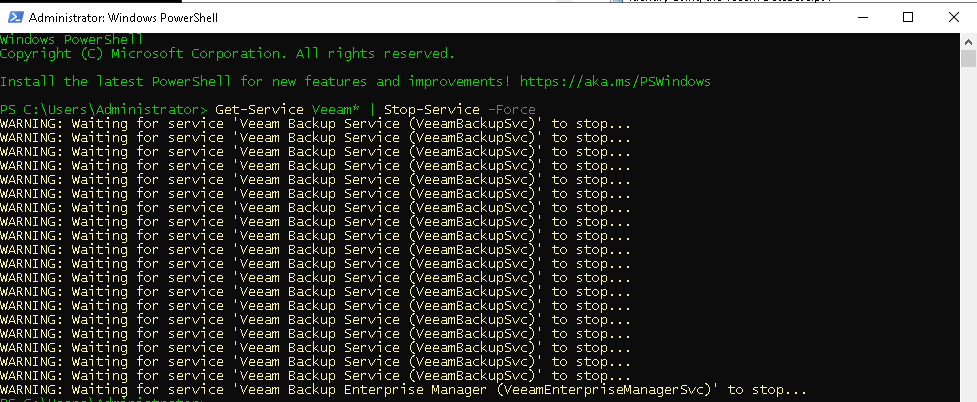
  2. Stop all Veeam-related services on the Veeam Backup Server.
  3. Get-Service Veeam* | Stop-Service -Force
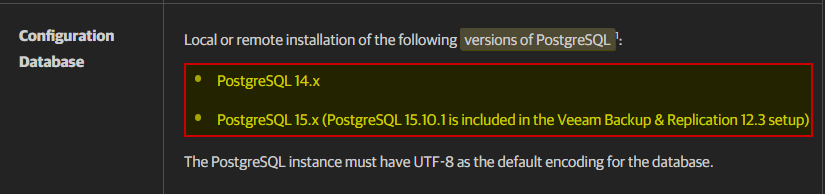
  1. Download the latest version of PostgreSQL that is compatible with Veeam Backup & Replication.
    Note: The most recent version of PostgreSQL may not be supported by Veeam Backup & Replication, it is critical that you check the compatibility list in the Veeam Backup & Replication User Guide for details.
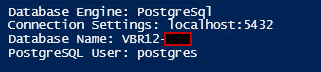
  • Identify VBR Database
$activeConfig = (Get-ItemProperty -Path 'HKLM:\SOFTWARE\Veeam\Veeam Backup and Replication\DatabaseConfigurations' -Name 'SqlActiveConfiguration').SqlActiveConfiguration
if ($activeConfig -eq "MsSql") {
$sqlServerName = (Get-ItemProperty -Path 'HKLM:\SOFTWARE\Veeam\Veeam Backup and Replication\DatabaseConfigurations\MsSql' -Name 'SqlServerName').SqlServerName
$sqlInstanceName = (Get-ItemProperty -Path 'HKLM:\SOFTWARE\Veeam\Veeam Backup and Replication\DatabaseConfigurations\MsSql' -Name 'SqlInstanceName').SqlInstanceName
$sqlDatabaseName = (Get-ItemProperty -Path 'HKLM:\SOFTWARE\Veeam\Veeam Backup and Replication\DatabaseConfigurations\MsSql' -Name 'SqlDatabaseName').SqlDatabaseName
Write-Host " Database Engine: $($activeConfig) "
Write-Output "Connection Settings: $($sqlServerName)\$($sqlInstanceName)"
Write-Output "Database Name: $($sqlDatabaseName)"
} elseif ($activeConfig -eq "PostgreSql") {
$pgServerName = (Get-ItemProperty -Path 'HKLM:\SOFTWARE\Veeam\Veeam Backup and Replication\DatabaseConfigurations\PostgreSql' -Name 'SqlHostName').SqlHostName
$pgPortNumber = (Get-ItemPropertyValue -Path 'HKLM:\SOFTWARE\Veeam\Veeam Backup and Replication\DatabaseConfigurations\PostgreSql' -Name 'SqlHostPort')
$pgDatabaseName = (Get-ItemProperty -Path 'HKLM:\SOFTWARE\Veeam\Veeam Backup and Replication\DatabaseConfigurations\PostgreSql' -Name 'SqlDatabaseName').SqlDatabaseName
$pgUser = (Get-ItemProperty -Path 'HKLM:\SOFTWARE\Veeam\Veeam Backup and Replication\DatabaseConfigurations\PostgreSql' -Name 'PostgresUserForWindowsAuth').PostgresUserForWindowsAuth
Write-Host "Database Engine: $($activeConfig)"
Write-Output "Connection Settings: $($pgServerName):$($pgPortNumber)"
Write-Output "Database Name: $($pgDatabaseName)"
Write-Output "PostgreSQL User: $($pgUser)"
}
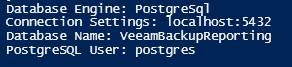
  • Identify VEM Database
$activeConfig = (Get-ItemProperty -Path 'HKLM:\SOFTWARE\Veeam\Veeam Backup Reporting\DatabaseConfigurations' -Name 'SqlActiveConfiguration').SqlActiveConfiguration
if ($activeConfig -eq "MsSql") {
$sqlServerName = (Get-ItemProperty -Path 'HKLM:\SOFTWARE\Veeam\Veeam Backup Reporting\DatabaseConfigurations\MsSql' -Name 'SqlServerName').SqlServerName
$sqlInstanceName = (Get-ItemProperty -Path 'HKLM:\SOFTWARE\Veeam\Veeam Backup Reporting\DatabaseConfigurations\MsSql' -Name 'SqlInstanceName').SqlInstanceName
$sqlDatabaseName = (Get-ItemProperty -Path 'HKLM:\SOFTWARE\Veeam\Veeam Backup Reporting\DatabaseConfigurations\MsSql' -Name 'SqlDatabaseName').SqlDatabaseName
Write-Host " Database Engine: $($activeConfig) "
Write-Output "Connection Settings: $($sqlServerName)\$($sqlInstanceName)"
Write-Output "Database Name: $($sqlDatabaseName)"
} elseif ($activeConfig -eq "PostgreSql") {
$pgServerName = (Get-ItemProperty -Path 'HKLM:\SOFTWARE\Veeam\Veeam Backup Reporting\DatabaseConfigurations\PostgreSql' -Name 'SqlHostName').SqlHostName
$pgPortNumber = (Get-ItemPropertyValue -Path 'HKLM:\SOFTWARE\Veeam\Veeam Backup Reporting\DatabaseConfigurations\PostgreSql' -Name 'SqlHostPort')
$pgDatabaseName = (Get-ItemProperty -Path 'HKLM:\SOFTWARE\Veeam\Veeam Backup Reporting\DatabaseConfigurations\PostgreSql' -Name 'SqlDatabaseName').SqlDatabaseName
$pgUser = (Get-ItemProperty -Path 'HKLM:\SOFTWARE\Veeam\Veeam Backup Reporting\DatabaseConfigurations\PostgreSql' -Name 'PostgresUserForWindowsAuth').PostgresUserForWindowsAuth
Write-Host "Database Engine: $($activeConfig)"
Write-Output "Connection Settings: $($pgServerName):$($pgPortNumber)"
Write-Output "Database Name: $($pgDatabaseName)"
Write-Output "PostgreSQL User: $($pgUser)"
}
  • Check PostgreSQL version
  • Backup PostgreSQL from CLI
Backup PostgreSQL from CLI
cd "C:\Program Files\PostgreSQL\15\BIN"
pg_dump -U postgres -d “yourDB-name” > C:\BackupPostgreSQL15\“yourDB-name” sql
pg_dump -U postgres -d “yourDB-name” > C:\BackupPostgreSQL15\“yourDB-name”.sql

  • Lunch installer\upgrade

C:\temp\postgresql-15.11-1-windows-x64.exe --mode unattended --disable-components stackbuilder
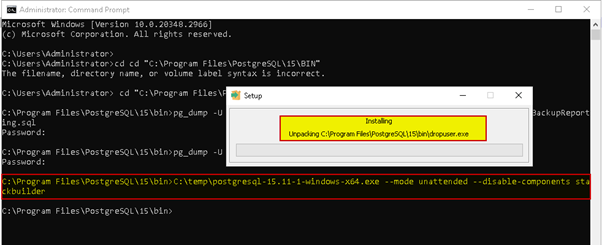
 

Reboot VBR re – enable jobs check version PostgreSQL

regards & enjoy

14 comments

Chris.Childerhose
Forum|alt.badge.img+21
  • Veeam Legend, Veeam Vanguard
  • February 19, 2025

This is a great article and came out at a good time as there have been questions around whether Veeam upgrades Postgres.  Thanks for sharing this one!  👍🏼


Link State
Forum|alt.badge.img+11
  • Author
  • Veeam Legend
  • February 19, 2025

This is a great article and came out at a good time as there have been questions around whether Veeam upgrades Postgres.  Thanks for sharing this one!  👍🏼

you are welcome 😁


dloseke
Forum|alt.badge.img+8
  • Veeam Vanguard
  • February 19, 2025

Thank you ​@Link State  for posting this.  As Chris noted, there were other questions about this so this couldn’t have come at a better time and I actually thought it was a response to another thread that I’m tagging below.


Iams3le
Forum|alt.badge.img+11
  • Veeam Legend
  • February 19, 2025

This is a great article and came out at a good time as there have been questions around whether Veeam upgrades Postgres.  Thanks for sharing this one!  👍🏼

Exactly. I saw your response on that earlier. This is a very great and tailored guide ​@Link State!  


matheusgiovanini
Forum|alt.badge.img+7

Great post! The step-by-step guide on upgrading PostgreSQL for Veeam was really helpful. Stopping all services and making sure jobs are paused before upgrading is a key detail. I used this guide to upgrade my environment successfully—thanks for sharing such a clear and useful resource


  • New Here
  • March 14, 2025

Hi.


I have a question:

So upgrading PostgreSQL to 15.12 is supported by VBR, and 16.8 and 17.4 isn't in this moment, right?

Does 15.12 resolves current CVE threats?


Link State
Forum|alt.badge.img+11
  • Author
  • Veeam Legend
  • March 14, 2025

Hi.


I have a question:

So upgrading PostgreSQL to 15.12 is supported by VBR, and 16.8 and 17.4 isn't in this moment, right?

yes

Does 15.12 resolves current CVE threats?

yes


yes this fix was included starting from version 15.11.


  • New Here
  • March 14, 2025

Thank you for your reply.
Just to clarify.

Per URL: “https://helpcenter.veeam.com/docs/backup/vsphere/system_requirements.html?zoom_highlight=versions%20of%20PostgreSQL&ver=120

PostgreSQL 15.x is compatible, including 15.12?


Chris.Childerhose
Forum|alt.badge.img+21
  • Veeam Legend, Veeam Vanguard
  • March 14, 2025

Thank you for your reply.
Just to clarify.

Per URL: “https://helpcenter.veeam.com/docs/backup/vsphere/system_requirements.html?zoom_highlight=versions%20of%20PostgreSQL&ver=120

PostgreSQL 15.x is compatible, including 15.12?


Yes it is compatible.


  • New Here
  • March 14, 2025

Thanks Chris.


  • New Here
  • April 16, 2025

Thanks so much


  • New Here
  • November 24, 2025

I have a PostgreSQL 15 (installed part of VBR12.3), and I then upgraded to VBR13. However the VBR upgrade process did not automatically upgraded database.


I follow this step to upgrade to PostgreSQL 17.6-1. Completed successfully.


In Control Panel> Program, I now have both PostgreSQL 15 and PostgreSQL 17 listed, should I uninstall PostgreSQL 15?


How do I verify that my VeeamBackup database is now running on PostgreSQL 17?


Because now I have both directories, C:\Program Files\PostgreSQL\15\BIN and C:\Program Files\PostgreSQL\17\BIN and running psql -V in each directory show different version respective to the parent directory.


Chris.Childerhose
Forum|alt.badge.img+21
  • Veeam Legend, Veeam Vanguard
  • November 24, 2025

I have a PostgreSQL 15 (installed part of VBR12.3), and I then upgraded to VBR13. However the VBR upgrade process did not automatically upgraded database.


I follow this step to upgrade to PostgreSQL 17.6-1. Completed successfully.


In Control Panel> Program, I now have both PostgreSQL 15 and PostgreSQL 17 listed, should I uninstall PostgreSQL 15?


How do I verify that my VeeamBackup database is now running on PostgreSQL 17?


Because now I have both directories, C:\Program Files\PostgreSQL\15\BIN and C:\Program Files\PostgreSQL\17\BIN and running psql -V in each directory show different version respective to the parent directory.

You need to be careful because if your database is in the 15 directory you could possibly affect Veeam.  Just take a configuration backup and then do it worse case you restore.  I don't think it will touch the DB though.


Iams3le
Forum|alt.badge.img+11
  • Veeam Legend
  • November 24, 2025

I have a PostgreSQL 15 (installed part of VBR12.3), and I then upgraded to VBR13. However the VBR upgrade process did not automatically upgraded database.

In Control Panel> Program, I now have both PostgreSQL 15 and PostgreSQL 17 listed, should I uninstall PostgreSQL 15?

How do I verify that my VeeamBackup database is now running on PostgreSQL 17?

This is a different us-case, but might be helpful.

Why not check if PostgreSQL 15 is stopped, and if 17 is running. If yes, you can safely remove the program. You can also check via PS: "C:\Program Files\PostgreSQL\17\bin\psql.exe" -U veeam -d VeeamBackup -p 5432 or run sql: SELECT version(); will help determine which PostgreSQL version your Veeam Db is running on