



While upgrading to Veeam Backup for Microsoft 365 8.4, you might notice the following message:
Connection to PostgreSQL is not encrypted. Enable TLS in PostgreSQL for secure communication.
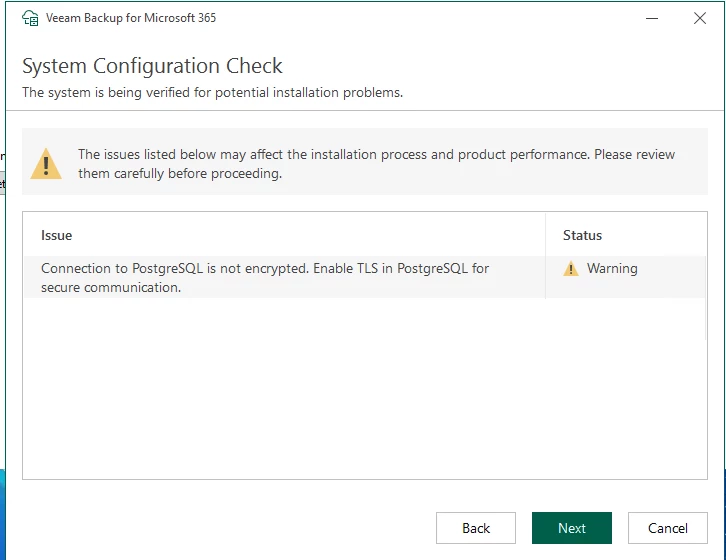
VB365 checks whether the connection to the PostgreSQL database uses TLS.
If TLS is not explicitly enabled, the warning is shown regardless of whether PostgreSQL is local or remote.
If the PostgreSQL database is locally hosted on the vb365 server itself, this traffic does not leave the host. But if you have multiple proxies, those proxies also connect to the database, and this traffic leaves the network. So in those scenarios, it might be good to have this traffic encrypted.
I will describe here how you can enable this traffic to be encrypted.
Step 1 - backup config files
On all hosts (vb365 server and proxies), back up the following files:
C:\ProgramData\Veeam\Backup365\config.xml
C:\ProgramData\Veeam\Backup365\proxy.xml
C:\Program Files\PostgreSQL\<YOUR POSTGRESQL VERSION>\data\postgresql.conf
C:\Program Files\PostgreSQL\<YOUR POSTGRESQL VERSION>\data\postgresql.auto.conf
If possible, do a VM snapshot.
Step 2 - create a new self signed certificate
"C:\Program Files\OpenSSL-Win64\bin\openssl.exe" req -new -x509 -days 3650 -nodes -text -out server.crt -keyout server.key -subj "/CN=<your_server_hostname>"
Place both files in the PostgreSQL data directory. (C:\Program Files\PostgreSQL\<YOUR POSTGRESQL VERSION>\data)

Step 3 - Enable SSL in PostgreSQL
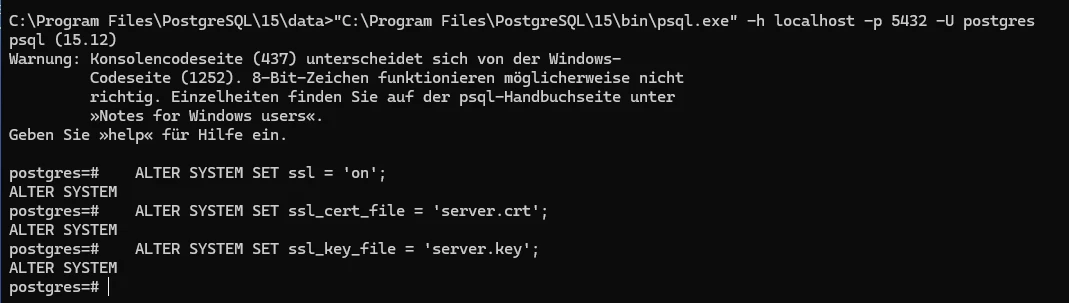
"C:\Program Files\PostgreSQL\15\bin\psql.exe" -h localhost -p 5432 -U postgres
ALTER SYSTEM SET ssl = 'on';
ALTER SYSTEM SET ssl_cert_file = 'server.crt';
ALTER SYSTEM SET ssl_key_file = 'server.key';
Step 4 - Restart PostgreSQL service
Step 5 - note the thumbprint of the newly created certificate
"C:\Program Files\OpenSSL-Win64\bin\openssl.exe" x509 -in server.crt -fingerprint -sha1 -noout

Step 6 - configure vb365 to use SSL
There are 3 settings, that need to be changed
- controller service connecting to the config DB (config.xml)
- proxy service connecting to the config DB (proxy.xml)
- proxy service connecting to the persistent cache DB (proxy.xml)
Using the Set-VBOConfigurationParameter PowerShell cmdlet, you can change those settings.
Set-VBOConfigurationParameter -Controller -XPath "/Veeam/Archiver/ControllerPostgres" -Key "TlsEnabled" -Value "True"
Set-VBOConfigurationParameter -Controller -XPath "/Veeam/Archiver/ControllerPostgres"   -Key "CertificateThumbprint" -Value "<thumbprint-from-step-5>"

$proxy = Get-VBOProxy -Hostname "<proxy-hostname>"

$credential = Get-Credential

Set-VBOConfigurationParameter -Proxy $proxy -XPath "/Veeam/Archiver/ProxyPostgres" -Key "TlsEnabled" -Value "True" -WindowsCredential $credential

Set-VBOConfigurationParameter -Proxy $proxy -XPath "/Veeam/Archiver/PersistentCachePostgres" -Key "TlsEnabled" -Value "True" -WindowsCredential $credential


Set-VBOConfigurationParameter -Proxy $proxy -XPath "/Veeam/Archiver/ProxyPostgres"   -Key "CertificateThumbprint" -Value "<thumbprint-from-step-5>"

Set-VBOConfigurationParameter -Proxy $proxy -XPath "/Veeam/Archiver/PersistentCachePostgres"   -Key "CertificateThumbprint" -Value "<thumbprint-from-step-5>"
Note: you cannot just copy paste the thumbprint: you need to remove the “:”
In my example: -Value "56C05459F12E…." and not -Value "56:C0:54:59:F1:2E…."
Repeat this also for every proxy in your system.
Now your traffic between vb365 and PostgreSQL is encrypted.







