Unable to run the installer because files from this ISO are blocked for security reasons.

  • March 13, 2026
  • 5 comments
  • 171 views

Dynamic
Forum|alt.badge.img+13

Dear all, this is just a quick guide, but maybe helpful for some of you!

I had this behaviour with the latest release from yesterdays ISO, to patch to the latest release…


After mounting the ISO and click on Setup.exe I received the following error:

Unable to run the installer because files from this ISO are blocked for security reasons. Use the “Unblock” option in the file properties to proceed.
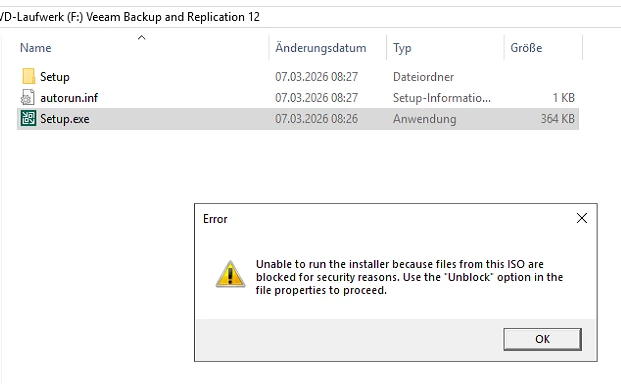


It’s an easy step, but keep in mind, this you have to do on the ISO file itself, not on the Setup.exe file 😉

So right-click on the ISO, and choose Unblock under Security. Hit OK/Apply and have fun, while applying your urgent updates!
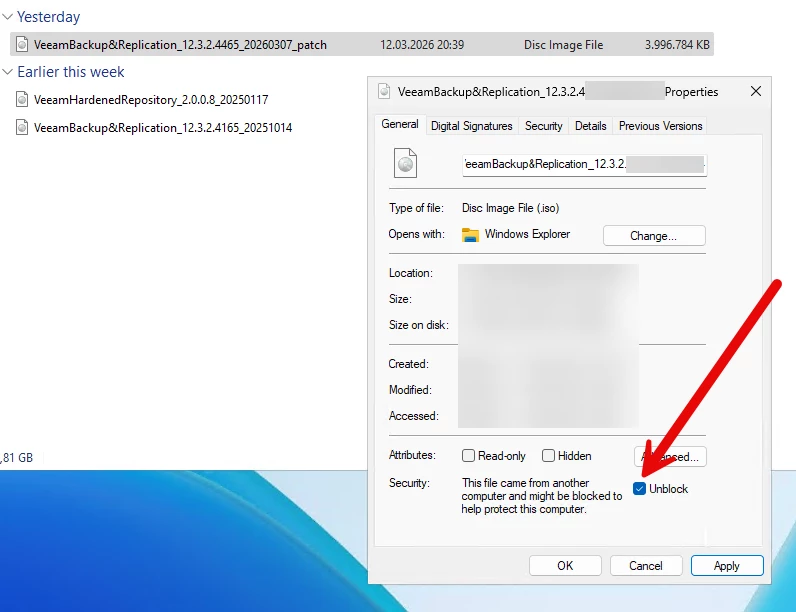


Take care, stay up2date and have a great weekend!



5 comments

Link State
Forum|alt.badge.img+11
  • Veeam Legend
  • March 13, 2026

yes  or

Unblock-File -Path

"C:\Path\to\File\VeeamBackup&Replication_12.3.2.4465_20260307_patch.iso"

KB4696: Release Information for Veeam Backup & Replication 12.3


Chris.Childerhose
Forum|alt.badge.img+21

The good old unblock file checkbox such an easy thing but a pain overall.  😂 


Dynamic
Forum|alt.badge.img+13
  • Author
  • Veeam Vanguard
  • March 13, 2026

yes  or

Unblock-File -Path

"C:\Path\to\File\VeeamBackup&Replication_12.3.2.4465_20260307_patch.iso"

KB4696: Release Information for Veeam Backup & Replication 12.3


yes, totally right! And a note for myself: rtfm (or in this case the whole KB article till the end) 🤣


coolsport00
Forum|alt.badge.img+21
  • Veeam Legend
  • March 13, 2026

I was gonna type exactly what Chris did: “the old block the installer Windows ‘feature’ “ issue” 😂 

Yep...always good to check this before attempting iinstall. Thanks Markus! 😊


kciolek
Forum|alt.badge.img+1
  • Influencer
  • March 13, 2026

thanks for sharing! I haven’t come across this yet but know the workaround if I do.