Hello Community,
There’s something every backup admin will relate to.
You arrive, open the Veeam console, filter jobs by status, start clicking through failures, make a note of error codes, maybe open a browser tab to Google it or check the Veeam Community, cross-reference it, and slowly form a picture of what your morning actually looks like.
By the time you know what needs fixing, it's already been half an hour. I’ve done this for years. We all have.
A few days back, I came across a post talking about Veeam introduced feature called Data Resilience Daily, also known as the Morning Coffee Report.
The concept is straightforward. Before you open any console, the report lands in your inbox and tells you exactly what happened overnight, which jobs have issues, which workloads are affected, and what you should probably do about it.
When I first heard about it, my reaction was simple. Another summary email? We've had those before.
But what makes this different is the last part
what you should probably do about it.
Before even opening the console, there is already a clear picture of what happened overnight.
This is where Veeam Intelligence and Data Resilience Daily started to make sense.
Instead of logging into Veeam first thing, imagine this:
You open your email.
And you already know:
- How many jobs ran
- What failed
- Which workloads are affected
- What actually needs your attention
Not just raw alerts, but context. And more importantly, direction.
What the report actually looks like in real life
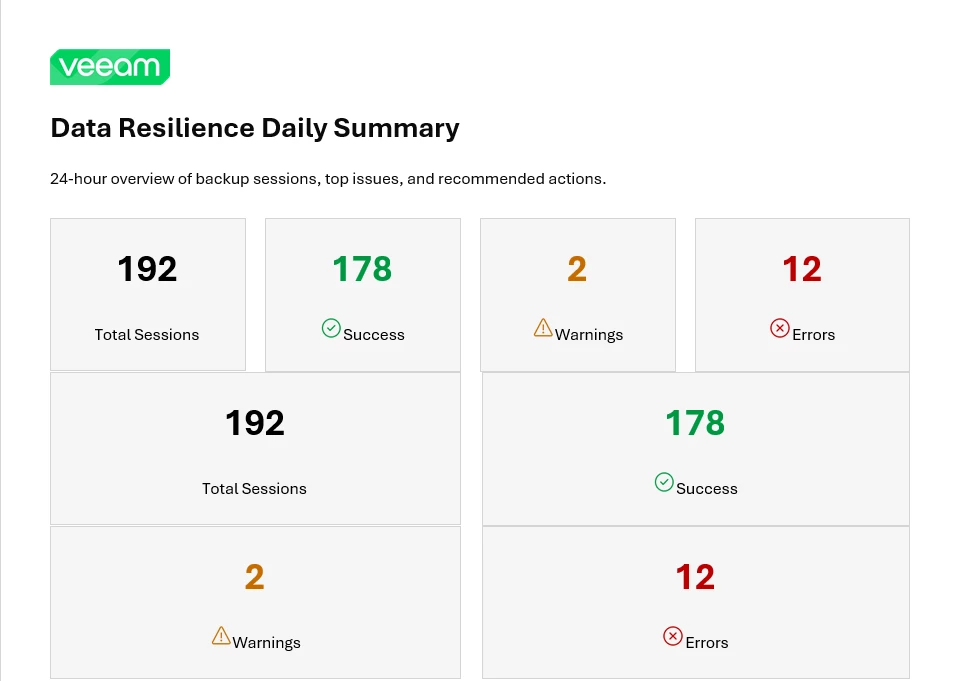
A typical overnight run in a multi-site environment might process close to 200 backup sessions. Most succeed. A few don’t.
The report starts with a clear summary, how many ran, how many succeeded, and how many had errors or warnings. You immediately know whether the day is routine or needs attention.
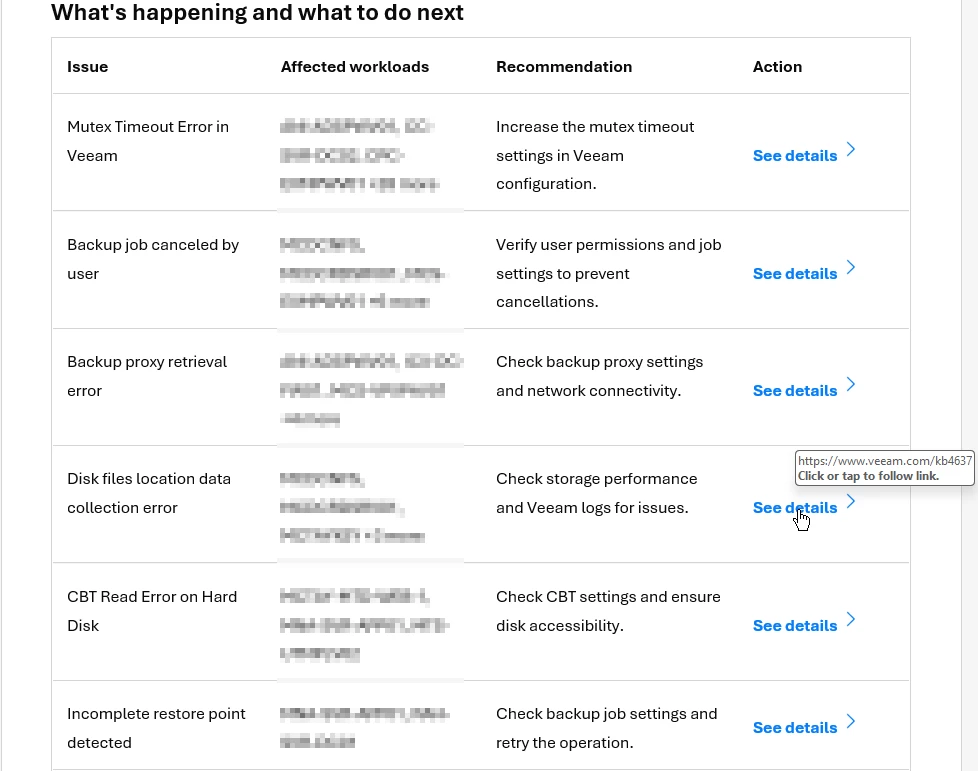
Issues are grouped logically. You might see VSS timeouts affecting a set of VMs, CBT read errors on others, or warnings about outdated VMware Tools.
Each group includes a clear recommendation. Not “check logs,” not an error code, but something actionable. Increase VSS timeout, reset CBT, check proxy connectivity.
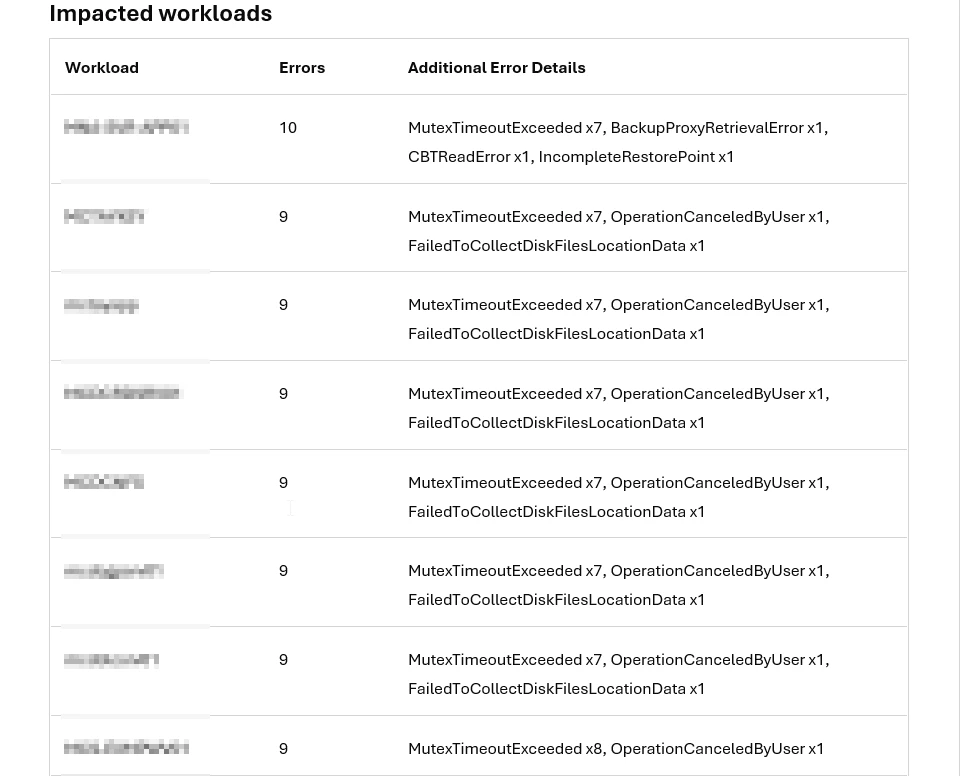
Below that, you see the workloads with the most errors. This helps you decide where to focus. A VM with repeated identical errors is very different from one with multiple different issues. The report helps you see that instantly, without digging through logs.
It also catches patterns you'd miss
One unexpected benefit is trend visibility.
When the same issue appears day after day, across different machines or jobs, that’s a signal. It could point to a configuration issue, infrastructure degradation, or something that no longer fits the environment.
These patterns are hard to spot when checking logs manually. Much easier when they show up consistently in a daily report.
To be clear, this doesn’t replace troubleshooting. It works well for common issues like VSS, CBT, proxy connectivity, or application-aware processing gaps. For complex problems, you still need to dig, but it gives you a strong starting point.
How to enable the Veeam Data Resilience Daily
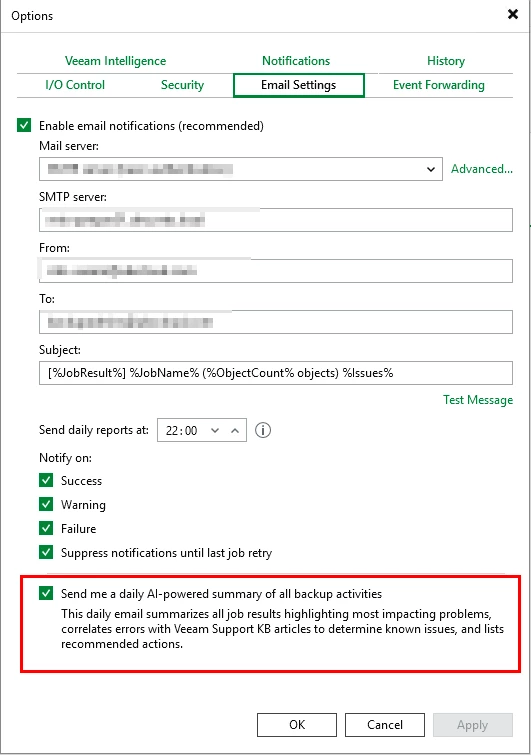
- Login to Veeam Backup & Replication Console
- Open Options from the main menu, navigate to Email Settings
- Select "Send me a daily AI-powered summary of all backup activities”
A small thing, consistently
Backup failures are not the real problem. Not knowing about them early enough is.
If we, as backup admins, can start the day already knowing what matters… That’s a big win.
You spend less time on information gathering. You spend more time on actual problems. The environment gets a bit more attention, a bit more consistently. Things get caught earlier. Fixes land faster.
That's not a revolution. But it's quietly, reliably useful, which is exactly what backup operations needs more of.