When working with tape environments, tape backup troubleshooting in Veeam is often more complex than it initially appears. Many professionals associate errors directly with faulty media. However, in real-world scenarios, issues often originate from hardware behavior, environmental conditions, or subtle physical problems.
In this article, I will share real troubleshooting cases and, more importantly, explain the reasoning behind each analysis. The goal is to demonstrate how to identify the root cause instead of relying only on error messages.
Case 1 – Mechanical obstruction during tape movement
Scenario
Backup jobs started failing during tape movement operations between slots and drives.
Observed symptoms
- Failures during load and unload operations
- Errors affecting a specific range of slots
- Intermittent behavior that initially appeared random
Example error:
Unexpected slider block, cartridge is not pushed far enough into the slot
(ROB_SLIDER_UNEXPECTED_BLOCK_DURING_INSERT)
Troubleshooting
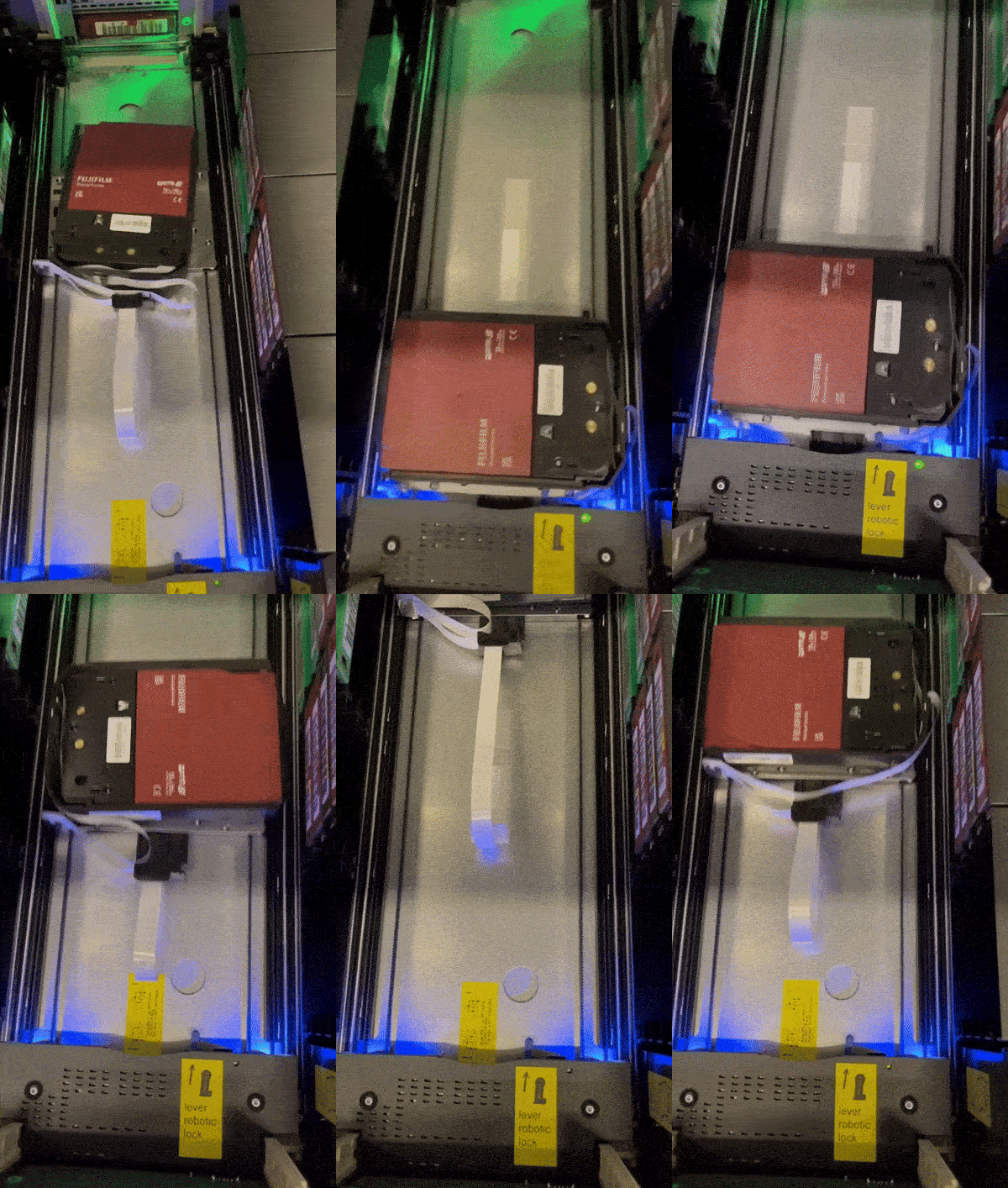
Manual operations were executed directly on the library interface. The issue was consistently reproduced within a specific slot range.
After isolating those slots, all errors immediately stopped, indicating that the issue was not software-related.
Root cause
A small piece of fiber cable was found obstructing the robotic mechanism.
Additionally, uneven tape distribution caused a slight imbalance in the library, affecting alignment during insertion.
Resolution
- Removed the obstruction
- Redistributed tapes evenly
The robotic mechanism returned to normal operation.
Insight
Even minimal physical obstructions can cause critical failures.
Case 2 – New tapes marked as bad and I/O errors
Scenario
Newly introduced tapes started presenting unexpected behavior shortly after deployment.
Observed symptoms
- Tapes with very low load count (around 3 loads)
- Frequent I/O errors during backup operations
- Tapes getting stuck inside the drive
- Multiple tapes flagged as bad
Library logs showed errors such as:
- Move medium failed (MOVE_MEDIUM_FAILED)
- Failed moving cartridge from drive (MOV_MOVE_FROM_DRIVE_FAILED)
- Communication error – Timeout (COMMERR_CMD_TIMEOUT)
Job has been terminated Error: Input/output error
Host status = 0x0000000000000003 (DID_TIME_OUT)
Failed to invoke rpc command
Job has been terminated Error: The request could not be performed because of an I/O device error.
Tape erasure finished with error.
Error: The request could not be performed because of an I/O device error.
Tape erasure finished with error.
Job has been terminated Error: The request could not be performed because of an I/O device error.
Tape positioning error.
Initial analysis
Typically, tape-related issues occur after a high number of loads.
As a general reference:
- Data tapes can support hundreds or thousands of loads
- Cleaning tapes usually support around 50 uses
Because of this, tapes with only a few loads should not present these types of errors.
Additionally, the fact that multiple tapes exhibited the same behavior significantly reduced the likelihood of isolated media failure.
Troubleshooting
The first step was to validate behavior across different drives.
Then, multiple tapes were tested to confirm consistency and eliminate isolated media issues.
Next, the analysis focused on identifying whether the errors were related to:
- Tape movement (robotics / loading)
- Read/write operations (drive interaction)
At this point, it became clear that the issue was not limited to media.
Additional scenario – Leader pin behavior
During troubleshooting, it is important to understand how tapes are physically loaded.
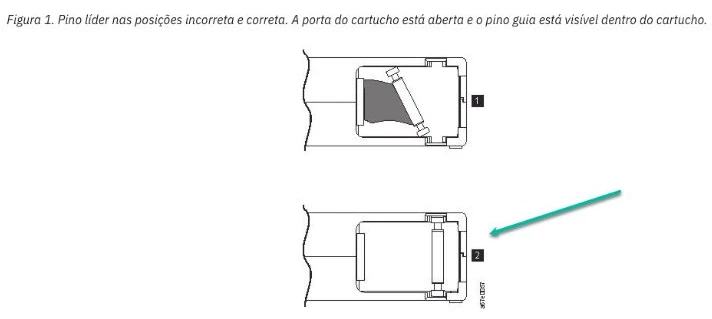
Each cartridge contains a leader pin, which the drive uses to pull the tape into its internal mechanism.
If this pin becomes loose or misaligned, the drive may fail to:
- Load the tape properly
- Maintain correct tension
- Eject the media
As a result, symptoms such as stuck tapes, I/O errors, and load failures may occur.
Although this was not the root cause in this case, it is a common issue that should always be considered during analysis.
Root cause
After opening a vendor case, the issue was identified as a firmware compatibility problem.
Modern tapes store calibration and environmental adaptation data internally. In this scenario, the drive firmware was not correctly interpreting this information.
As a result:
- Positioning errors occurred
- Read inconsistencies appeared
- Tapes were incorrectly flagged as bad
Environmental factors and LTO-9 behavior
Environmental conditions also play a critical role, especially with newer technologies such as LTO-9.
Due to higher data density, LTO-9 operates with significantly tighter tolerances. Small variations in temperature and humidity can directly impact tape behavior.
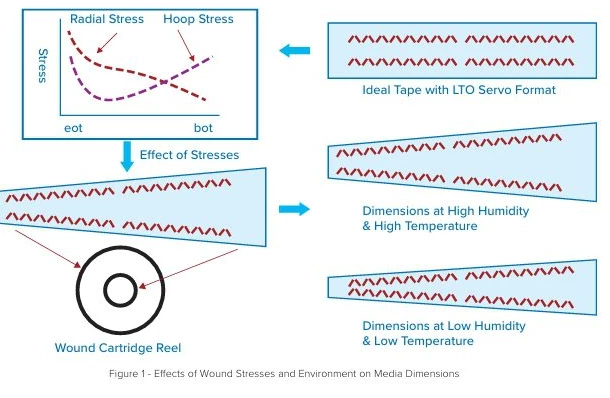
Tape media is not physically static — it is a viscoelastic material that changes dimensions based on environmental conditions and mechanical stress.
Because of this:
- Humidity can alter tape width
- Tension variations affect alignment
- Dimensional changes impact tracking accuracy
To compensate, tape drives continuously adjust tension and positioning during operation.
However, when combined with firmware limitations, these variations may lead to:
- Intermittent positioning errors
- Read/write inconsistencies
- False-positive “bad tape” scenarios
In some cases, allowing the media to acclimatize or performing additional load cycles can help stabilize behavior. Persistent issues, however, should always be validated with vendor support.
Insight
Not all “bad media” alerts indicate defective tapes.
Firmware behavior, environmental conditions, and drive interpretation logic can significantly impact reliability — especially in high-density formats like LTO-9.
Case 3 – Performance degradation leading to hardware failure
Scenario
Backup routines started failing completely in an IBM TS3100 Tape Library environment.
Observed symptoms
- Backup job failures
- Drives marked with error in the library
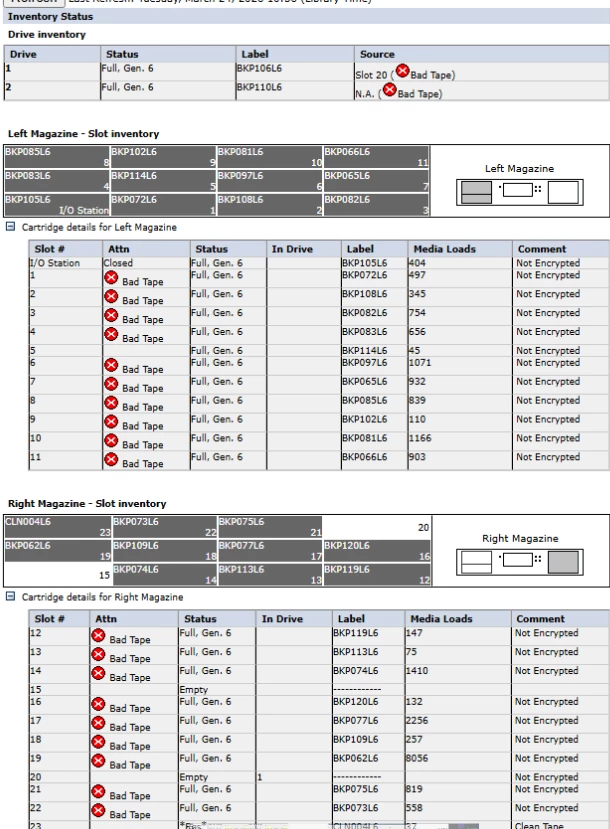
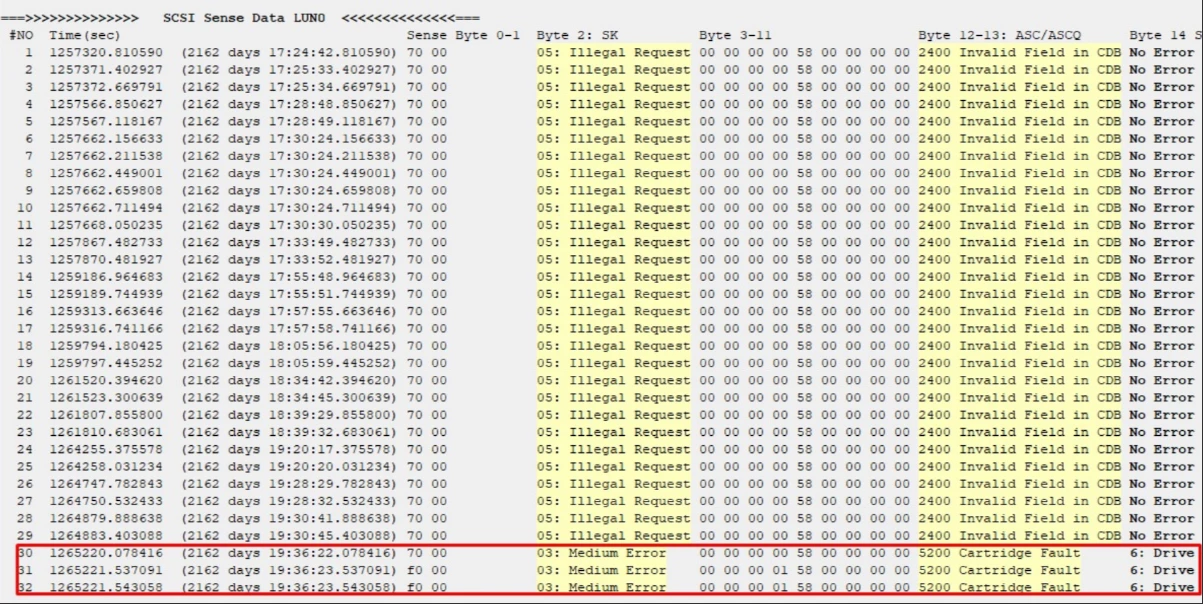
- Multiple tapes flagged as bad
- Tape-out process interrupted
Evidence
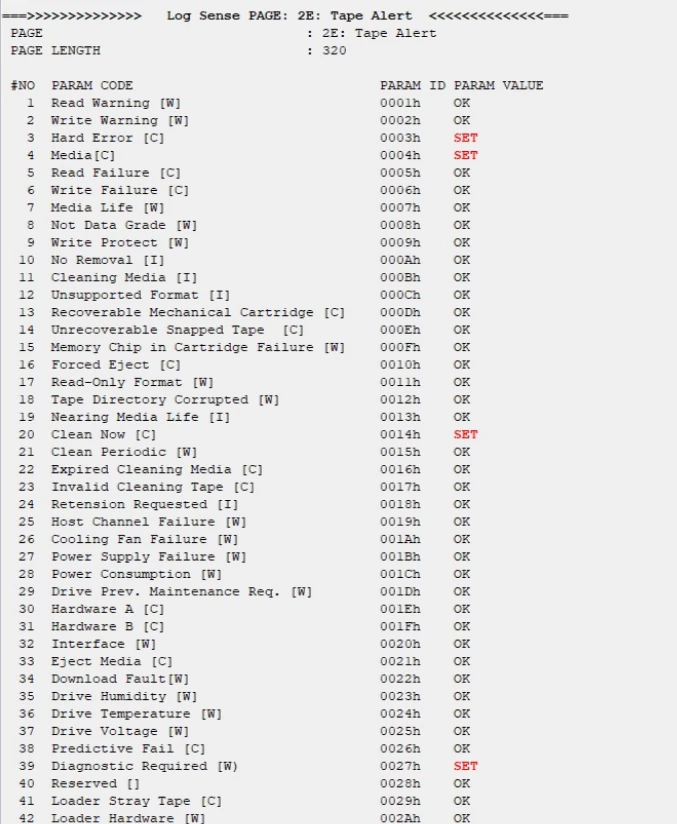
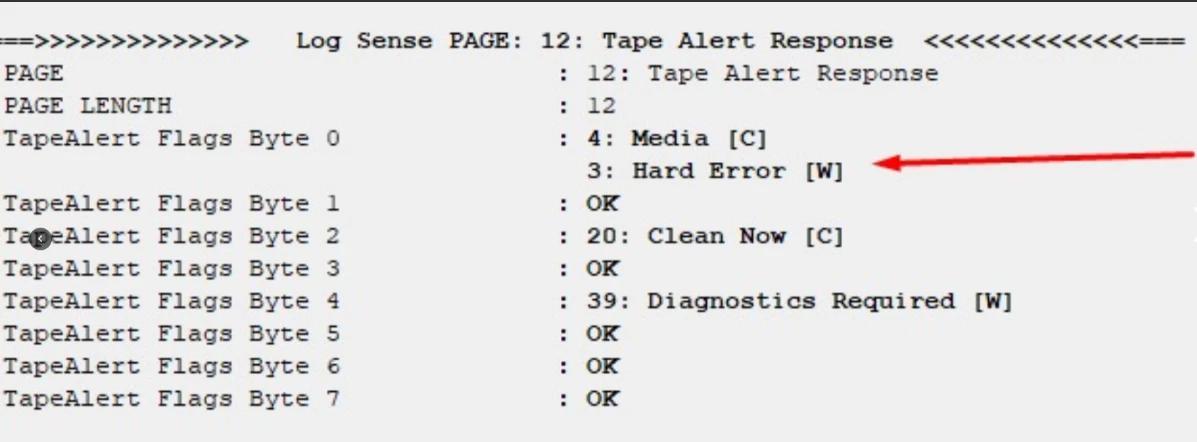
TapeAlert logs indicated:
- Media errors
- Hard errors
- Clean now required
- Diagnostics required
Inventory showed a large number of tapes marked as bad across different slots.


Troubleshooting
The following actions were performed:
- Power cycle
- Firmware update
- Server reboot
- Multiple cleaning cycles
- Validation using IBM ITDT
The issue persisted.
Analysis
Diagnostic results confirmed:
- Physical errors on Drive 1
- Mechanical failure on Drive 2 (ejection issues)
When drives degrade, they may incorrectly classify healthy tapes as bad, creating a cascading failure scenario.
Root cause
Hardware failure in both tape drives.
Resolution
Since the environment was out of support:
- Replace tape drives
or - Acquire a new tape library
Backup operations were temporarily maintained using cloud-based redundancy.
Insight
When multiple tapes are flagged as bad simultaneously, the issue is often related to drive integrity, not media.
Troubleshooting approach
Based on these cases, a structured approach is essential when dealing with tape-related issues.
Before diving into deeper analysis, some fundamental checks should always be performed first:
Initial actions (baseline checks)
- Perform a full power cycle of the tape library and drives
- Verify and, if necessary, update firmware (library, drives, and related components)
- Reboot backup servers when communication issues are suspected
- Validate connectivity (FC/iSCSI paths, zoning, and stability)
These steps can resolve a significant number of transient or environmental issues.
Tape and drive care
Proper maintenance is critical to avoid false positives during troubleshooting:
- Ensure cleaning routines are being executed correctly
- Do not overuse cleaning tapes (respect manufacturer limits)
- Monitor cleaning alerts (e.g., “clean now”)
- Inspect tapes for physical damage when possible
- Store media under proper temperature and humidity conditions
Poor maintenance can lead to symptoms that mimic hardware or media failure.
Deeper analysis
If the issue persists after initial checks:
- Identify patterns across tapes, slots, and drives
- Validate behavior using different drives and media
- Distinguish between:
- Movement-related issues (robotics / library)
- Read/write issues (drive-level)
- Perform manual operations directly on the library when possible
- Use diagnostic tools (e.g., ITDT) for deeper validation
- Consider environmental factors and media behavior
When to escalate
- Persistent I/O errors across multiple tapes
- Multiple tapes being flagged as bad simultaneously
- Recurrent positioning or mechanical errors
- Inconsistent behavior across drives
At this stage, involving vendor support is recommended.
Final considerations
Tape environments remain reliable when properly maintained. However, troubleshooting requires both logical analysis and physical inspection.
Issues may originate from:
- Mechanical obstruction
- Media behavior
- Firmware limitations
- Environmental conditions
- Hardware degradation
Understanding how tape systems behave in real-world scenarios is essential for accurate diagnosis.