PostgreSQL May 2026 Security Updates: Why Your VBR Server Needs Attention Now

  • May 18, 2026
  • 11 comments
  • 852 views

Michael Melter
Forum|alt.badge.img+12

TL;DR

On May 14, 2026, the PostgreSQL Global Development Group released security updates for all supported branches (18.4, 17.10, 16.14, 15.18, 14.23), fixing 11 CVEs, several rated CVSS 8.8. If you run VBR on Windows with PostgreSQL as your configuration database, you are affected. Veeam does not auto-update PostgreSQL. You have to do it yourself! Here is what you need to know and what to do about it.


Why this matters for VBR

Since VBR v12, PostgreSQL has been the default (and recommended) configuration database. VBR v13 GA ships with PostgreSQL 17.6, and the latest cumulative update (13.0.1.2067) bumps it to 17.9.1. Both versions are below the patched 17.10 and therefore vulnerable to all 11 CVEs disclosed on May 14 (PostgreSQL release announcement).

If you are still on VBR v12.x, your PostgreSQL 15.x is equally affected and needs to be updated to at least 15.18 (PostgreSQL release announcement).

The key takeaway: Veeam does not update the PostgreSQL instance between VBR cumulative updates. At least not, if you’re not running the new Linux based VIA. When running VBR on Windows, it is your responsibility to keep it patched. This is not new, but it is easy to overlook, especially in environments where PostgreSQL was deployed as part of the VBR installer and never touched again. Same happened with MS SQL in the old days.

BTW: ​@Link State had a brilliant article about patching PostgreSQL already last year.


The CVEs you should care about

Not all 11 CVEs are equally relevant to a VBR environment. Here is a breakdown of the ones that matter most:

CVE CVSS What it does VBR relevance
CVE-2026-6473 8.8 Integer wraparound causes undersized allocation and out-of-bounds write. Can lead to arbitrary code execution as the OS user running PostgreSQL. High. Exploitable by any unprivileged database user.
CVE-2026-6637 8.8 Stack buffer overflow in the refint module plus SQL injection. Arbitrary code execution as the DB OS user. High. Low privilege required.
CVE-2026-6477 8.8 libpq lo_* functions allow a server superuser to overwrite client stack memory. Medium. Requires superuser access to PostgreSQL.
CVE-2026-6472 5.4 CREATE TYPE does not check multirange schema CREATE privilege. Allows query hijacking. Medium. Could be chained with other attacks.
CVE-2026-6479 n/a Unbounded recursion during SSL/GSS init causes denial of service. Medium. Relevant if the PostgreSQL port is reachable.
CVE-2026-6475 8.8 pg_basebackup and pg_rewind symlink following. Low. These tools are not used by VBR.


The full list of all 11 CVEs is available in the PostgreSQL release announcement.


"But PostgreSQL on my VBR server only listens on localhost"

True. By default, the VBR installer configures PostgreSQL to listen on 127.0.0.1 only, and authentication is handled via SSPI on Windows. There are no external database users. This significantly reduces the attack surface.

However, this is not a reason to skip the update:

  • Attack chaining is real. Earlier this year, Veeam disclosed CVE-2025-59470 (CVSS 9.0), where a user with the Backup Operator role in VBR could execute arbitrary code as the postgres OS user. If a similar vulnerability surfaces again, an unpatched PostgreSQL turns a privilege escalation into full code execution.
  • VBR servers are high-value targets. Ransomware operators specifically target backup infrastructure. A local-only listener does not help if the attacker already has a foothold on the VBR server itself.
  • Compliance and audit. If you are in a regulated environment, running a database with known CVSS 8.8 vulnerabilities is difficult to justify, regardless of network exposure.


How to update

PostgreSQL minor version updates (e.g. 17.9 to 17.10) are in-place upgrades. No pg_dump/pg_restore or pg_upgrade required. The process is straightforward:

  1. Stop and disable all VBR jobs
  2. Create a VBR configuration backup (always, before touching the database)
  3. Stop all Veeam services:
    Get-Service Veeam* | Stop-Service -Force


  4. Download PostgreSQL 17.10 for Windows from https://www.postgresql.org/download/windows/

  5. Run the installer. It will detect the existing installation and perform an in-place update of the binaries.
  6. Restart the VBR server and verify all services come up cleanly.
  7. Verify the version:
    & "C:\Program Files\PostgreSQL\17\bin\psql.exe" -U postgres -c "SELECT version();"


For VBR v12.x environments, the same process applies with PostgreSQL 15.18.

Important: Do not upgrade to PostgreSQL 18.x. Veeam supports branches 14.x, 15.x, and 17.x only. Jumping to a new major version will break your VBR installation.

Veeam documents the general procedure for manual PostgreSQL updates in KB4386.


What about the VBR appliance (Linux)?

If you deployed VBR v13 as the Linux appliance (Rocky Linux based), PostgreSQL updates are delivered through the Veeam Infrastructure Agent (VIA) update channel. In that case, you depend on Veeam to publish an updated package. As of today (May 18, 2026), I have not seen a VIA update addressing these CVEs yet. Worth keeping an eye on.


Summary

Scenario Action
VBR v13 on Windows, PostgreSQL 17.x Update to PostgreSQL 17.10 manually
VBR v12.x on Windows, PostgreSQL 15.x Update to PostgreSQL 15.18 manually
VBR v13 Linux appliance Monitor VIA update channel
VBR with MS SQL (no PostgreSQL)

Not affected by these specific CVEs
But check for any updates in your SQL branch, cause in general: same story here… ;)


The combination of CVSS 8.8 scores, low privilege requirements, and the fact that VBR servers are prime ransomware targets makes this one worth acting on quickly, even with the mitigating factor of a localhost-only listener.

Stay safe out there. 😎

11 comments

Chris.Childerhose
Forum|alt.badge.img+21

Time to start patching PG for sure.  I am planning PG migrations so will keep this in mind.  Thanks for sharing.


kciolek
Forum|alt.badge.img+5
  • Influencer
  • May 18, 2026

Thanks for sharing and the update!


coolsport00
Forum|alt.badge.img+22
  • Veeam Legend
  • May 18, 2026

I have mine on Windows, and I’m still only on v12...but still need to update it. Thanks Michael. I wasn’t aware of this CVE for PSSQL.


Link State
Forum|alt.badge.img+12
  • Veeam Legend
  • May 19, 2026

nice article ​@Michael Melter  thx for mention


Very nice article.

What’s about keeping updated the PostgreSQL 17 database engine introduced on Veeam ONE 13 as its reporting database?

Today I updated my Veeam ONE 13.0.1.6168 (which used PostgreSQL 17.6 along with the Microsoft SQL 2019 server with applied CU32) to Veeam ONE 13.0.2.6723 released few days ago and noticed that the PostgreSQL engine is still on 17.6 after the update procedure ended succesfully:

PS C:\Program Files\PostgreSQL\17\bin> &"C:\Program Files\PostgreSQL\17\bin\psql.exe" -V
psql (PostgreSQL) 17.6

PS C:\> Get-WmiObject -Class Win32_Product | where vendor -eq 'Veeam Software Group GmbH' | select Name, Version

Name                      Version
----                      -------
Veeam Analytics Service   13.0.2.6723
Veeam ONE Caching Service 13.0.2.6723
Veeam ONE Reporter Web    13.0.2.6723
Veeam ONE Monitor Server  13.0.2.6723
Veeam ONE Reporter Server 13.0.2.6723
Veeam ONE Client          13.0.2.6723

Is the manual way to perform an in-place upgrade (e.g. moving from PostgreSQL 17.6 to latest PostgreSQL 17.10) similar to the ones documented above for Veeam B&R Server V12/V13 (when running respectively on PostgreSQL 15/17 as their configuration databases)?

I’m used to manually update PostgreSQL 15 on the VBR 12 but I never tried on Veeam ONE yet, which pre-tasks should be made (stopping Veeam services, etc.)?

Thanks for sharing!


coolsport00
Forum|alt.badge.img+22
  • Veeam Legend
  • June 3, 2026

Hi ​@Davide.Poletto - did you reach out to Veeam Support for the *official* upgrade process? I’m sure they have a procedure to share with customers.


Hi ​@coolsport00, not yet really...because the update of Veeam ONE 13 was done just two hours ago...but I wonder if it’s something simple like managing the update of PostgreSQL on VBR (see https://www.veeam.com/kb4386).

OTOH the fact that Veeam ONE 13.0.2.6723 uses PostgreSQL 17.10 (as declared on  the https://www.veeam.com/kb4762) and it doesn’t upgrade that DB component automatically during an update procedure (e.g. 13.0.1 → 13.0.2) is not so strange (no issues for new installs of Veeam ONE 13.0.2: they will deploy PostgreSQL 17.10): it happens the same on VBR V12 where the PostgreSQL 15 configuration database engine patching - along with Microsoft .NET components updates - should be manually made when required (I’ve done it so many times since deployment of VBR 12.0.0 up to latest 12.3.2 and since PostgreSQL 15.1 up to latest 15.18). 


PeteSteven
Forum|alt.badge.img+5
  • Veeam Vanguard
  • June 3, 2026

Hi ​@Davide.Poletto - did you reach out to Veeam Support for the *official* upgrade process? I’m sure they have a procedure to share with customers.

Maybe you'll have better luck. We received a response from support regarding the M365 and PostgreSQL upgrade, and they told us to follow the instructions from the PostgreSQL community.
As for M365, I know that Veeam is currently working on a knowledge base article.
I'm sure there will be updates for other products using PostgreSQL as well.


Hi ​@PeteSteven, I tried today an unofficial but reasonable path (after protecting our Veeam ONE installation) and I was able to successfully update the Reporting Database engine from PostgreSQL 17.6 to PostgreSQL 17.10.

Basically I followed the approach described on Veeam KB4386 so I stopped Veeam ONE running services:

  • VeeamCHS: Veeam ONE Caching Service
  • VeeamDCS: Veeam ONE Monitoring Service
  • VeeamERS: Veeam ONE Error Reporting Service
  • VeeamOAS: Veeam Analytics Service
  • VeeamRSS: Veeam ONE Reporting Service

then I dumped the PostgreSQL’s database “VeeamONEWarehouse” with the usual PS command:

& "C:\Program Files\PostgreSQL\17\BIN\pg_dump.exe" -U postgres -F c -b -f "C:\Users\Administrator\Desktop\DB_dump\PGDBBackup_$($env:computername)_$(get-date -f yyyy-MM-dd_HH.mm).sql" VeeamONEWarehouse

finally executing the update using the PostgreSQL 17.10 via the installer file (postgresql-17.10-1-windows-x64.exe) - duration: about 10 minutes - and rebooted the system once the update procedure successfully ended.

& "C:\Program Files\PostgreSQL\17\BIN\psql.exe" -V
psql (PostgreSQL) 17.10

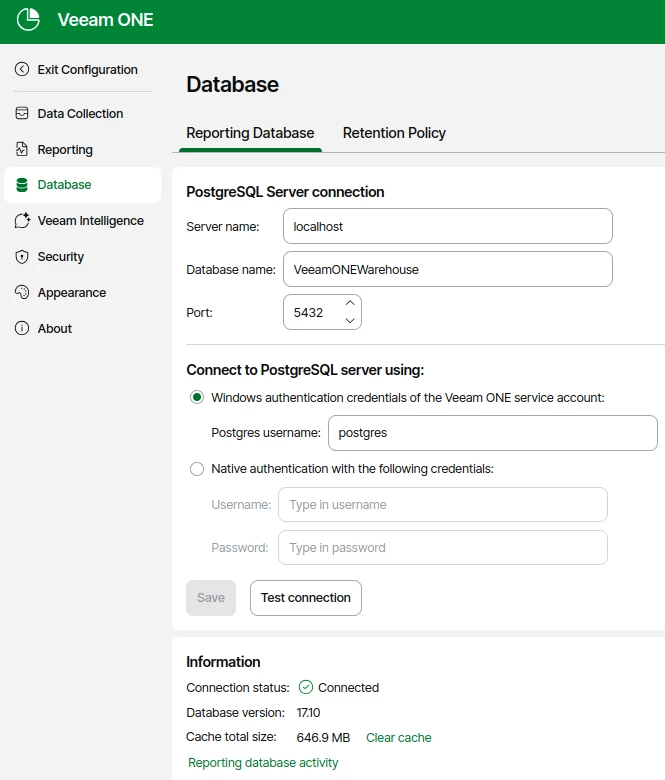
Once booted, the Veeam ONE server’s services appear correctly running and the Reporting Database appears correctly connected:


I’m aware I haven’t followed an official Veeam KB but, being it unavailable, I tried the most reasonable path and, AFAIK, it worked.


coolsport00
Forum|alt.badge.img+22
  • Veeam Legend
  • June 4, 2026

Thank you for sharing your upgrade steps ​@Davide.Poletto . 👍🏻


PeteSteven
Forum|alt.badge.img+5
  • Veeam Vanguard
  • June 4, 2026

Hi ​@PeteSteven, I tried today an unofficial but reasonable path (after protecting our Veeam ONE installation) and I was able to successfully update the Reporting Database engine from PostgreSQL 17.6 to PostgreSQL 17.10.

Basically I followed the approach described on Veeam KB4386 so I stopped Veeam ONE running services:

  • VeeamCHS: Veeam ONE Caching Service
  • VeeamDCS: Veeam ONE Monitoring Service
  • VeeamERS: Veeam ONE Error Reporting Service
  • VeeamOAS: Veeam Analytics Service
  • VeeamRSS: Veeam ONE Reporting Service

then I dumped the PostgreSQL’s database “VeeamONEWarehouse” with the usual PS command:

& "C:\Program Files\PostgreSQL\17\BIN\pg_dump.exe" -U postgres -F c -b -f "C:\Users\Administrator\Desktop\DB_dump\PGDBBackup_$($env:computername)_$(get-date -f yyyy-MM-dd_HH.mm).sql" VeeamONEWarehouse

finally executing the update using the PostgreSQL 17.10 via the installer file (postgresql-17.10-1-windows-x64.exe) - duration: about 10 minutes - and rebooted the system once the update procedure successfully ended.

& "C:\Program Files\PostgreSQL\17\BIN\psql.exe" -V
psql (PostgreSQL) 17.10

Once booted, the Veeam ONE server’s services appear correctly running and the Reporting Database appears correctly connected:


I’m aware I haven’t followed an official Veeam KB but, being it unavailable, I tried the most reasonable path and, AFAIK, it worked.

Great, thanks for sharing!