TL;DR
On May 14, 2026, the PostgreSQL Global Development Group released security updates for all supported branches (18.4, 17.10, 16.14, 15.18, 14.23), fixing 11 CVEs, several rated CVSS 8.8. If you run VBR on Windows with PostgreSQL as your configuration database, you are affected. Veeam does not auto-update PostgreSQL. You have to do it yourself! Here is what you need to know and what to do about it.
Why this matters for VBR
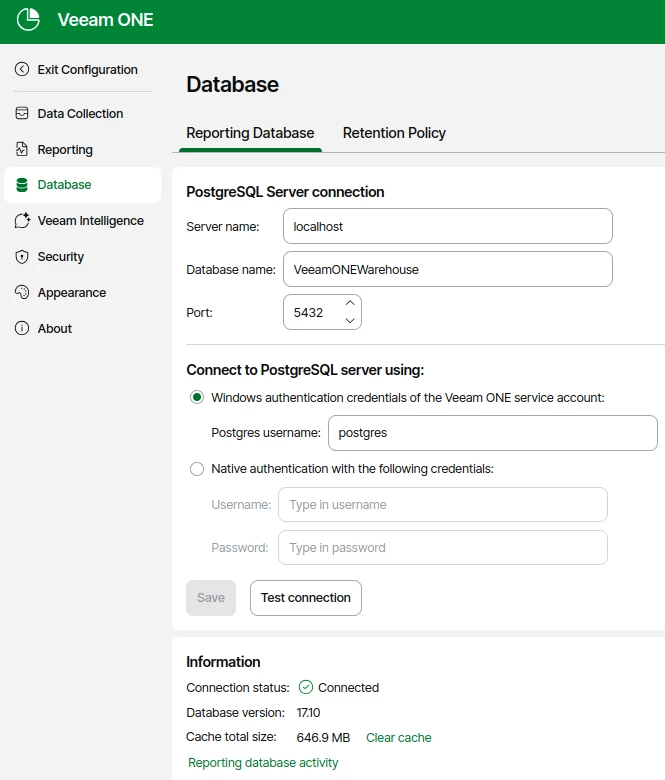
Since VBR v12, PostgreSQL has been the default (and recommended) configuration database. VBR v13 GA ships with PostgreSQL 17.6, and the latest cumulative update (13.0.1.2067) bumps it to 17.9.1. Both versions are below the patched 17.10 and therefore vulnerable to all 11 CVEs disclosed on May 14 (PostgreSQL release announcement).
If you are still on VBR v12.x, your PostgreSQL 15.x is equally affected and needs to be updated to at least 15.18 (PostgreSQL release announcement).
The key takeaway: Veeam does not update the PostgreSQL instance between VBR cumulative updates. At least not, if you’re not running the new Linux based VIA. When running VBR on Windows, it is your responsibility to keep it patched. This is not new, but it is easy to overlook, especially in environments where PostgreSQL was deployed as part of the VBR installer and never touched again. Same happened with MS SQL in the old days.
BTW:
The CVEs you should care about
Not all 11 CVEs are equally relevant to a VBR environment. Here is a breakdown of the ones that matter most:
| CVE | CVSS | What it does | VBR relevance |
|---|---|---|---|
| CVE-2026-6473 | 8.8 | Integer wraparound causes undersized allocation and out-of-bounds write. Can lead to arbitrary code execution as the OS user running PostgreSQL. | High. Exploitable by any unprivileged database user. |
| CVE-2026-6637 | 8.8 | Stack buffer overflow in the refint module plus SQL injection. Arbitrary code execution as the DB OS user. | High. Low privilege required. |
| CVE-2026-6477 | 8.8 | libpq lo_* functions allow a server superuser to overwrite client stack memory. | Medium. Requires superuser access to PostgreSQL. |
| CVE-2026-6472 | 5.4 | CREATE TYPE does not check multirange schema CREATE privilege. Allows query hijacking. | Medium. Could be chained with other attacks. |
| CVE-2026-6479 | n/a | Unbounded recursion during SSL/GSS init causes denial of service. | Medium. Relevant if the PostgreSQL port is reachable. |
| CVE-2026-6475 | 8.8 | pg_basebackup and pg_rewind symlink following. | Low. These tools are not used by VBR. |
The full list of all 11 CVEs is available in the PostgreSQL release announcement.
"But PostgreSQL on my VBR server only listens on localhost"
True. By default, the VBR installer configures PostgreSQL to listen on 127.0.0.1 only, and authentication is handled via SSPI on Windows. There are no external database users. This significantly reduces the attack surface.
However, this is not a reason to skip the update:
- Attack chaining is real. Earlier this year, Veeam disclosed CVE-2025-59470 (CVSS 9.0), where a user with the Backup Operator role in VBR could execute arbitrary code as the
postgresOS user. If a similar vulnerability surfaces again, an unpatched PostgreSQL turns a privilege escalation into full code execution. - VBR servers are high-value targets. Ransomware operators specifically target backup infrastructure. A local-only listener does not help if the attacker already has a foothold on the VBR server itself.
- Compliance and audit. If you are in a regulated environment, running a database with known CVSS 8.8 vulnerabilities is difficult to justify, regardless of network exposure.
How to update
PostgreSQL minor version updates (e.g. 17.9 to 17.10) are in-place upgrades. No pg_dump/pg_restore or pg_upgrade required. The process is straightforward:
- Stop and disable all VBR jobs
- Create a VBR configuration backup (always, before touching the database)
- Stop all Veeam services:
Get-Service Veeam* | Stop-Service -Force -
Download PostgreSQL 17.10 for Windows from https://www.postgresql.org/download/windows/
- Run the installer. It will detect the existing installation and perform an in-place update of the binaries.
- Restart the VBR server and verify all services come up cleanly.
- Verify the version:
& "C:\Program Files\PostgreSQL\17\bin\psql.exe" -U postgres -c "SELECT version();"
For VBR v12.x environments, the same process applies with PostgreSQL 15.18.
Important: Do not upgrade to PostgreSQL 18.x. Veeam supports branches 14.x, 15.x, and 17.x only. Jumping to a new major version will break your VBR installation.
Veeam documents the general procedure for manual PostgreSQL updates in KB4386.
What about the VBR appliance (Linux)?
If you deployed VBR v13 as the Linux appliance (Rocky Linux based), PostgreSQL updates are delivered through the Veeam Infrastructure Agent (VIA) update channel. In that case, you depend on Veeam to publish an updated package. As of today (May 18, 2026), I have not seen a VIA update addressing these CVEs yet. Worth keeping an eye on.
Summary
| Scenario | Action |
|---|---|
| VBR v13 on Windows, PostgreSQL 17.x | Update to PostgreSQL 17.10 manually |
| VBR v12.x on Windows, PostgreSQL 15.x | Update to PostgreSQL 15.18 manually |
| VBR v13 Linux appliance | Monitor VIA update channel |
| VBR with MS SQL (no PostgreSQL) | Not affected by these specific CVEs |
The combination of CVSS 8.8 scores, low privilege requirements, and the fact that VBR servers are prime ransomware targets makes this one worth acting on quickly, even with the mitigating factor of a localhost-only listener.
Stay safe out there. 😎