Moving nearly 360TB of backups is always interesting, but it becomes much more challenging when object lock and immutability are enabled and the repositories live in different cities. I wanted to share how I executed a large migration using only Veeam capabilities, while keeping performance high and the customer’s WAN usage low.
Project background
Our customer needed to migrate over 360TB of backups off an object storage platform that was being decommissioned. Both the source and target object repositories were located in separate datacenters in different cities, each reachable over the internet. It is worth noting that with object storage object re-use, the object storage usage was around 360TB, but the actual amount of restorable backup data was over 590TB.
Key constraints:
- The customer did not want to use their limited internet bandwidth for such a large data move.
- Both source and target object repositories had object lock and immutability enabled, which ruled out many traditional object-copy tools that do not understand Veeam’s backup layout or retention logic.
Why third‑party tools were not an option
Tools like rclone and other object migration utilities might be considered for such a move. However, these approaches introduce several risks:
- They are not aware of how Veeam manages objects inside a repository, which conflicts with best practices for object repositories.
- Immutability, object lock, and versioning meant data could not simply be rewritten or reorganized at the object level without risking compliance or integrity issues.
This led to a clear requirement: the migration had to be done natively by Veeam, letting Veeam handle object layout, chains, and immutability settings.
Designing a Veeam‑native migration
Veeam comes with the ability to move backup jobs between repositories native with the "Move Backup" function. However, in my experience and testing, using this for large jobs with many VMs contain increases the chance of partial failures. In one case with a different customer, part of the job failed while migrating, and subsequent retries failed because Veeam saw that other backups already existed in the target, and failed to retry.
The approach settled on was to leverage a Scale‑out Backup Repository (SOBR) and Veeam’s evacuation process.
The core design elements were to:
- Add both the source and target object storage repositories as performance extents of the same SOBR.
- Place the source extent into maintenance mode to trigger evacuation of backups from source to target.
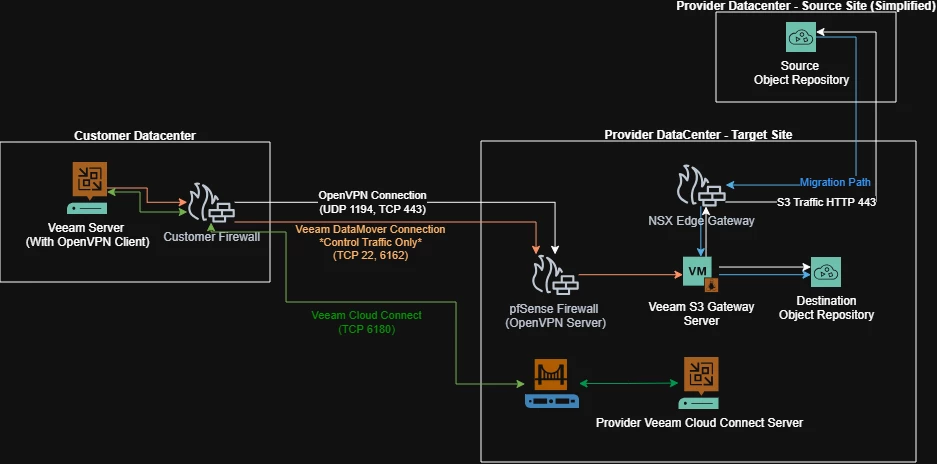
- Use remote gateway servers in our target provider datacenter so that the actual S3 traffic flows over our high-bandwidth internet instead of the customer’s WAN.
This design keeps everything within supported Veeam workflows while optimizing where and how the data moved.
Building the gateway and network architecture
To fully utilize available bandwidth and isolate traffic, a dedicated gateway design was implemented in the provider datacenter.
Key implementation details:
- Multiple Linux servers were deployed as gateway servers for the object repositories and configured explicitly in the Veeam object repository settings. (Only one S3 Gateway Server shown in the diagram to simplify it)
- Network throttling rules were configured on the customer's Veeam server ensure that control and metadata traffic did not overwhelm our site, following guidance from the network team.
Connecting the customer environment safely
The customer environment needed a secure, controlled path into the provider datacenter. That was achieved with a simple but effective setup:
- The remote gateway servers were created in a vCloud Datacenter hosted at the same site as the target object storage, which effectively limits any horizontal movement via those gateway servers. They only have access to the other proxy servers, and outbound access to the object storage
- The customer’s Veeam server connected to the remote gateway servers over OpenVPN, providing encrypted and controlled access. Ports allowed were restricted to only what was required between Veeam Backup and Replication server and a Veeam Linux server.
- Linux server passwords were not shared with the customer, and were only typed in during a screen sharing session.
- The customer connected to one of our Veeam Cloud Connect servers with the option to allow management by the service provider. This allowed me to connect to their Veeam server securely to manage and monitor the migration
This allowed orchestration to remain under the customer’s control while offloading all heavy data movement to the provider’s infrastructure.
Migration Execution
Once the SOBR, gateways, and VPN connectivity were in place, I started the migration process by placing the source object repository extent into maintenance mode and evacuating backups. Veeam handled copying immutable backup data from the source object repository to the target repository. It started by writing each individual VM's backup sequentially instead of in parallel, since it's pre-run checks determined that the source backup and target object storage was suitable for object re-use. The first restore point for each VM took longest; then subsequent restore points finished much faster because it was able to reference previously written objects.
Transfer speeds were better than expected, by utilizing multiple proxies it was able to consistently saturate the upload capacity of the source object storage datacenter’s internet connection.
Errors and Troubleshooting
A project like this is not without its share of problems, and I ran into a few.
Internet Speed Issues
I initially designed this implementation to use 4 gateway servers and 2 separate internet connections in the target datacenter. My logic was that 2 proxies would be assigned to each, and they could fully utilize both internet connections. However while the migration was in progress, I noticed that the proxies assigned to the faster internet connection were going much slower than expected. When you have multiple gateway servers assigned to an object repository, it balances out tasks among them. The downside to this is that this can also be within a single evacuation task. It was effectively throttling the faster connection down to the speed of the slower connection. To resolve this, I abandoned the idea and just stuck with one internet connection.
Backup Meta Version Mismatches
After probably 90% of the backup data was moved, some remaining backups failed to transfer with the following error:
"Error: Backup file version mismatch: scale-out backup repository rescan is required."
Digging deeper into the logs with the assistance of Veeam Support, we were able to find this:
Info (3) Backup meta version in DB 4911, meta version in vbm 4911
Info (3) Backup meta version in DB 4911 is less than meta version in vbm 4912
It is possible that while we were cancelling the Backup Copy jobs originally, using the "Stop Immediately" instead of the "Stop Gracefully" option may have caused some backups to be incomplete. However since we couldn't change the past we had to look forward, and Veeam support provided the following registry key to resolve the discrepancy between the database and the object storage. (Reminder: Do not apply registry keys like this unless at the direction of Veeam support)
Key Location: HKEY_LOCAL_MACHINE\SOFTWARE\Veeam\Veeam Backup and Replication
Value Name: SkipCloudBackupsWithSyncedLastCheckpoint
Value Type: D-Word
Value Data: 0
The effectiveness of this registry key cannot be 100% confirmed however, because the customer upgraded their Veeam server from v12 to v13 as part of their own troubleshooting. The upgrade itself may have fixed the error. Regardless, when I reconnected and performed another rescan, the error was replaced by a different warning;
S3 Hashing Method Mismatch
"Error: S3 error: Content-MD5 HTTP header is required for Put Object requests with Object Lock parameters Code: InvalidRequest Agent failed to process method"
Veeam support shared this KB Article, and recommended I apply the following registry key:
Key Location: HKLM\SOFTWARE\Veeam\Veeam Backup and Replication\
Value Name: S3UseMd5ContentHash
Value Type: DWORD (32-Bit) Value
Value Data: 1
After applying the key to the Veeam server and the S3 Gateway servers, the errors went away and backup migrations resumed.
Conclusion and Final Thoughts
Following this method, I was able to move over 360TB of data in a couple weeks instead of over a month as it may have if we had utilized the customer's internet connection. Doing so we were able to minimize the impact to the customer's RPO and bandwidth utilization. Customer backups were resumed without having to create new active fulls, or new backup jobs.
It was immensely satisfying to be able to use Veeam's native functionality to cleanly move backup data at this scale.
If you have any questions about this project, or comments/suggestions on how it could be improved for future implementations, please leave a comment below!