In this article, I'll take you through five different restore scenarios I've tested in my lab, and you should do the same.
You’ve got green checkmarks.
Your jobs are running.
Storage looks fine.
Everything seems good.
But here’s the uncomfortable truth I’ve learned the hard way:
A successful backup job does not mean a successful recovery.
Day 2 operations is where this really hits. This is the phase where you stop asking “Did it back up?” and start asking:
“Can I actually get my data back when it matters?”
If you’re not actively testing restores, you’re running on assumptions—and assumptions don’t survive outages, corruption, or ransomware.
Here are five restore scenarios you should be testing regularly (but most people don’t).
1. Full VM Restore (The “Everything Is Gone” Scenario)
This is the big one.
The “we lost the entire server” moment.
It sounds obvious, but a lot of environments never test a full VM restore end-to-end.
What to validate:
- Can you restore to the original location?
- Can you restore to a new location (different host/datastore)?
- How long does it actually take?
- Does the VM boot cleanly?
What usually breaks:
- Network mappings
- Storage availability
- Permissions
- Outdated infrastructure assumptions
Reality check:
If your only test is a SureBackup job or a quick boot verification, you’re missing half the story.
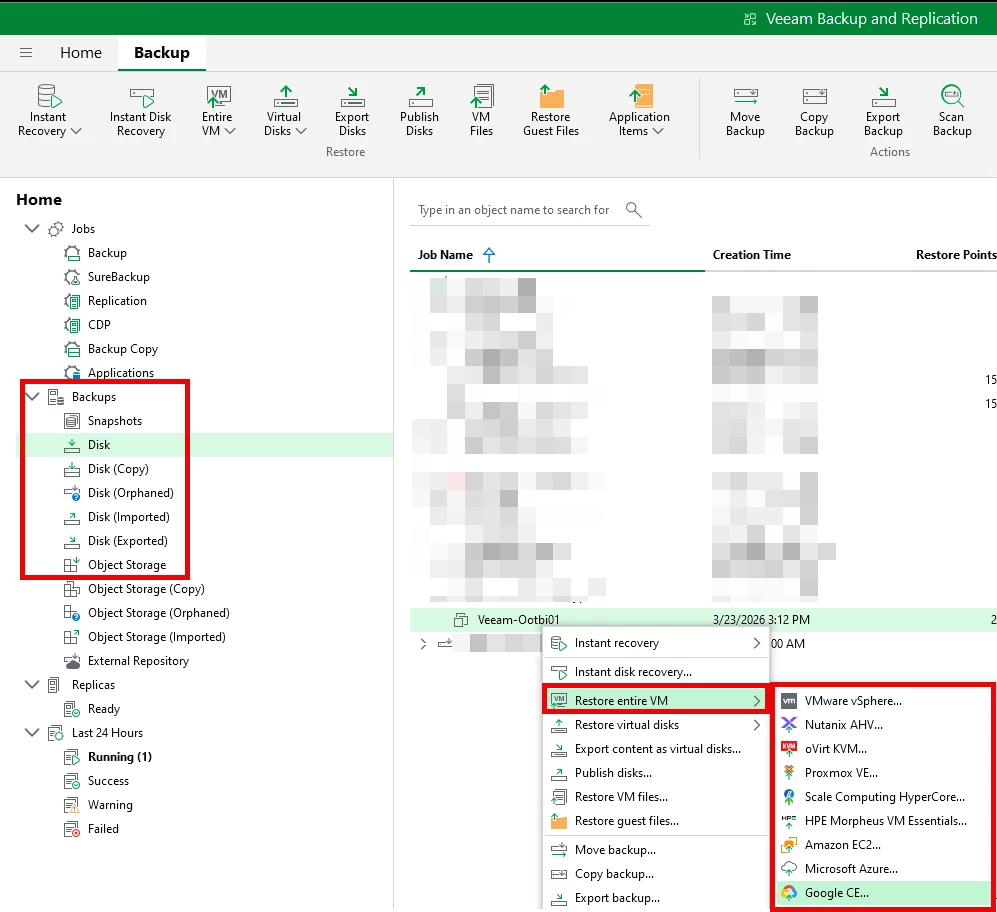
Screenshot of a Full VM Restore - Navigate to Home ==> Backups (choose where you want to restore from) ==> Find the Backup, right-click RESTORE Entire VM ==> Location you want to restore to.
2. File-Level Restore (The Most Common Real-World Request)
This is what users actually ask for:
“Hey… I deleted a file last week. Can you get it back?”
And this is where things get surprisingly messy.
What to validate:
- Can you browse backups quickly?
- Are file indexes working properly?
- Can you restore to:
- Original location
- Alternate location
- Are permissions preserved?
What usually breaks:
- Slow browsing due to repository performance
- Missing guest indexing
- Permission mismatches after restore
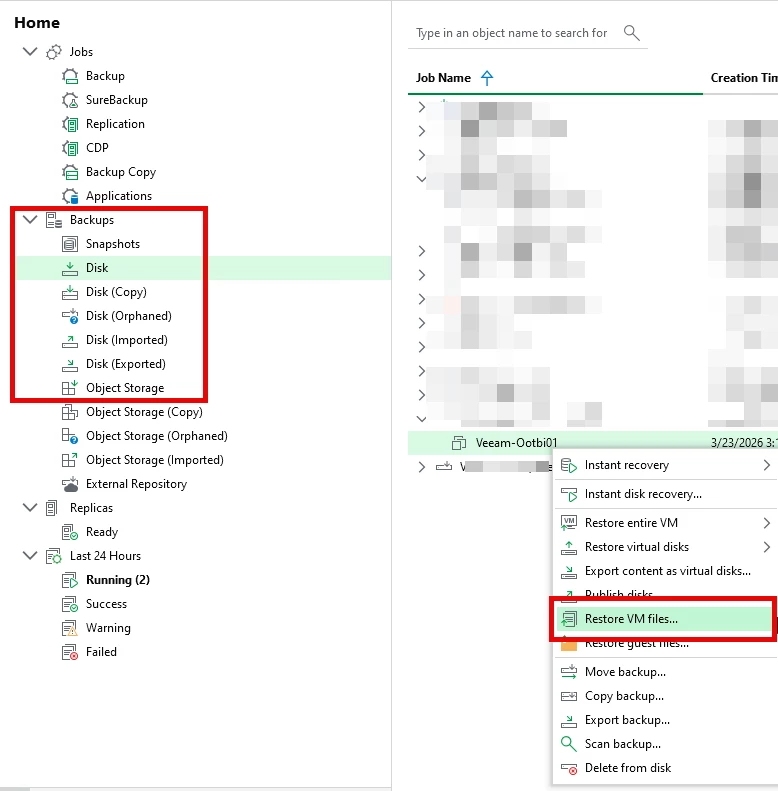
Screenshot of a Full VM Restore - Navigate to Home ==> Backups (choose where you want to restore from) ==> Find the Backup, right-click RESTORE VM Files ==> Run through the Wizard and select Files to Restore
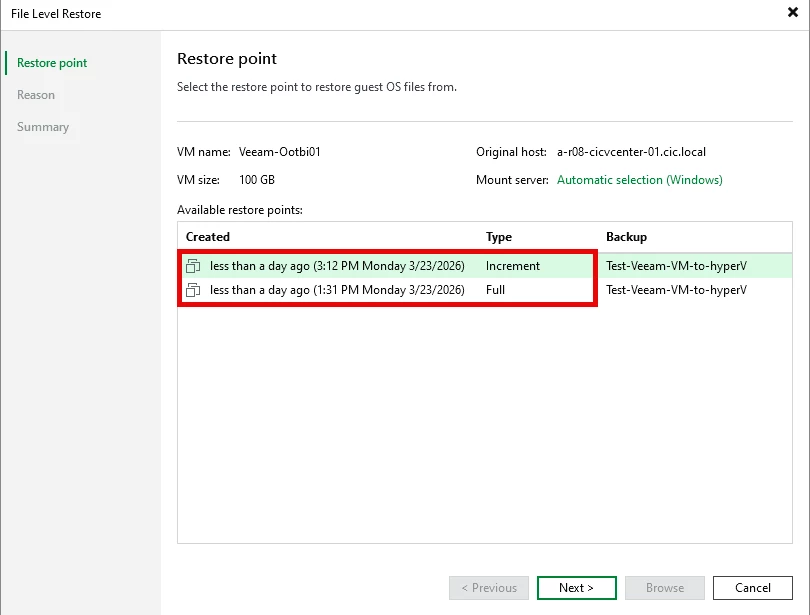
Select the backup you want to Restore from ==> click NEXT
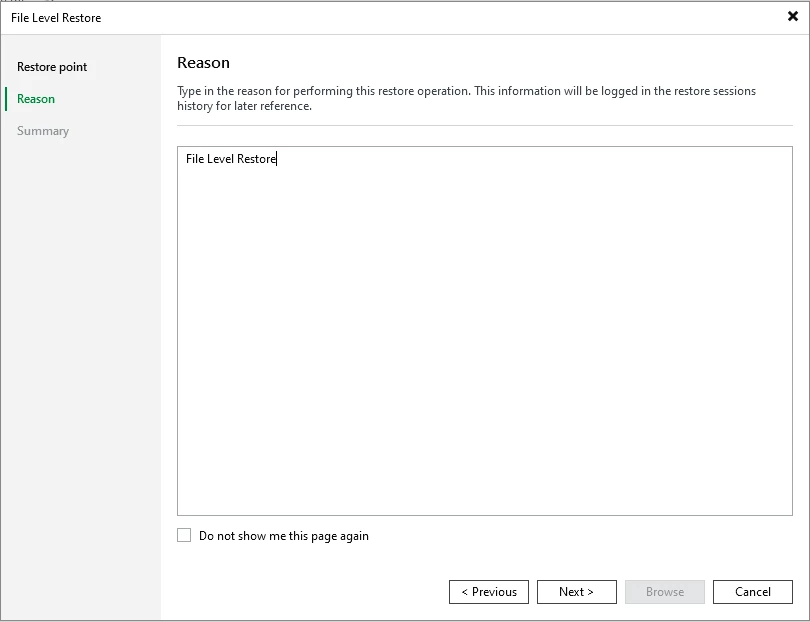
Type the Reason ==> click Next
The Summary page will appear ==> click Browse
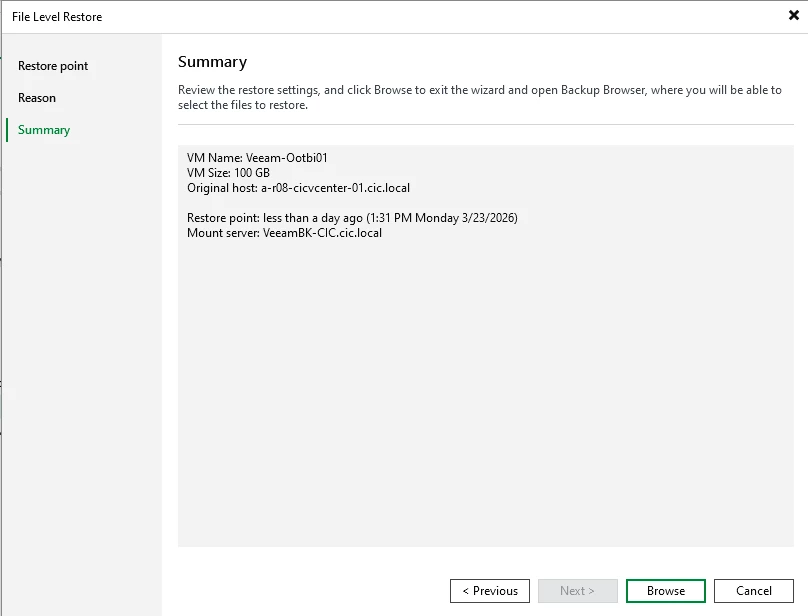
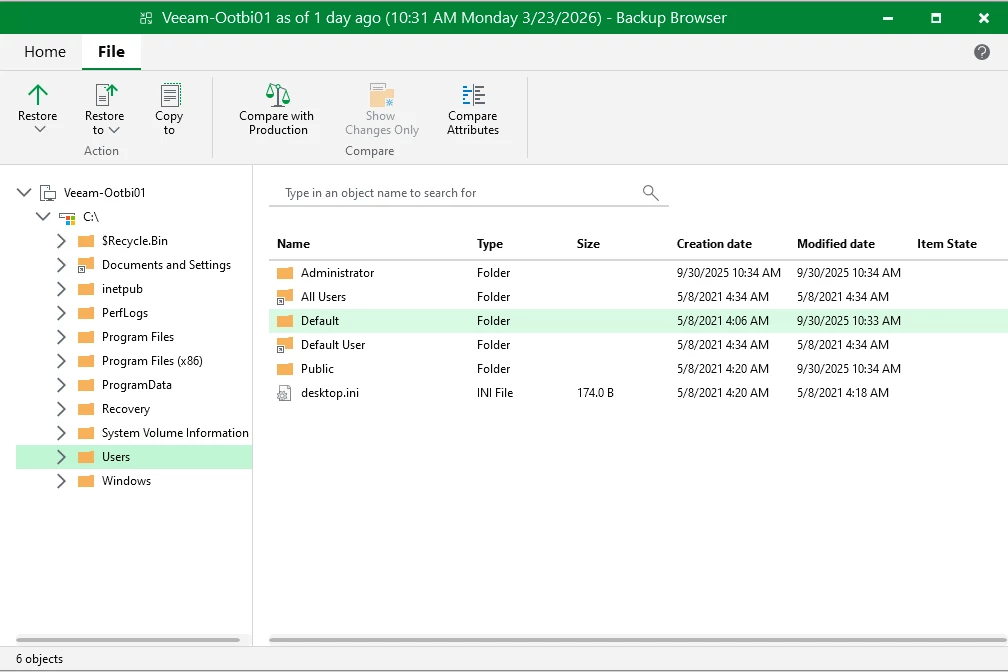
The Restore session will start ==> Locate the file that you want to Restore, right-click and select the Restore Option
3. Application Item Restore (Where Backups Get Real)
This is where things move beyond infrastructure and into business impact.
Think:
- Exchange emails
- SQL databases
- Active Directory objects
What to validate:
- Can you restore individual items (not entire databases)?
- Do you have the right credentials and access?
- Are application-aware backups configured correctly?
What usually breaks:
- Application-aware processing misconfigurations
- Missing logs for point-in-time recovery
- Permission issues when accessing explorers
This is the test that separates “we have backups” from “we can recover the business.”
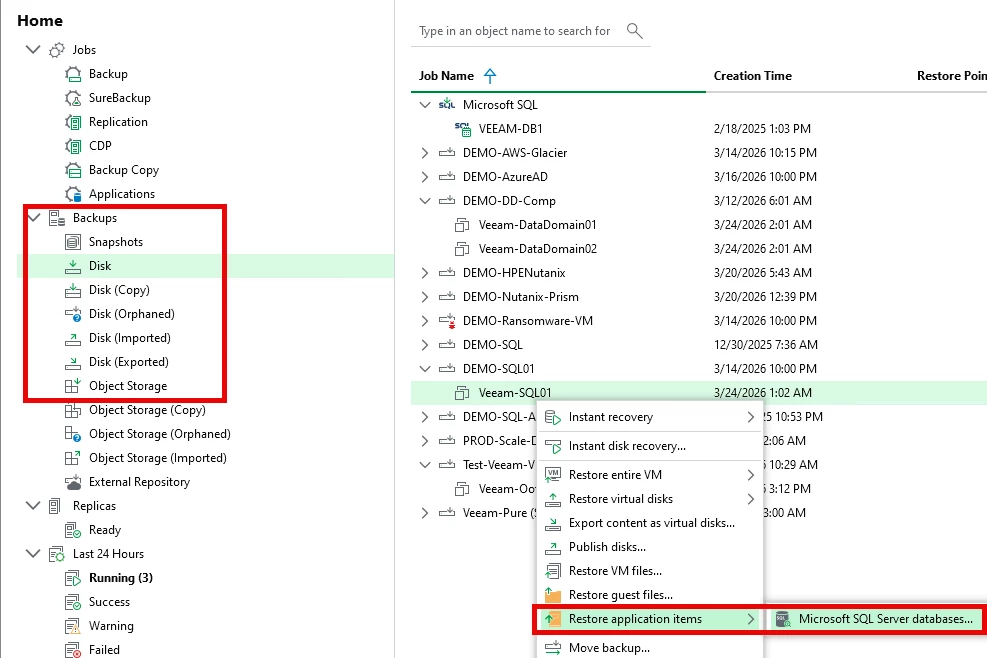
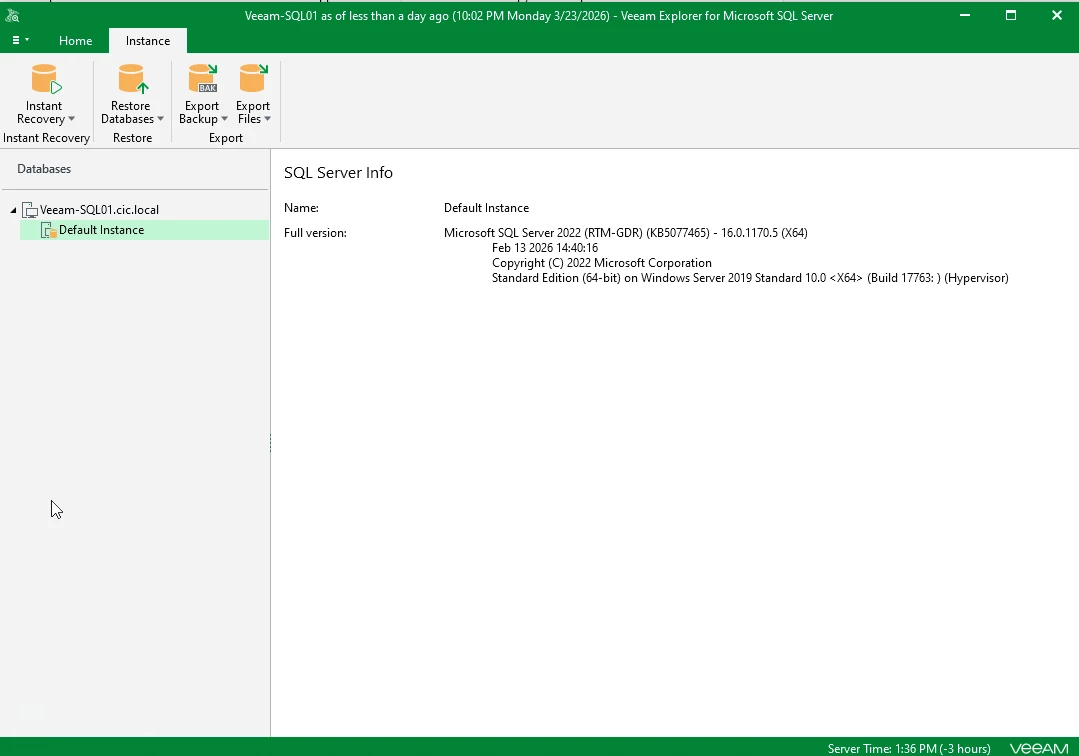
Screenshot of a Application Restore - Navigate to Home ==> Backups (choose the application server to restore from) ==> Find the Backup, right-click RESTORE application items ==> Run through the Wizard and select Files to Restore - my test is from a SQL Server
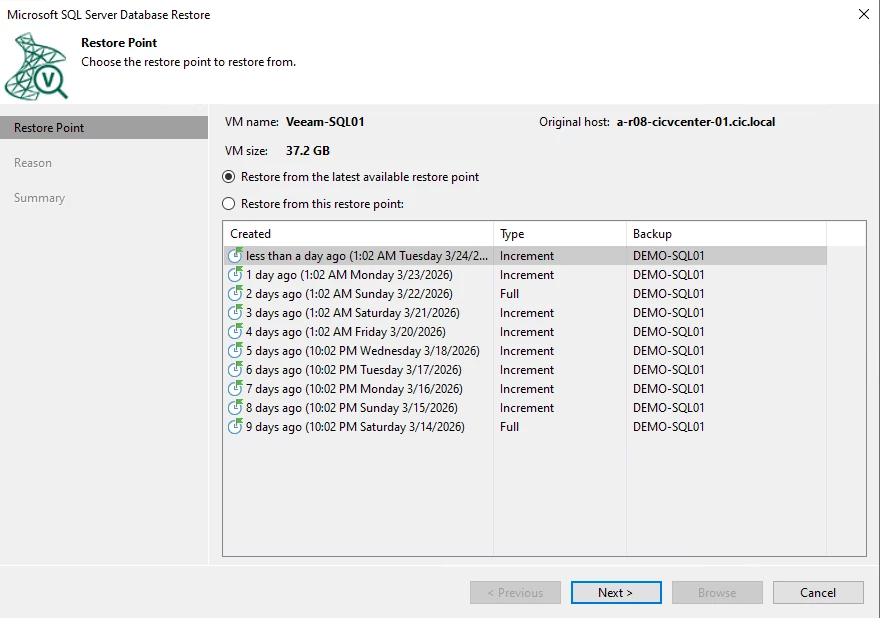
Select the point in time backup you want to Restore from
On the next screen you can enter the reason for Restore ==> click Next ==> the summary screen will appear and click on Browse == select the Instance you want to Restore and where
4. Instant Recovery (Your “We Need It Up NOW” Option)
Instant Recovery is one of those features everyone demos… but few truly test under pressure.
This is your RTO lifesaver.
What to validate:
- How fast can you actually bring a VM online?
- Can your storage handle the load while running from backup?
- Can you migrate it cleanly back to production storage?
What usually breaks:
- Performance under load
- Storage latency issues
- Migration back to production (this is often skipped in testing)
Important:
Don’t just power it on and call it a success. Run it. Stress it. Treat it like production.
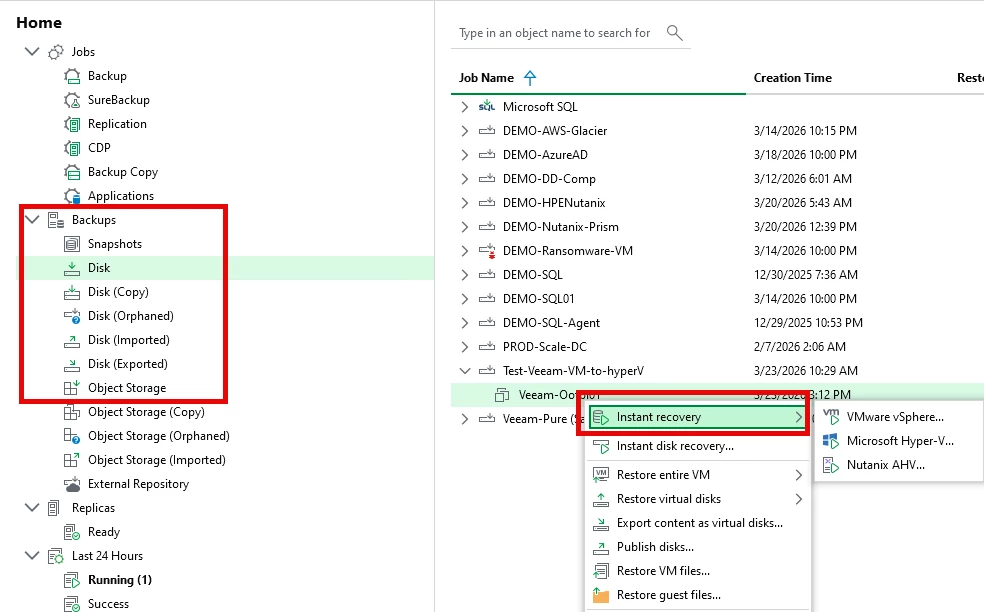
Screenshot of a Instant Recovery - Navigate to Home ==> Instant Recovery and you have the choice to retore to VMware, Hyper-V, or Nutanix
5. Cross-Site / DR Restore (The One That Exposes Everything)
This is the scenario most people avoid testing because it’s “complicated.”
It’s also the one that fails the hardest when it’s needed most.
What to validate:
- Can you restore in a different location/site?
- Are networking and DNS ready?
- Do credentials and access still work?
- Is your documentation actually accurate?
What usually breaks:
- Network reconfiguration
- Missing dependencies
- Outdated DR plans
- Assumptions about infrastructure that no longer exist
Hard truth:
If you’ve never tested a cross-site restore, you don’t have a DR plan—you have a guess.
Bringing It All Together
Here’s the shift that happens in Day 2 operations:
- Day 1 mindset: “Backups are running.”
- Day 2 mindset: “Recoveries are proven.”
If you’re serious about data protection, your job isn’t just to create backups—it’s to guarantee recovery outcomes.
A Simple Testing Cadence (That Actually Works)
If you’re wondering where to start:
- Weekly: File-level restore test
- Monthly: Full VM or Instant Recovery
- Quarterly: Application item restore
- Twice a year: Cross-site / DR test
It doesn’t need to be perfect. It just needs to happen.
Final Thought
Nobody cares about your backup success rate during an outage.
They care about one thing:
“How fast can you get us back up?”
And the only way to answer that confidently is to test—regularly, realistically, and sometimes uncomfortably.
Because the worst time to learn your restores don’t work…
is when you actually need them.
If you’ve been burned by a restore that didn’t go as planned, you’re not alone.
That’s exactly why this matters.
Test it now—before it tests you.