



In my latest blog article part 2 of Integration Veeam with CrowStrike, I'll walk through the steps of a recent implementation & integration of CrowdStrike with Veeam backup servers.
Cyberattacks continue to target backup infrastructure because attackers know backups are often the last line of defense. Traditional antivirus solutions are no longer enough to protect modern backup environments, especially when ransomware actors specifically target backup repositories, backup servers, and privileged accounts.
That’s where integrating CrowdStrike with Veeam Software can significantly improve your security posture.
By combining Veeam’s ransomware detection and secure recovery capabilities with CrowdStrike Falcon’s endpoint protection and threat intelligence, organizations can better detect, contain, and recover from cyber incidents.
In this lab guide, I’ll walk through the steps to implement and configure CrowdStrike integration with Veeam and explain how the two platforms complement each other in a modern cyber recovery strategy.
Why Integrate CrowdStrike with Veeam?
The goal of the integration is simple:
- Protect backup infrastructure from malware and ransomware
- Detect suspicious activity on backup servers
- Improve visibility into backup-related threats
- Harden the overall recovery environment
- Enable faster incident response and recovery validation
Together, CrowdStrike and Veeam create layered defense across:
- Endpoint protection
- Threat detection
- Backup immutability
- Malware scanning
- Clean recovery validation
Lab Environment
For this deployment, my lab included:
| Component | Version |
| Veeam Backup & Replication/VSA | V13.02 |
| CrowdStrike Falcon Sensor | Latest |
| VMware vSphere | 8.x |
| Hardened Repository | Linux-based |
| Backup Storage | Object Storage + Immutable Repository |
Step 1 – Prepare the Veeam Backup Environment
Before integrating CrowdStrike, verify your Veeam environment is healthy and updated.
Recommended Best Practices
Update Veeam Components
Ensure all components are running supported versions:
- Veeam Backup Server
- Backup Proxies
- Repository Servers
- Enterprise Manager
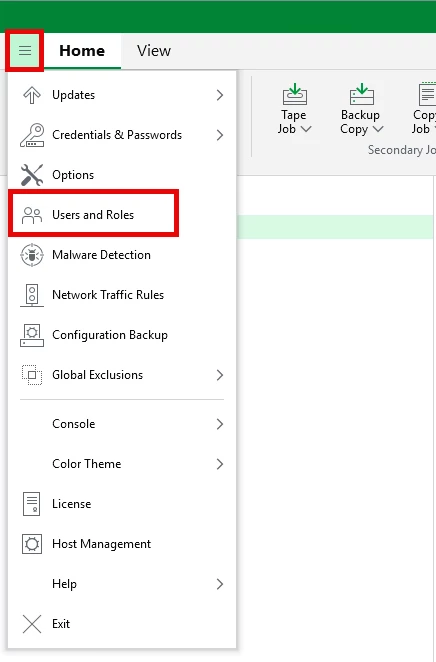
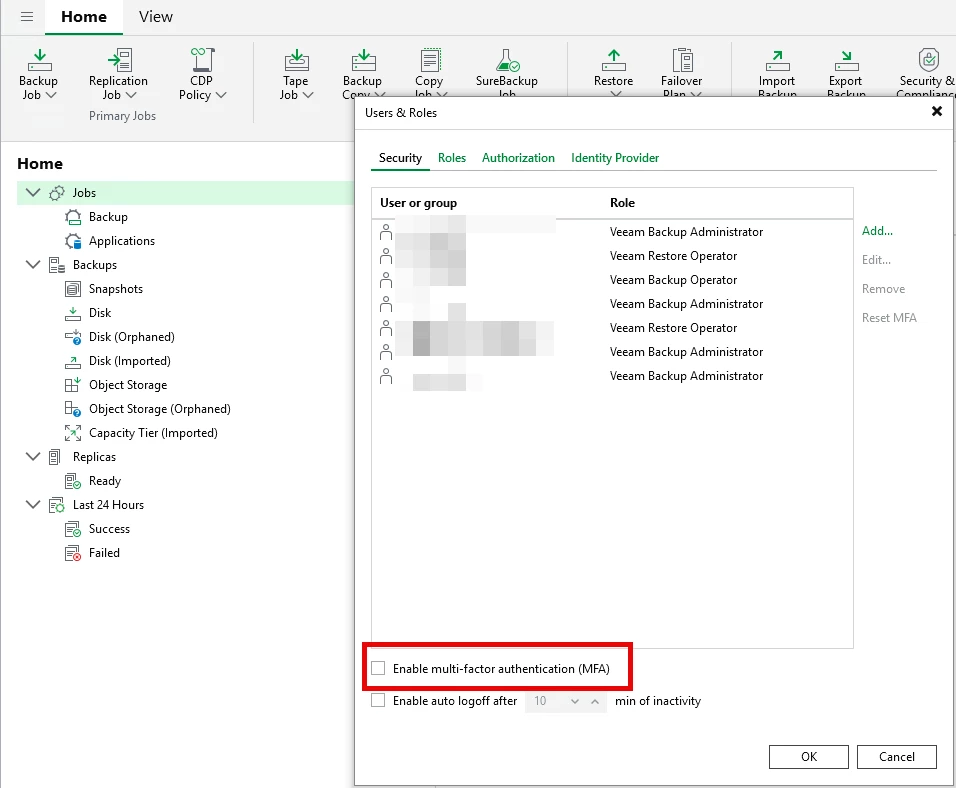
Enable MFA
Protect administrative access with multi-factor authentication. Enable MFA from the Veeam "User and Roles" options.
Use Immutable Storage
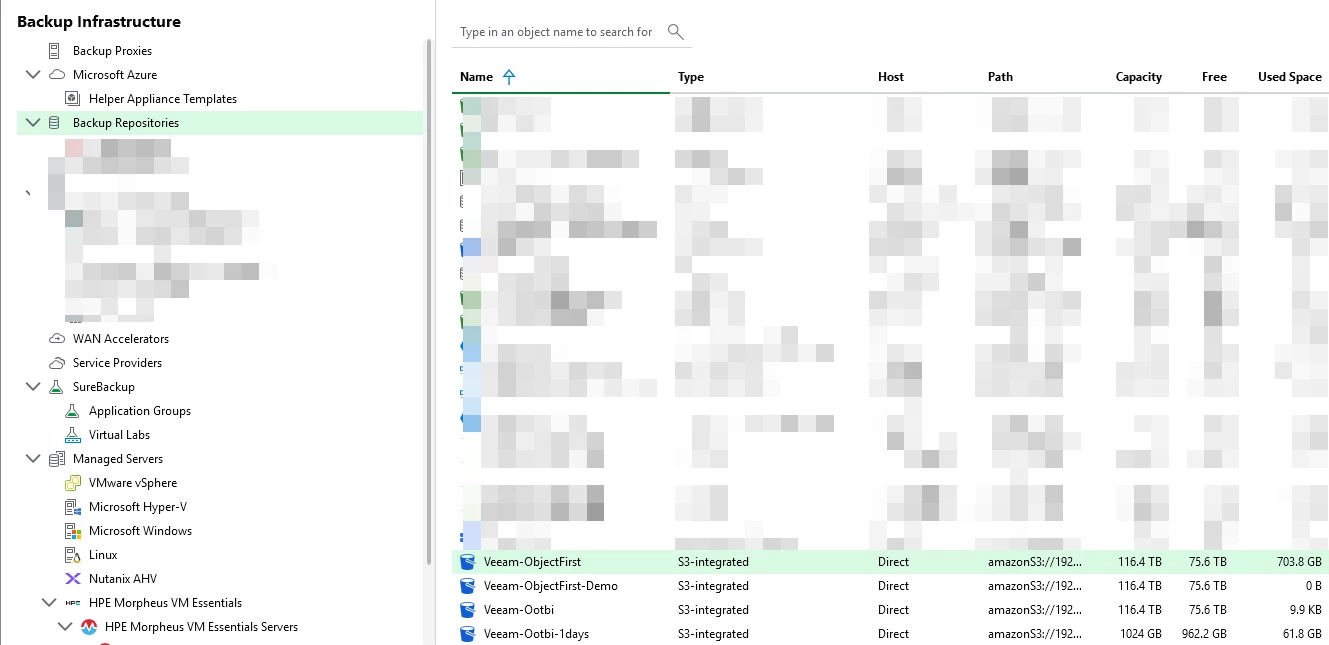
Configure immutable repositories whenever possible. The Ootbi appliance would be a perfect fit
Separate Administrative Accounts
Avoid using shared or domain admin accounts for backup administration.
Step 2 – Deploy CrowdStrike Falcon Sensor
Next, deploy the CrowdStrike Falcon Sensor to all critical Veeam infrastructure components.
Install Targets
Install Falcon Sensor on:
- Veeam Backup Server
- Proxy Servers
- Windows-based Repositories
- Enterprise Manager Server
- Mount Servers
Installation Steps
Download the Sensor
From the CrowdStrike Falcon portal:
- Navigate to Host Setup and Management
- Select Sensor Downloads
- Download the Windows Sensor installer
Install the Sensor
Run the installer with administrative privileges:
WindowsSensor.exe /install /quiet /norestart CID=<CustomerID>
Verify successful installation:
sc query csagent
You should see the Falcon Sensor actively running.
Step 3 – Configure CrowdStrike Policies for Veeam
This is one of the most important steps.
Backup applications generate heavy I/O and may trigger aggressive endpoint protection policies if exclusions are not configured correctly.
Configure Recommended Exclusions
In CrowdStrike Falcon:
- Navigate to Endpoint Security
- Open Prevention Policies
- Create exclusions for Veeam processes and directories
Common Veeam Process Exclusions
Examples include:
Veeam.Backup.Manager.exe
VeeamAgent.exe
VeeamTransportSvc.exe
VeeamDeploymentSvc.exe
Step 4 – Enable Malware Detection in Veeam
Modern versions of Veeam include built-in malware detection capabilities.
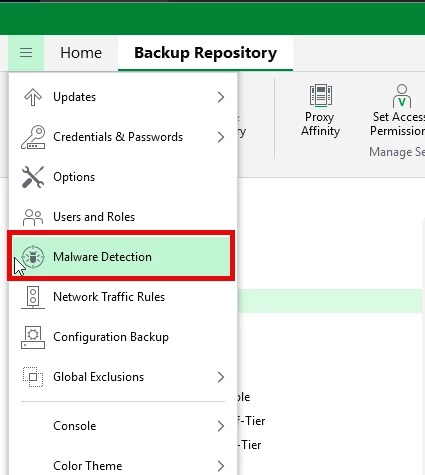
Configure Inline Entropy Analysis
Entropy analysis helps detect suspicious encryption patterns often associated with ransomware.
Steps
- Open Veeam Console
- Navigate to:
- Backup Infrastructure
- Repositories
- Edit the repository
- Enable:
- Inline malware detection
- Entropy analysis
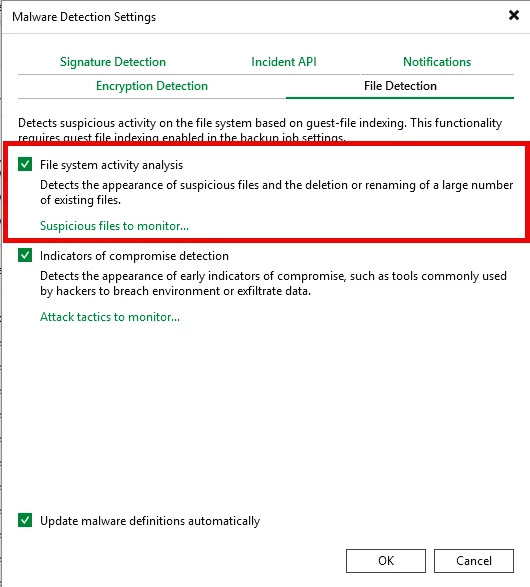
Step 5 – Configure YARA Scanning
YARA rules help identify malicious file signatures during backup scans.
Enable YARA Content Analysis
- Open Backup Infrastructure
- Select the repository
- Configure malware scanning
- Enable:
- YARA scanning
- Threat detection events
You can also import custom YARA rule sets for enhanced protection.
Step 6 – Test Ransomware Detection
Never finish an implementation without testing.
Example Validation Tests
Simulate Suspicious Encryption Activity
Create encrypted test files inside a protected workload and monitor:
- CrowdStrike detection events
- Veeam entropy alerts
- Backup anomaly notifications
Verify Backup Integrity
Run:
- SureBackup jobs
- Instant Recovery testing
- Malware scans on restore points
Step 7 – Harden the Backup Infrastructure
Integration alone is not enough.
Additional Hardening Recommendations
Use Linux Hardened Repositories
Immutable Linux repositories dramatically reduce ransomware exposure.
Disable Internet Access Where Possible
Limit outbound communication from backup servers.
Restrict RDP Access
Use jump servers or privileged access workstations.
Segment Backup Networks
Separate backup traffic from production networks.
Real-World Operational Benefits
After integrating CrowdStrike with Veeam in my lab, several improvements stood out immediately:
Improved Threat Visibility
Security teams gained visibility into backup infrastructure activity.
Faster Incident Response
Potential malicious activity on backup servers triggered alerts earlier.
Better Recovery Confidence
Malware scanning and clean restore validation improved confidence during recovery testing.
Reduced Backup Infrastructure Risk
Endpoint protection on backup servers added another defensive layer against lateral movement attacks.
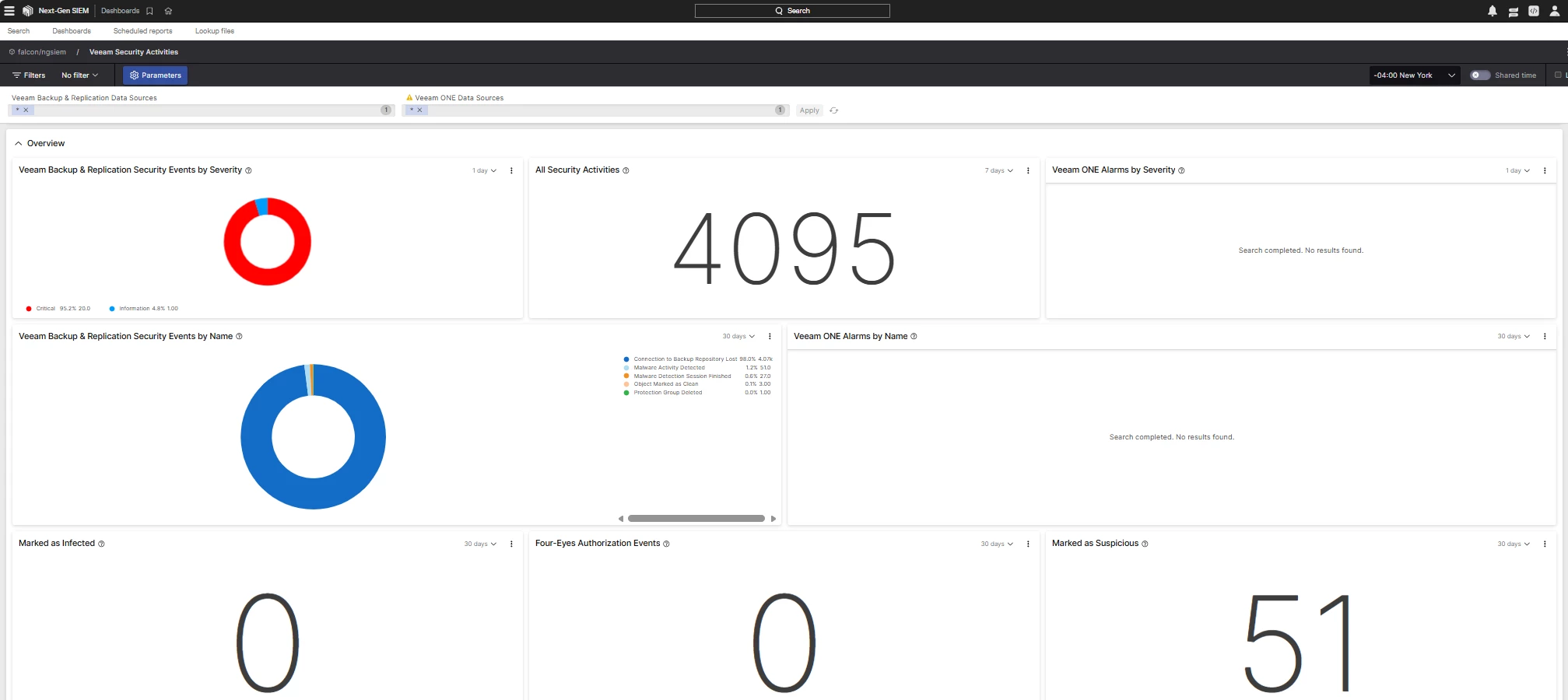
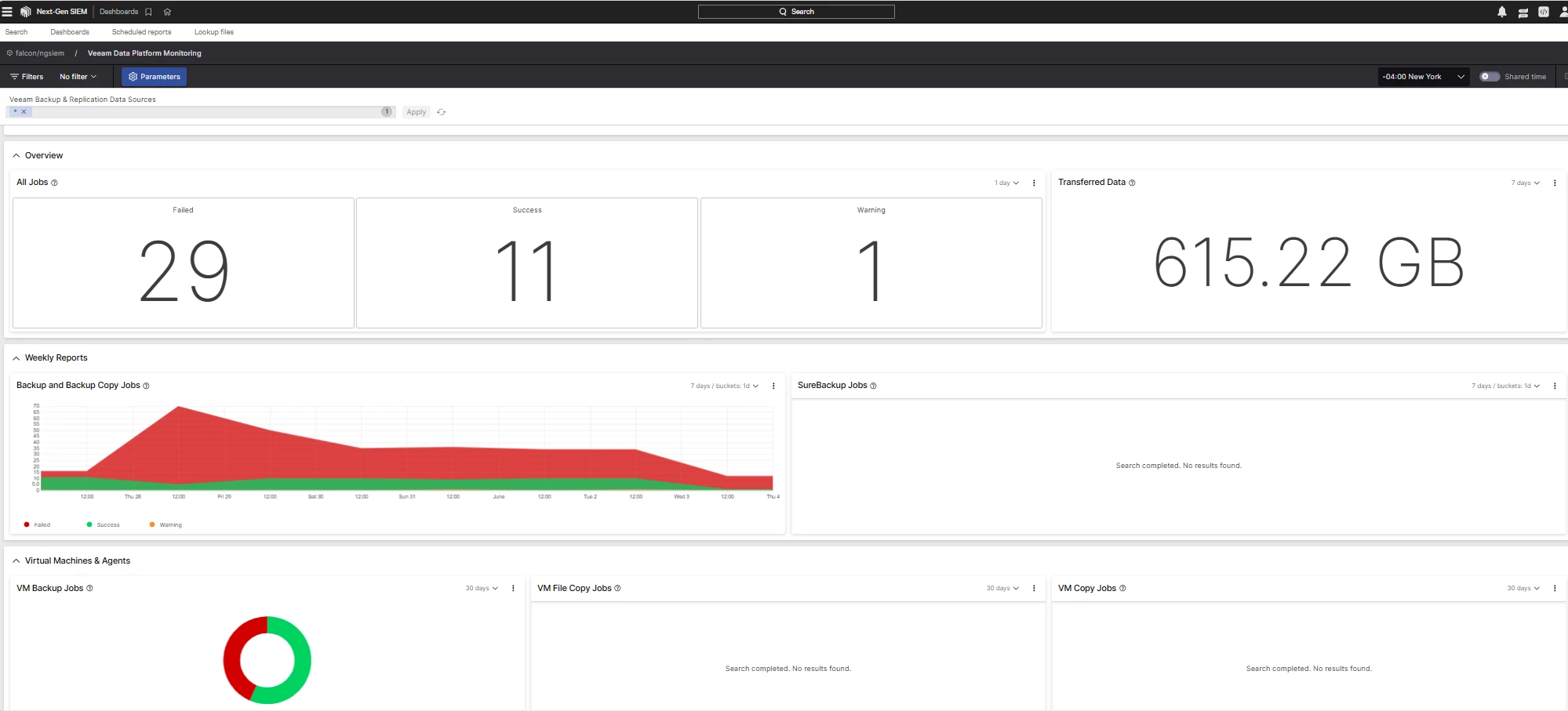
Step 8 - CrowdStrike Dashboard - Veeam Monitoring
Final Thoughts
Backup infrastructure is now a primary ransomware target. Protecting the backup platform itself is just as important as protecting production workloads.
Integrating CrowdStrike Falcon with Veeam adds another critical layer of security by combining:
- Endpoint protection
- Threat intelligence
- Malware detection
- Secure recovery validation
- Immutable backup architecture
No single product stops ransomware completely, but layered security combined with tested recovery procedures dramatically improves resilience.
If you’re running Veeam in production today, adding CrowdStrike protection to your backup infrastructure is absolutely worth evaluating.
Key Takeaways
- Protect backup servers with CrowdStrike Falcon
- Configure proper exclusions for Veeam components
- Enable malware detection and entropy analysis in Veeam
- Test ransomware detection regularly
- Combine immutable backups with endpoint protection
- Validate recovery processes before an incident occurs
The real recovery plan starts long before ransomware ever hits your environment.

