
How to Fix Veeam Active Directory Application-Aware Backup Failures with SentinelOne &Resolving VSS Errors

  • February 17, 2026
  • 4 comments
  • 129 views

Link State
Forum|alt.badge.img+11


I am sharing with the community the procedure I followed to resolve the failure of the Application Aware backup  post-installation of Sentinel One.
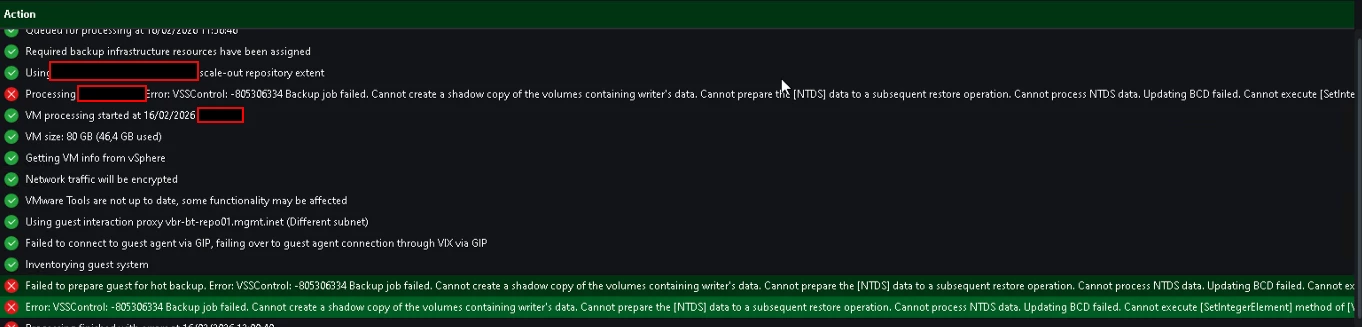
 

  • Exception procedure S1 VSS SafeBOOt Tamper Protection

Open Administrative CMD 

cd "C:\Program Files\SentinelOne\Sentinel Agent your-version"

sentinelctl unprotect -k "<passphrase>"


sentinelctl config -p agent.vssConfig.enableResearchDataCollectorVssWriter -v false -k""PASSPHRASE"


sentinelctl config -p agent.vssConfig.vssProtection -v false


sentinelctl config -p agent.vssSnapshots -v false


sentinelctl config -p agent.safeBootProtection -v false -k "PASSPHRASE"


sentinelctl config antiTamperingConfig.allowSignedKnownAndVerifiedToSafeBoot true -k "PASSPHRASE"
  • delete shadow :

diskshadow

delete shadows all

Exit


  • re-enable protection:
sentinelctl protect -k "<passphrase>"


Regards

4 comments

Chris.Childerhose
Forum|alt.badge.img+21
  • Veeam Legend, Veeam Vanguard
  • February 17, 2026

It's funny but not surprising that an AV would need some intervention for this type of issue.  Seen this many times with other products.


coolsport00
Forum|alt.badge.img+21
  • Veeam Legend
  • February 17, 2026

Nice quick fix! Appreciate the share ​@Link State 


wolff.mateus
Forum|alt.badge.img+11
  • Veeam Vanguard
  • February 20, 2026

Good to see this here!

I got it in some environments with S1 running on it.


This is a working solution from the S1 web GUI:

Create a machine group and put Domain Controllers machines in it (only the ones where you run Guest Processing, no need to add all of them)

create a Policy Override rule with this code and assign it to the machine group:


{
"antiTamperingConfig": {
"allowSignedKnownAndVerifiedToSafeBoot": true
}
}

Danilo