
Hi,
We are thrilled to announce the general availability of AsBuiltReport.Veeam.VBR 1.0.0 — a comprehensive PowerShell module that generates professional as-built documentation reports for Veeam Backup & Replication (VBR) infrastructure.
What is AsBuiltReport.Veeam.VBR?
AsBuiltReport.Veeam.VBR is a specialized report generator that plugs into the AsBuiltReport framework to automatically document your VBR environment. It produces multi-format reports (HTML, Word, Text) that capture the complete state of your backup infrastructure—from backup jobs and repositories to proxies, tape libraries integration, cloud gateways, and more.
Key Features
- Report Sections — Comprehensive coverage of all VBR components including backup repositories, jobs, proxies, WAN accelerators, tape integration, and cloud connectivity
- Diagram Types — Visual representations of your infrastructure, including backup-to-repository flows, proxy routing, and tape library topology
- Flexible InfoLevel Configuration — Control reporting depth (summary, advanced, or detailed) per section
- Health Checks — Highlight potential issues and non-optimal configurations with automated validation
- Multiple Output Formats — Generate HTML, Word, or text reports with consistent styling
- Diagram Customization — Three themes (White, Black, Neon) and export to PNG, SVG, or PDF
Supported Environments
- VBR Versions: v12+ (Windows); VBR v13 (Windows and Appliance installs)
- PowerShell: Windows PowerShell 5.1 for VBR v12; PowerShell 7 for VBR v13
- Operating System: Windows, Linux with PowerShell 7 modules for VBR v13
Report Sample
Getting Started
To install the module, run:
Install-Module -Name AsBuiltReport.Veeam.VBR
Once installed, you can generate a report with:
New-AsBuiltReport -Report Veeam.VBR -Target <VBRServer> -Username <User> -Password <Password> -Format Html,Word -OutputFolderPath <Path>
To use the GUI (In Beta), simply run:
Start-AsBuiltReportVBR
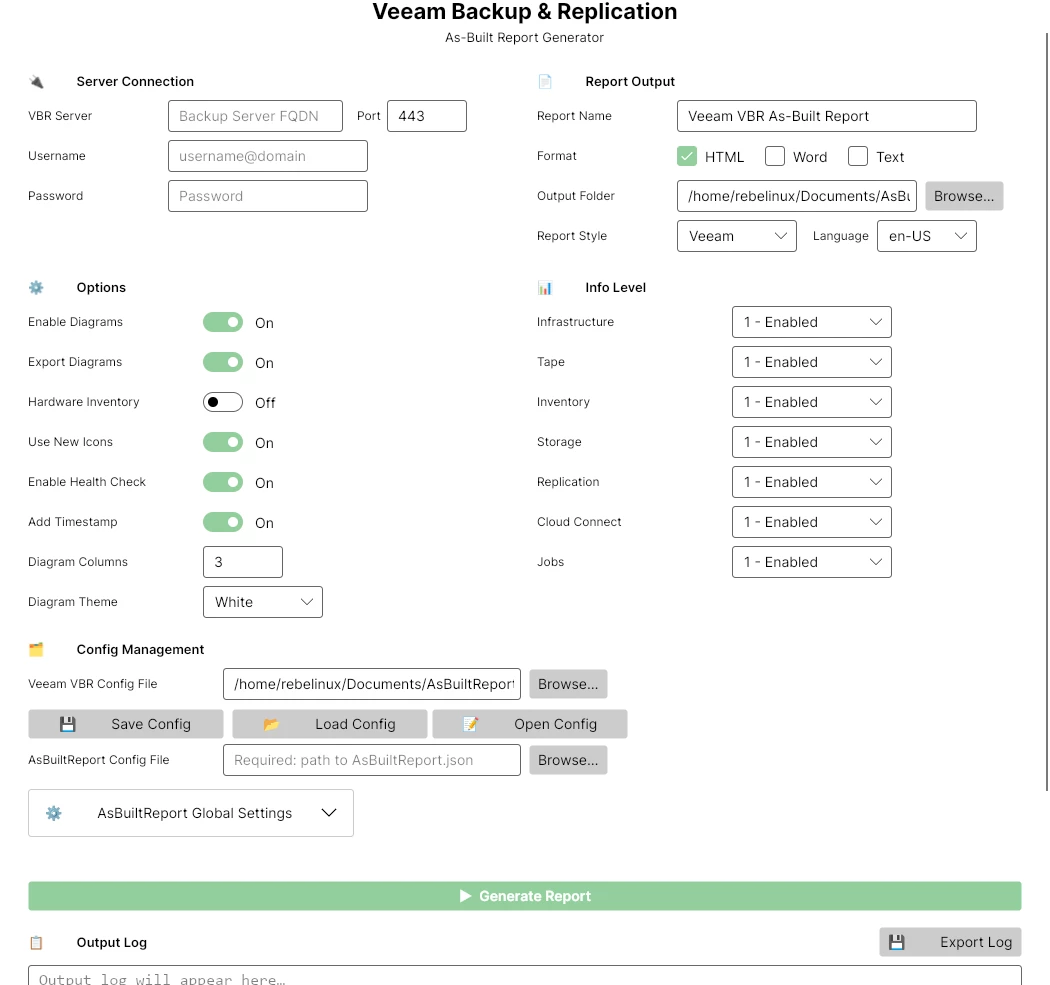
Refer to the README for detailed usage instructions and examples.
Enjoy!





