Hi everyone,
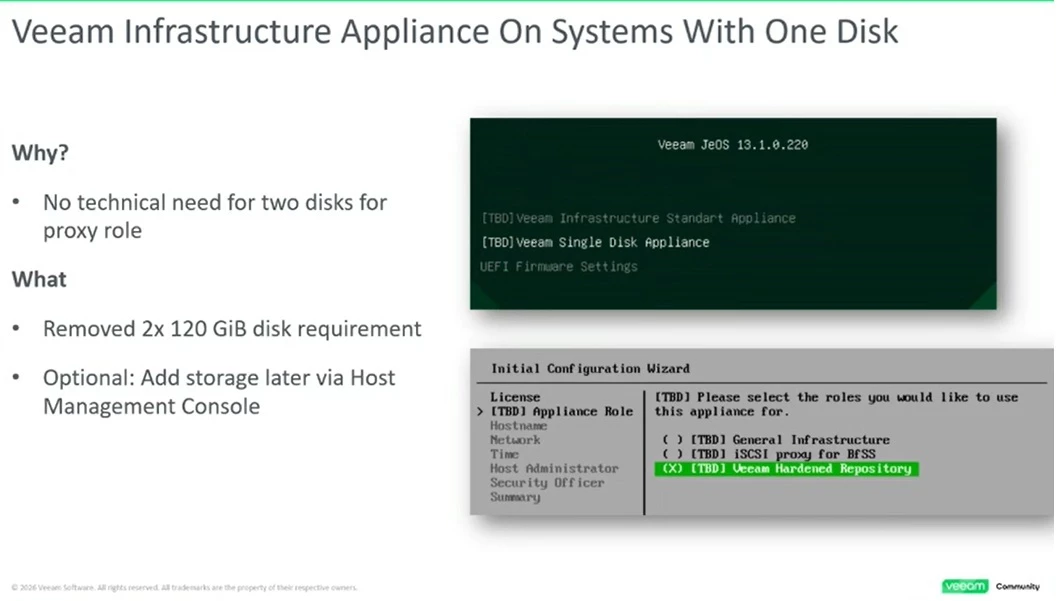
I’d like to get your feedback on a design question regarding the deployment of the Veeam Software Appliance (VSA) v13.
👉 Customer context (healthcare environment):
- Dell R470 servers
- Current configuration: 2 SSD drives in RAID 1
- Several servers involved (2 VSA + 1 Tape Library server)
👉 Challenge:
Based on Veeam VSA v13 system requirements, the appliance needs at least:
- Disk 1: OS + VBR + configuration DB + Instant Recovery cache
- Disk 2: catalog + local backup storage
➡️ Which implies having two separate volumes, ideally each on a RAID1 → so 4 disks total to ensure resiliency.
💡 However, our current servers only have 2 disks in RAID1, and extending the configuration is not straightforward without hardware upgrades.
---
❓ My questions:
- Has anyone already deployed the VSA in a similar setup with only one RAID1 group (2 disks)?
- Is it acceptable (or at least supported) to partition a single RAID1 volume to meet VSA requirements (even if not optimal)?
- On the Dell side: do R470 PERC controllers support two independent RAID1 groups (4 SSDs) without limitations?
- Any field feedback regarding performance or support impact if we don’t strictly follow the physical separation?
---
🎯 The goal is to determine whether:
- a “degraded but working” setup could be acceptable
- or if adding disks is strictly mandatory (which seems to be the recommended approach)
Thanks in advance for your insights and feedback 👌
Sébastien
Presales Consultant – Heliaq