
Question

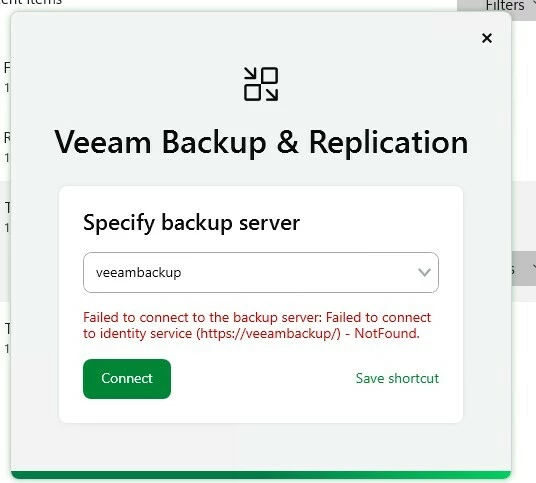
Veeam13 failed to connect to backup server failed to connect to identity service

  • January 21, 2026
  • 7 comments
  • 28 views

Hi I had veeam backup 12.3 and it was working a charm however after updating to 13 now i get this error

This is windows installation on windows 25 server and domain controllers are also windows 2025 I basically upgraded VBR from 12.3 to 13 and it was smooth however now i cannot login although all services are started and running

 

7 comments

lukas.k
Forum|alt.badge.img+13
  • Influencer
  • January 21, 2026

I assume the hostname is corrent? Are all DNS records (including reverse pointers) in place?

Did you reboot the server after the upgrade?


In case nothing helps I’d recommend reaching out to Veeam Support to let them investigate this.


Best

Lukas


coolsport00
Forum|alt.badge.img+21
  • Veeam Legend
  • January 21, 2026

Hi ​@cer113 -

Did you try either FQDN or IP instead of just the hostname? Are all the Veeam services running?


Chris.Childerhose
Forum|alt.badge.img+21
  • Veeam Legend, Veeam Vanguard
  • January 21, 2026

Is the Veeam server a Windows box or the new appliance?  Check to make sure the API and Web Server services are running.  I have seen this before.  Also try accessing the URL mentioned in the error to see if you can access it that way.  Barring this open a support ticket.


  • Author
  • New Here
  • January 22, 2026

tried local host tried short name and FQDN when i ping server DNS name it works from anywhere


  • Author
  • New Here
  • January 22, 2026

as a matter of fact Veeam Web service cannot start

When i reboot server it says starting but never finishes


Chris.Childerhose
Forum|alt.badge.img+21
  • Veeam Legend, Veeam Vanguard
  • January 22, 2026

as a matter of fact Veeam Web service cannot start

When i reboot server it says starting but never finishes

That is the cause of the issue.  You need that service running.  Would contact support.


coolsport00
Forum|alt.badge.img+21
  • Veeam Legend
  • January 22, 2026

Yep...as Chris shared….because the service isn’t started, that is the cause of your logon error. You can review Veeam logs in C:\ProgramData\Veeam\Backup, but probably your best bet is to contact Support.



