Question

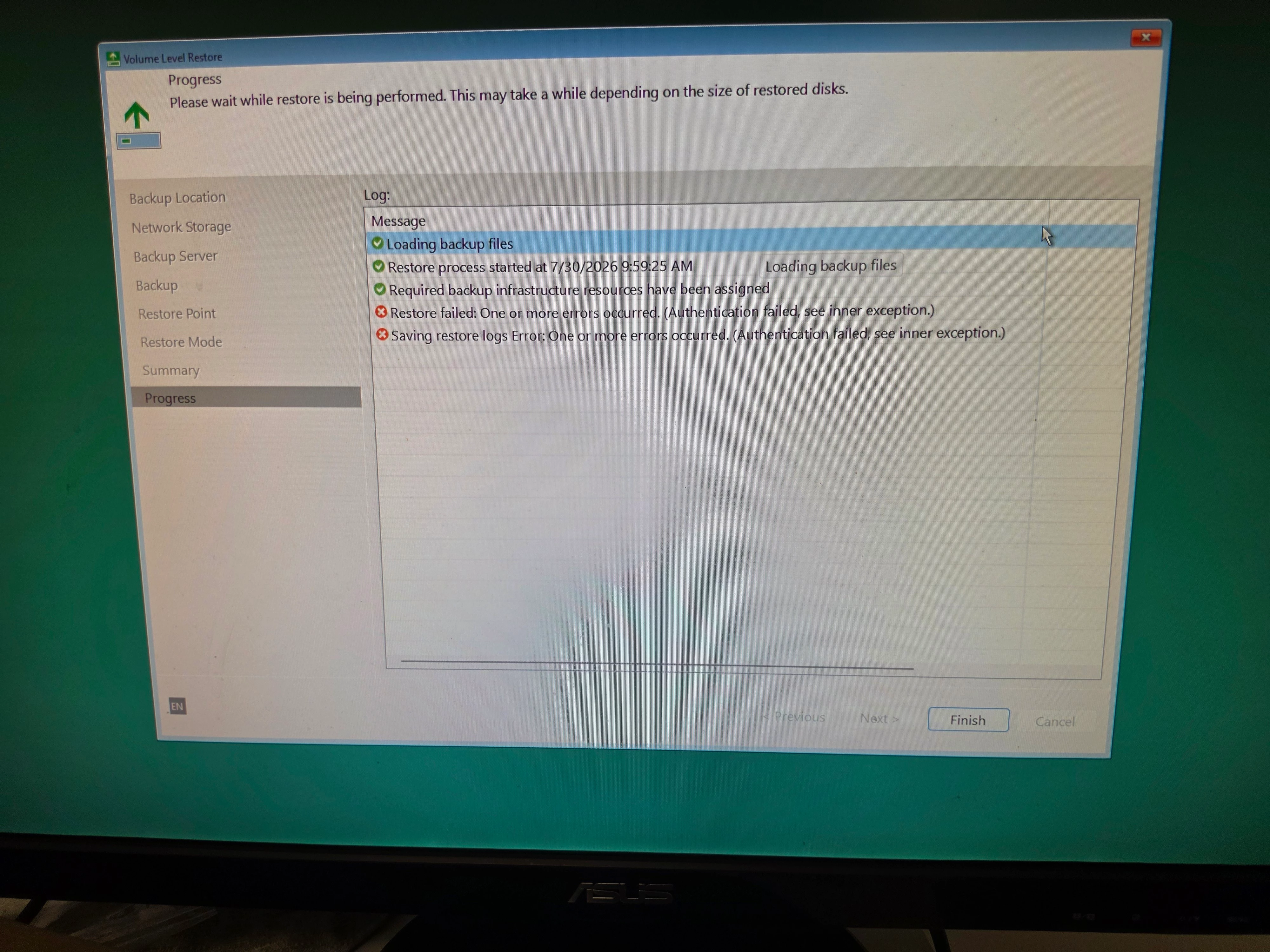
"Authentication failed, see inner exception" when doing a Bare Metal Restore from USB Recovery Media.

  • July 17, 2026
  • 23 comments
  • 501 views

I'm running the latest version of Windows 25H2 version, and Veeam version 13.0.3.1220.  I installed Veeam Agent for Microsoft Windows Free version, and created the USB Recovery Media. I then did a test Bare Metal Restore. 


I immediately get the error: Authentication failed, see inner exception.

If I use old Recovery media created on an different PC, that is running an older Windows version with an older version of Veeam, the restore process works just fine. I don’t get the Authentication error.


I found a post on Reddit, where everyone was having this same problem. One poster said he opened a support ticket with Veeam, and they acknowledged the problem. But I can’t find any information on what Veeam is doing about this very significant bug.


Does anyone have an update on this bug? Is Veeam planning a fix, and where can I find a timeline? I’m not updating my Veeam version on the older PC, as I don’t want to introduce the bug on that PC.
 

Thank you.

23 comments

coolsport00
Forum|alt.badge.img+23
  • Veeam Legend
  • July 17, 2026

This is the 1st I’ve seen of this ​@Scooch . My suggestion is open a case with Veeam to log the bug (yes, still allowed to do so with Free Edition); I’d also maybe create a post over on the Veeam Forums and see if 1. it has been seen by the Veeam Product Managers there, and 2. If they have a resolution in the works.

Best.


Chris.Childerhose
Forum|alt.badge.img+22

I have not seen any updates regarding this bug; however, there could be changes that address it when Veeam 13.1 releases later this month, as they tend to update the Agents as well.  Maybe hold off until then; otherwise you will need to open a case, as Shane suggested getting more details from support on the issue.


  • Author
  • Not a newbie anymore
  • July 17, 2026

Thanks Shane and Chris.

I did try and open a case, but must have been doing it wrong. I think I’ll wait until Veeam 13.1 before pushing harder. Clearly I’m a rookie on Veeam’s website, as I missed the Forum option all together. 

Before I retired, I was in IT, and played a role in supporting Veeam for a large University in Canada. We used Veeam to backup a LOT of VMware virtual machines on Campus. When there was an issue, Veeam was all over us with support help. Mind you, the boss did write a big cheque. 

If the problem is still there in 13.1, I’ll give opening a Support case another shot, and figure out the forums as well. I’ve cloned my USB Recovery media just in case😉

Thanks for the help!

Mark


coolsport00
Forum|alt.badge.img+23
  • Veeam Legend
  • July 18, 2026

Sounds good ​@Scooch . Keep us posted. 


Chris.Childerhose
Forum|alt.badge.img+22

Sounds good and here is to 13.1 hopefully fixing it.  🤞


  • New Here
  • July 23, 2026

I am seeing the same error


  • New Here
  • July 25, 2026

We’ve sadly run into the exact same error.

Windows 25H2 and Veeam 13.0.3.1220

We tried to install an older version of Veeam (6.3.3.38) on a Windows 24H2, sadly this just gave a different error. Could you maybe point to the version you tried ​@Scooch and what Windows version you used?


  • Author
  • Not a newbie anymore
  • July 25, 2026

c0urier

I’m afraid I don’t know the Windows or Veeam version. I made the this USB Boot media quite a while back. I didn’t even expect it to work as it was made on a different PC, and I assumed the media was tied to the hardware via MAC address or something.

But the old media worked just fine, the Auth error was gone, and the Bare Metal Restore worked perfectly. I’ve since used this same USB on another PC, and it worked as well. 

My understanding is Veeam 13.1 is “supposed” to have a fix, and will be available “real soon now”. I find the lack of communication on the part of Veeam about this very serious bug appalling. 


  • New Here
  • July 29, 2026

We just started the 30 day trial and our first test was restoring a Windows 11 workstation and got this error... Cant believe this "bug" made it into production for one of the best known backup solutions on the market... Does not give me a lot of confidence. 


coolsport00
Forum|alt.badge.img+23
  • Veeam Legend
  • July 29, 2026

Though you’re not entirely wrong in saying this should’ve been QA’d by Veeam better, I think this happening for the 1st time in my recollection in the almost 15yrs I’ve been using various Veeam products, is not a bad history and shoudn’t be totally counted against them as a whole. Sure, call out to them their mistake. But I also still have the utmost confidence in them rectifying it. Hopefully with the next release...which I’m hearing will be in the coming days...(v13.1), this will be resolved. 


  • New Here
  • July 30, 2026

v13.1.0.544 it’s already avaliable to manual download, I’ll do a test this weekend with Windows 11 25h2.


coolsport00
Forum|alt.badge.img+23
  • Veeam Legend
  • July 30, 2026

Keep us posted how it goes...


  • New Here
  • July 30, 2026

Installed 13.1 this morning and then redownloaded the BMR ISO. Same error. I am new to Veeam, so maybe I’m missing something. Backup is on a NAS. I sign in to the Veeam instance and I’m able to see the backup files and select one, then I start the restore and this is the error I get.


coolsport00
Forum|alt.badge.img+23
  • Veeam Legend
  • July 30, 2026

You have a few options ​@Joshj . Read through the VAW User Guide and make sure you meet ALL requirements and have configured everything correctly; view the Job Restore log file at C:\Programdata\Veeam\Endpoint and see if anything more detailed is shown in there you can check ; verify you have A/V exclusions in your system following this KB ; view Events on the system using the User Guide as a reference
https://helpcenter.veeam.com/docs/agentforwindows/userguide/appendix_events.html?ver=13

or contact Support for assistance:

https://helpcenter.veeam.com/docs/agentforwindows/userguide/support.html?ver=13


  • New Here
  • July 31, 2026

I get the same error on 13.0.3.

@coolsport00 FYI This is via the USB Recovery Media.


This is a fresh install of “Veeam Agent for Microsoft Windows FREE”.

Backup the machine via Bare Metal.

Make recovery media directly or via ISO using Rufus.

Boot off USB.

Proceed through restore process, then “Authentication Failed, see inner exception” as per screenshot.


Tried 13.1.0.544, I get the same issue.

I have logged a case with Support to check it out further.


  • New Here
  • July 31, 2026

Well, the issue isn’t gone ☹️

Computer that never had veeam installed, with Windows 11 Pro 25h2, with all windows updates installed.

Installed Veeam Agent v13.1.0.544 and created USB Recovery Drive.

I’ve made a full backup to a USB Disk Drive.

When doing a baremetal recovery I get the same issue "Authentication failed, see inner exception".


coolsport00
Forum|alt.badge.img+23
  • Veeam Legend
  • July 31, 2026

Just out of curiosity, where are you getting the error?...as in, what step of the bare metal recovery process? Is it when you enter credentials? Did you follow the User Guide “how-to” section on doing so?

https://helpcenter.veeam.com/docs/agentforwindows/userguide/howto_baremetal_recovery.html?ver=13

Did you enter the credentials in the format <hostname-or-domain>\username? I assume you did and are still getting the error but wanted to make sure. As mentioned above, if you did as is stated in the Guide, you have the options I listed just above.


  • New Here
  • July 31, 2026

In my test:

  1. Boot from USB FlashDrive
  2. Select Bare Metal Recovery
  3. Selected backup from USB Disk Drive (There’s no need for credencials because I didn’t encrypt the backup, and the backup is stored in a USB Disk Drive connected to a USB 3.0 port).
  4. When pressing proceed, I get the same error.

coolsport00
Forum|alt.badge.img+23
  • Veeam Legend
  • July 31, 2026

@rouroni - that isn’t the process shared in the link I provided (there’s a restart required). Please follow those steps to see if the process shared resolves the issue. If not, reach out to Support like ​@kane did.

Thanks.


  • New Here
  • July 31, 2026

@coolsport00 Got it. But the case of the link provided is for backups in network storage. That’s not my case. I’m using “Local Storage” a.k.a. USB Hard Drive.


And yes, I did shutdown the computer first, then started up the computer, selected to choose boot device, and then selected the USB FlashDrive with Veeam recovey to boot.

My conclusion is that the issue is the same for Local or Network Storage, and that the newest version of Veeam Agent Free didn’t solve it.

Thank you for sugesting for reaching Support.


  • New Here
  • August 3, 2026

I have the same issue, trying to do a bmr restore today.  Same version, same error.  My source is encrypted and I’m pulling from a truenas share.  I’ve successfully done a bmr restore in the past with the same setup.  PC and Truenas NAS.


  • New Here
  • August 3, 2026

Went through the logs and found TLS errors, it basically fails to create a TLS session correctly thus you get the Auth Errors.


The Issue: Windows 11 25H2

The Fix: Use a Windows 11 24H2 machine to make the recovery USB


Tested and successfully applied my image to the machine.

Machine booted up to Windows 11 without any issues.


coolsport00
Forum|alt.badge.img+23
  • Veeam Legend
  • August 3, 2026

Thank you for sharing your resolution ​@kane 

Glad you got it sorted.