Question

Orchestrator Embedded VBR Repair Required

  • February 19, 2026
  • 8 comments
  • 35 views

Forum|alt.badge.img+1

Orchestrator Embedded VBR Repair Required.

Have a ticket opened with Support for a week now but so far we haven’t figured out the cause of the issue. We have tried to refresh the Registry entry below

 

and reset the state in the VAO DB
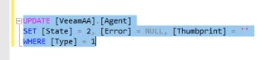
 

and restarted the Backup Orchestrator Agent but to no avail.
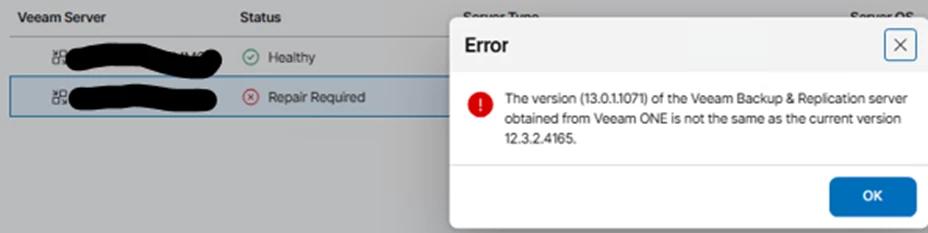


Connection to an external VBR is working as shown above as Healthy.


Thanks again for the community’s input/

8 comments

Chris.Childerhose
Forum|alt.badge.img+21
  • Veeam Legend, Veeam Vanguard
  • February 19, 2026

I think it best to continue with support at this point.  I know not the answer to hear but it is the best path.


coolsport00
Forum|alt.badge.img+21
  • Veeam Legend
  • February 20, 2026

Yeah...siding with Chris here ​@spider32 . Wait and see what Support has to say. Hopefully they get your sorted soon 🙏🏻 If you can...keep us posted what they say.


CMF
Forum|alt.badge.img+8
  • Veeam Legend
  • February 20, 2026

Support is definitely the best option. but please keep us posted about the findings. Maybe its an issue that more of us can run into. 


Andanet
Forum|alt.badge.img+12
  • Veeam Legend
  • February 20, 2026


Connection to an external VBR is working as shown above as Healthy.


Thanks again for the community’s input/

I received this error using a Veeam One v13 with an external VBR server in 12.3. 

In your case your VRO environment detect a previous version of VBR server that’s included in VRO package???? Mmmmmm 
@spider32 please explain better your situation. Have you performed an upgrade of your exixtent VRO or is a fresh installation? 

Thanks


Forum|alt.badge.img+1
  • Author
  • Influencer
  • February 23, 2026

@Andanet, the external VBR was updated to v13. I was advised by Support to upgrade the Orchestrator to v13 as well since that would have caused the version mismatched as shown below. Even before the upgrade, the embedded VBR already showed “Communication Error”. After the upgrade, it showed “Repair Required”. 

Before Upgrade:

After Upgrade:


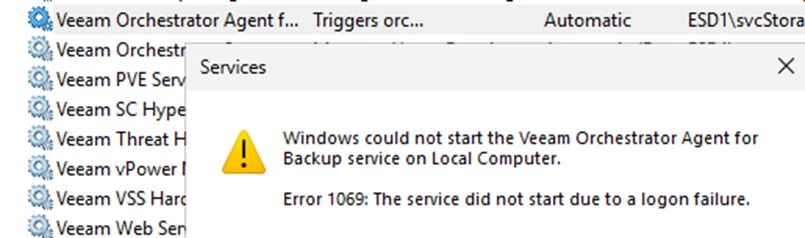
Another issue I noticed is that the Orchestrator Agent backup keeps on reverting to the account with an incorrect password. I tried several times to change to the correct password and even use Local System.


I raised this issue with support so hopefully, we’ll get some clue as what’s going on.


Chris.Childerhose
Forum|alt.badge.img+21
  • Veeam Legend, Veeam Vanguard
  • February 23, 2026

What version of VRO as you using?  The latest release is 13.0.0.1167 so that might be part of the problem.  Check versions here - https://www.veeam.com/kb4358


coolsport00
Forum|alt.badge.img+21
  • Veeam Legend
  • February 23, 2026

Interested to hear what Support has to say about that ​@spider32 


Andanet
Forum|alt.badge.img+12
  • Veeam Legend
  • February 23, 2026

@Andanet, the external VBR was updated to v13. I was advised by Support to upgrade the Orchestrator to v13 as well since that would have caused the version mismatched as shown below. Even before the upgrade, the embedded VBR already showed “Communication Error”. After the upgrade, it showed “Repair Required”. 

Before Upgrade:

After Upgrade:


Another issue I noticed is that the Orchestrator Agent backup keeps on reverting to the account with an incorrect password. I tried several times to change to the correct password and even use Local System.


I raised this issue with support so hopefully, we’ll get some clue as what’s going on.

Ahhhhhh Ok ok... this means you proceeded with VRO  upgrade but embedded VBR remains to 12.3 version. I'm writing from my smartphone but, if I remember correctly, in the ISO there are some packages for every upgrade and you can check there for VBR setup. Please open ISO and browse in to find correct package.