
Question

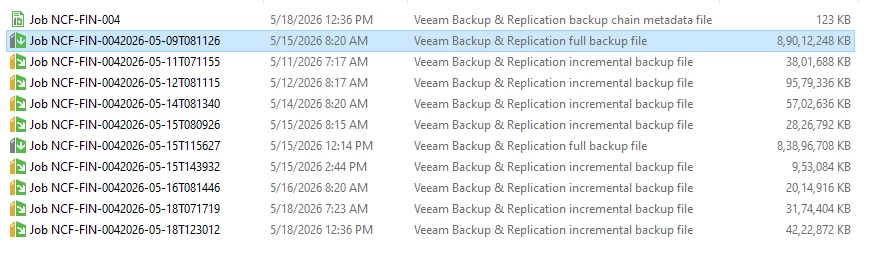
Why are there multiple .VBK files stored in the same backup folder?

  • May 22, 2026
  • 6 comments
  • 30 views

Hello Team,

I am using Veeam Agent / Veeam Backup and Replication for backup storage on a NAS.

I noticed that in my backup repository folder, Veeam creates:

  • .VBK full backup files
  • multiple .VIB incremental backup files
  • .VBM metadata files

My question is:

Why are there multiple .VBK files stored in the same backup folder?
Are these incremental restore points expected behavior?

Also:

  • Will Veeam automatically delete old .VBK and .VIB files according to the retention policy?
  • Is it safe to manually delete multiple or older .VBK files from the repository folder if storage becomes low?
  • How does Veeam manage the backup chain cleanup process?

I want to better understand how Veeam handles incremental backup retention and storage management.

Thank you.
 

6 comments

coolsport00
Forum|alt.badge.img+22
  • Veeam Legend
  • May 22, 2026

Without knowing much about your Backup Job retention, etc ​@Esayas.T , it sounds like the reason for multiple .VBKs is because of the Backup Mode you’re using is Forward Incremental.


Chris.Childerhose
Forum|alt.badge.img+21

What is your backup schedule and job settings for the Agent backup set to?  If you have the create periodic full or synthetic full selected, that is how additional VBK files are created.  If this is VM backups, then the new per-vm backup chains cause this too.


coolsport00
Forum|alt.badge.img+22
  • Veeam Legend
  • May 22, 2026

Check out this KB that explains why you would have multiple .VBKs:

https://www.veeam.com/kb1932

And, to answer your question about removing stale files….yes, one you met your retention, Veeam would delete the old files. If you’re using Fwd Increm, Veeam has to keep older files on your Repo so you can actually restore files (i.e. meet your retention). 

Hope that helps.


CMF
Forum|alt.badge.img+8
  • Veeam Legend
  • May 22, 2026

Hi ​@Esayas.T as Shane already mentioned it seems that you are using forward incremental with synthetic full backups as described here:

https://helpcenter.veeam.com/docs/vbr/userguide/forward_incremental_backup.html?ver=13 


Stabz
Forum|alt.badge.img+9
  • Veeam Legend
  • May 22, 2026

@Esayas.T We could give you more informations if you copy/paste the job configuration.
But it s normal comportement if you are check Active Full or Synthetic Full. 


AndrePulia
Forum|alt.badge.img+9
  • Veeam Vanguard
  • May 22, 2026

@Esayas.T 

Besides the posts from other members above, I would like to recommend that you take some free Veeam classes from Veeam University:
https://community.veeam.com/onboarding-for-veeam-data-platform-163/onboarding-for-veeam-data-platform-10010

And if you want to take it to the next level, you can purchase a course from Veeam University Pro:
https://veeamuniversity-pro.com/

@Federica









