Answer

Veeam setup Engine upgrade error 12.1.2 on PostgresSQL


Link State
Forum|alt.badge.img+11

hello everyone,

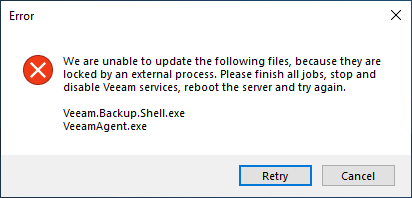
I'm trying to install the update from both executable and ISO always returns this error.
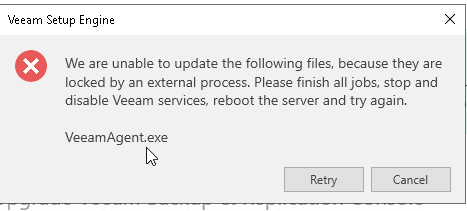
- Veeam with PostgresSQL Database

Instead if I launch the same executable with a SQL database it works.

has it happened to anyone yet? Is there any bug?

thx


p.s.

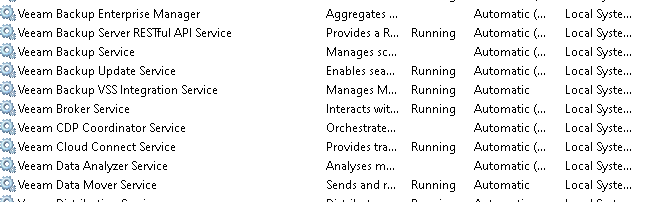
solved by stopping the following services
 

Best answer by CarySun

@Link State One of my customers had the same issue when I installed the new version. But it’s using SQL Express, not PostgreSQL. I tried to reboot the server and ran install again (I ensured all services were up and running). The issue is gone. just FYI.


11 comments

Chris.Childerhose
Forum|alt.badge.img+21

Done a few upgrades with Postgres and not had an issue with it.  Maybe a support case can help determine the issue and inform others here?


CarySun
Forum|alt.badge.img+7
  • Veeam Vanguard
  • May 24, 2024

Interesting case, it is supposed to stop all services automatically before start installing the upgrade.

This seems not to stop services completely during the installation process.


Link State
Forum|alt.badge.img+11
  • Author
  • Veeam Legend
  • May 24, 2024

Interesting case, it is supposed to stop all services automatically before start installing the upgrade.

This seems not to stop services completely during the installation process.

exactly.

I didn't delve into it unfortunately I was in a hurry to update the production environment.
I have more infrastructure to update today I updated 3 of them,
next week I have at least 6 more. but all with SQL express.
let's see if the case comes up again.

stay tuned.


CarySun
Forum|alt.badge.img+7
  • Veeam Vanguard
  • Answer
  • May 24, 2024

@Link State One of my customers had the same issue when I installed the new version. But it’s using SQL Express, not PostgreSQL. I tried to reboot the server and ran install again (I ensured all services were up and running). The issue is gone. just FYI.


coolsport00
Forum|alt.badge.img+21
  • Veeam Legend
  • May 24, 2024

Nice to see a workaround in case this comes up for me when I upgrade. Thanks @Link State 


dloseke
Forum|alt.badge.img+8
  • Veeam Vanguard
  • May 26, 2024

I haven’t run into this but it does feel like something here manually stopping services/processes may resolve the issue if rebooting the server prior to the update doesn’t.


Link State
Forum|alt.badge.img+11
  • Author
  • Veeam Legend
  • May 31, 2024

I haven’t run into this but it does feel like something here manually stopping services/processes may resolve the issue if rebooting the server prior to the update doesn’t.

hi @dloseke  & @CarySun  in my case even with the vbr server reboot ,i had the same behavior i had to kill the services.


coolsport00
Forum|alt.badge.img+21
  • Veeam Legend
  • June 19, 2024

Hi @Link State - just following up on your post here. It seems you answered your own query possibly? If so, or if any provided comments helped, go ahead and mark one as ‘Best Answer’ so others who experience the same issue may benefit. 

Thanks.


Link State
Forum|alt.badge.img+11
  • Author
  • Veeam Legend
  • June 20, 2024

Hi @Link State - just following up on your post here. It seems you answered your own query possibly? If so, or if any provided comments helped, go ahead and mark one as ‘Best Answer’ so others who experience the same issue may benefit. 

Thanks.

lol marked wrong post  @safiya can you correct? thx


Chris.Childerhose
Forum|alt.badge.img+21

Hi @Link State - just following up on your post here. It seems you answered your own query possibly? If so, or if any provided comments helped, go ahead and mark one as ‘Best Answer’ so others who experience the same issue may benefit. 

Thanks.

lol marked wrong post  @safiya can you correct? thx

Doh 😂 


coolsport00
Forum|alt.badge.img+21
  • Veeam Legend
  • June 20, 2024

Hi @Link State - just following up on your post here. It seems you answered your own query possibly? If so, or if any provided comments helped, go ahead and mark one as ‘Best Answer’ so others who experience the same issue may benefit. 

Thanks.

lol marked wrong post  @safiya can you correct? thx

Or @Madi.Cristil 😊