Solved

veeam run time logs location


Forum|alt.badge.img+1

how to find veeam run time logs while integration with azure and deploying appliance

Best answer by Chris.Childerhose

Typically the Veeam logs on the VBR server are under - C:\ProgramData\Veeam\Backup for jobs but there are other folders located here as well for the other components.  I would check here first.

View original

3 comments

Chris.Childerhose
Forum|alt.badge.img+23

Typically the Veeam logs on the VBR server are under - C:\ProgramData\Veeam\Backup for jobs but there are other folders located here as well for the other components.  I would check here first.


Stabz
Forum|alt.badge.img+9
  • Veeam Legend
  • August 17, 2022

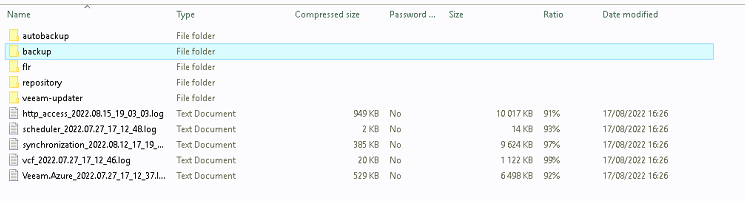
If you need information about the jobs in the appliance, you can download the log from the Appliance:
https://helpcenter.veeam.com/docs/vbazure/guide/support_information.html?ver=40

In the archive you will have the logs for the jobs, repository etc...


Chris.Childerhose
Forum|alt.badge.img+23

If you need information about the jobs in the appliance, you can download the log from the Appliance:
https://helpcenter.veeam.com/docs/vbazure/guide/support_information.html?ver=40

In the archive you will have the logs for the jobs, repository etc...


That works once the appliance is deployed but I think the OP was asking about the deployment and integration from VBR.  I could be wrong but that is how I read it.

This is great to know for sure though.