
Question

Veeam ONE V13 - restricted permissions after build

  • October 27, 2025
  • 12 comments
  • 151 views

MavMikeVBR
Forum|alt.badge.img+1

Fresh v13 build for VBR, EM and Veeam ONE.

Veeam ONE is installed on windows 2025 with a seperate win2025 SQL server.

Install is all good but when running the Veeam ONE client and I click ADD SERVER to add the VBR server, this opens a web interface to veeam one. Once logged in, I get this:

infrastructure is missing and I can click review data sources, when I click this I get error “failed to add the virtual infrastructure. The user account does not have the required permissions”.

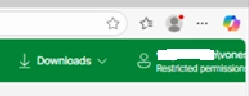
The user does have permissions, local admin, in the veeam administrators group as well. In the top corner of the web UI it also shows the user then underneath “restricted permissions user”.

Very odd…..anyone see this?

12 comments

Chris.Childerhose
Forum|alt.badge.img+21
  • Veeam Legend, Veeam Vanguard
  • October 27, 2025

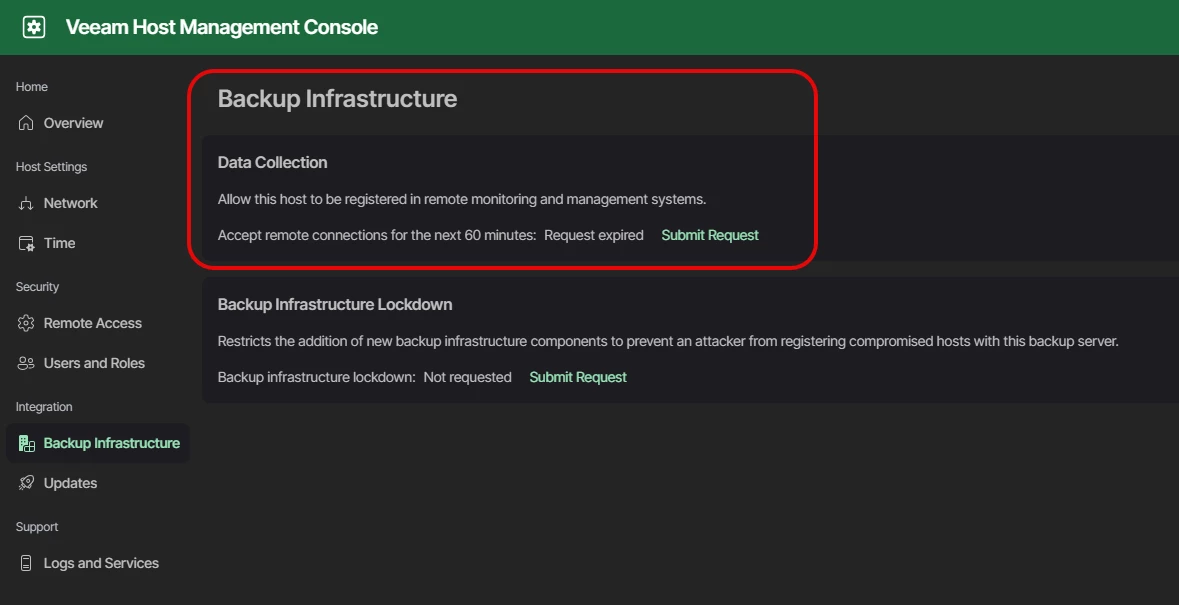
You need to turn on the backup infrastructure option in the WebUI 10443 for VBR.  Then it can be added to VONE.


MavMikeVBR
Forum|alt.badge.img+1
  • Author
  • Influencer
  • October 27, 2025

You need to turn on the backup infrastructure option in the WebUI 10443 for VBR.  Then it can be added to VONE.


thanks Chris, yes this has already been actioned but the UI doesnt even get that far to ask for the hostname of the VBR server. It is a user permissions issue so I’m assuming the user doesnt have the capability to add data sources. But it does as its part of veeam administrators and local admin.


Chris.Childerhose
Forum|alt.badge.img+21
  • Veeam Legend, Veeam Vanguard
  • October 27, 2025

You need to turn on the backup infrastructure option in the WebUI 10443 for VBR.  Then it can be added to VONE.


thanks Chris, yes this has already been actioned but the UI doesnt even get that far to ask for the hostname of the VBR server. It is a user permissions issue so I’m assuming the user doesnt have the capability to add data sources. But it does as its part of veeam administrators and local admin.

Are you using VEEAMADMIN user?  I know if MFA is enabled you need to create a second “Admin” user without MFA enabled to get it added properly.


MavMikeVBR
Forum|alt.badge.img+1
  • Author
  • Influencer
  • October 27, 2025

You need to turn on the backup infrastructure option in the WebUI 10443 for VBR.  Then it can be added to VONE.


thanks Chris, yes this has already been actioned but the UI doesnt even get that far to ask for the hostname of the VBR server. It is a user permissions issue so I’m assuming the user doesnt have the capability to add data sources. But it does as its part of veeam administrators and local admin.

Are you using VEEAMADMIN user?  I know if MFA is enabled you need to create a second “Admin” user without MFA enabled to get it added properly.

no, using a local user account which was created for this build. The Veeam one windows servers arent on the domain either. Create the local user called VONE, added it to local admin and the vone install added it to veeam administrators local group. When I login to the UI, it says it has restricted permissions


Chris.Childerhose
Forum|alt.badge.img+21
  • Veeam Legend, Veeam Vanguard
  • October 27, 2025

You need to turn on the backup infrastructure option in the WebUI 10443 for VBR.  Then it can be added to VONE.


thanks Chris, yes this has already been actioned but the UI doesnt even get that far to ask for the hostname of the VBR server. It is a user permissions issue so I’m assuming the user doesnt have the capability to add data sources. But it does as its part of veeam administrators and local admin.

Are you using VEEAMADMIN user?  I know if MFA is enabled you need to create a second “Admin” user without MFA enabled to get it added properly.

no, using a local user account which was created for this build. The Veeam one windows servers arent on the domain either. Create the local user called VONE, added it to local admin and the vone install added it to veeam administrators local group. When I login to the UI, it says it has restricted permissions

Did you log off or reboot after the install I find you need to do that to get the permissions working.


Iams3le
Forum|alt.badge.img+11
  • Veeam Legend
  • October 27, 2025

Hi ​@MavMikeVBR, Win2025 SQL server is not supported yet. Please, take a look at this link for more information: https://helpcenter.veeam.com/docs/one/userguide/system_requirements.html?ver=13


MavMikeVBR
Forum|alt.badge.img+1
  • Author
  • Influencer
  • October 28, 2025

Hi ​@MavMikeVBR, Win2025 SQL server is not supported yet. Please, take a look at this link for more information: https://helpcenter.veeam.com/docs/one/userguide/system_requirements.html?ver=13

whilst the server is win2025, the DB is 2022.


MavMikeVBR
Forum|alt.badge.img+1
  • Author
  • Influencer
  • October 28, 2025

You need to turn on the backup infrastructure option in the WebUI 10443 for VBR.  Then it can be added to VONE.


thanks Chris, yes this has already been actioned but the UI doesnt even get that far to ask for the hostname of the VBR server. It is a user permissions issue so I’m assuming the user doesnt have the capability to add data sources. But it does as its part of veeam administrators and local admin.

Are you using VEEAMADMIN user?  I know if MFA is enabled you need to create a second “Admin” user without MFA enabled to get it added properly.

no, using a local user account which was created for this build. The Veeam one windows servers arent on the domain either. Create the local user called VONE, added it to local admin and the vone install added it to veeam administrators local group. When I login to the UI, it says it has restricted permissions

Did you log off or reboot after the install I find you need to do that to get the permissions working.

I will give this a go as well, thanks


PeteSteven
Forum|alt.badge.img+5
  • Veeam Vanguard
  • October 28, 2025

could it be possible, that you haven’t set the “Backup Administrator” Role? after creating the user, you must log in with it once to properly initialize the account. Only then will it be activated correctly. This is therefore the alternative solution to the service account.


Have a look at my blogpost, i described the issue there

Veeam ONE V13 with a Veeam VBR V13 | Veeam Community Resource Hub


MavMikeVBR
Forum|alt.badge.img+1
  • Author
  • Influencer
  • October 28, 2025

could it be possible, that you haven’t set the “Backup Administrator” Role? after creating the user, you must log in with it once to properly initialize the account. Only then will it be activated correctly. This is therefore the alternative solution to the service account.


Have a look at my blogpost, i described the issue there

Veeam ONE V13 with a Veeam VBR V13 | Veeam Community Resource Hub

but the issue is even with the local user in the local admin groups, veeam one still sees it as restricted permissions


PeteSteven
Forum|alt.badge.img+5
  • Veeam Vanguard
  • October 28, 2025

could it be possible, that you haven’t set the “Backup Administrator” Role? after creating the user, you must log in with it once to properly initialize the account. Only then will it be activated correctly. This is therefore the alternative solution to the service account.


Have a look at my blogpost, i described the issue there

Veeam ONE V13 with a Veeam VBR V13 | Veeam Community Resource Hub

but the issue is even with the local user in the local admin groups, veeam one still sees it as restricted permissions


I replied to the other post.
Maybe a reboot is required for updating group memberships


MavMikeVBR
Forum|alt.badge.img+1
  • Author
  • Influencer
  • October 29, 2025

could it be possible, that you haven’t set the “Backup Administrator” Role? after creating the user, you must log in with it once to properly initialize the account. Only then will it be activated correctly. This is therefore the alternative solution to the service account.


Have a look at my blogpost, i described the issue there

Veeam ONE V13 with a Veeam VBR V13 | Veeam Community Resource Hub

but the issue is even with the local user in the local admin groups, veeam one still sees it as restricted permissions


I replied to the other post.
Maybe a reboot is required for updating group memberships

thanks but no joy, we have raised a case so will in very interested to get to the bottom of this.

I have looked at the reporter logs and see a permissions issue. I’m wondering if there’s a quirk on the windows system. Its server 2025 as well.