Solved

Veeam Infrastructure Appliance - Hardened Repository Stuck

  • March 19, 2026
  • 9 comments
  • 34 views

NemanjaJanicic
Forum|alt.badge.img+1

Hey guys,

I’m installing a VM on our Synology NAS to act as a Veeam Hardened Repo. I already had it before but now doing it trough Infrastructure Appliance.

When I start the installation I get’s stuck in this process:
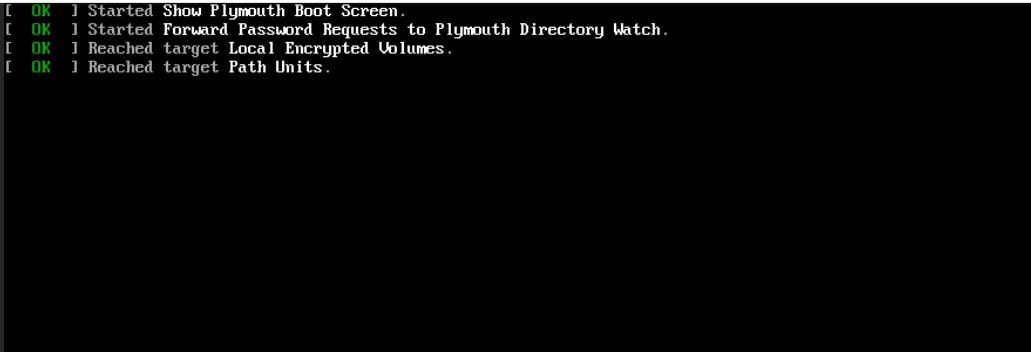


Any recommendations for it?

 

Best answer by NemanjaJanicic

Hello everybody,

I found what was the issue:
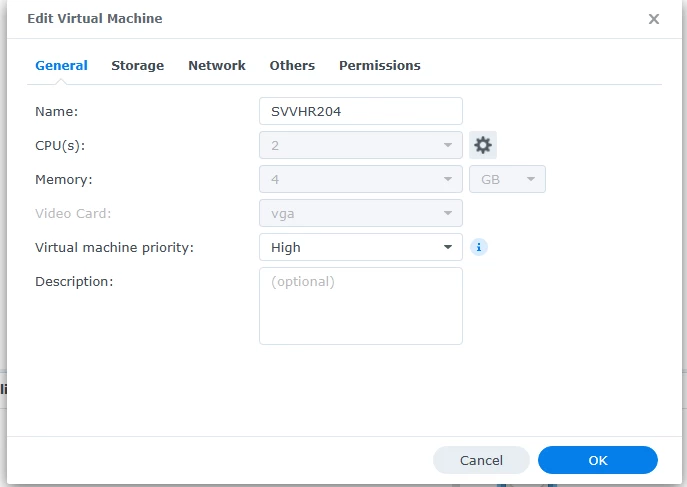
 

`Video Card` was set to `vmvga`, and that was the reason why it got stuck before loading GUI for installation fruther. When I changed that to `vga` the issue is not there anymore.

Thank’s for getting me some usefull informations.

9 comments

Chris.Childerhose
Forum|alt.badge.img+21

Try rebooting and see if that kicks it to go.  If not, then not sure what to suggest other than opening a support case.  I know it worked previously on the NAS, but that is not a typical setup usually, but hopefully, you get it working.


CMF
Forum|alt.badge.img+8
  • Veeam Legend
  • March 19, 2026

Could it be the bios mode? It has to be on uefi. I have a similar thing when installing the cream appliance on Hyper-V it wouldn't start without changing the bios boot-mode


Chris.Childerhose
Forum|alt.badge.img+21

Could it be the bios mode? It has to be on uefi. I have a similar thing when installing the cream appliance on Hyper-V it wouldn't start without changing the bios boot-mode

Good catch Chalid this could be it.


NemanjaJanicic
Forum|alt.badge.img+1

@Chris.Childerhose  ​@CMF 
It’s already in UEFI, did check that at the beginning.
Are there any articles about installing it manually on a Ubuntu Server?


Chris.Childerhose
Forum|alt.badge.img+21

I cannot seem to find the article that shows this but it is on the Veeam site somwhere.  This is from CoPilot.

In Veeam Backup & Replication v13, a Hardened Repository on Linux can be configured with immutability to protect backups from deletion or modification, even by administrators, for a defined retention period. This is a critical defense against ransomware and accidental deletions.

Preparation

  • Deploy a supported Linux server (Ubuntu, Debian, RHEL, etc.).

  • Create a dedicated non-root account for Veeam Data Mover.

  • Prepare storage (XFS with reflink=1 and crc=1 is recommended for fast clone support).

Example:

# Create immutable backup folder

mkdir /mnt/immutable_backup

chown -R veeamuser:veeamgroup /mnt/immutable_backup

chmod 700 /mnt/immutable_backup


# Optional: format XFS with fast clone support

mkfs.xfs -b size=4096 -m reflink=1,crc=1 /dev/sdb


CMF
Forum|alt.badge.img+8
  • Veeam Legend
  • March 19, 2026

NemanjaJanicic
Forum|alt.badge.img+1
  • Author
  • Influencer
  • Answer
  • March 20, 2026

Hello everybody,

I found what was the issue:
 

`Video Card` was set to `vmvga`, and that was the reason why it got stuck before loading GUI for installation fruther. When I changed that to `vga` the issue is not there anymore.

Thank’s for getting me some usefull informations.


CMF
Forum|alt.badge.img+8
  • Veeam Legend
  • March 20, 2026

Great news ​@NemanjaJanicic. It´s always the little things. 😊


Chris.Childerhose
Forum|alt.badge.img+21

Great to hear it was something simple for the fix. 👍