
Solved

Veeam egnet for Linux can't create recovery media

  • May 10, 2026
  • 6 comments
  • 41 views

When I try to do this after specifying an output directory of /home/amonra I get:
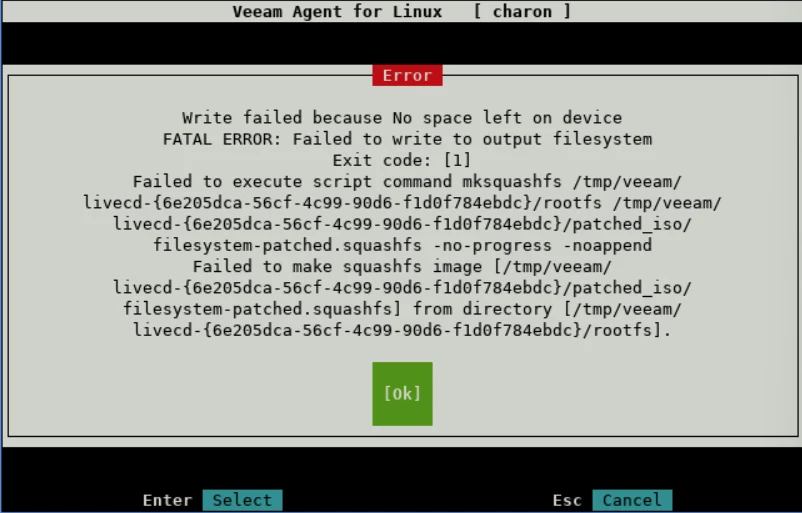
which doesn’t help lots.  What are you using /tmp when I explicitly gave an output directory where there’s loads of space.

Now I guess I need to massively enlarge /tmp which is a problem

D.

Best answer by perdrix52

I’ve managed to schedule a reboot to enlarge /tmp

6 comments

  • Author
  • Comes here often
  • Answer
  • May 10, 2026

I’ve managed to schedule a reboot to enlarge /tmp


coolsport00
Forum|alt.badge.img+23
  • Veeam Legend
  • May 10, 2026

Hi again ​@perdrix52 . What I recommend you do is simply go through the VAL User Guide installation process, step by step, to get it installed. That should help you two-fold...understand the product better and (hopefully) get it installed properly 😊

https://helpcenter.veeam.com/docs/agentforlinux/userguide/installation_before.html?ver=13


Marcel.K
Forum|alt.badge.img+12
  • Veeam Legend
  • May 12, 2026

Hi ​@perdrix52, if you extended /tmp, do you have different error?

as normally it should be loaded into RAM, but if is not enough, it uses /tmp


  • Author
  • Comes here often
  • May 12, 2026

Extending /tmp to 10G did what was necessary :).

Thanks, David


coolsport00
Forum|alt.badge.img+23
  • Veeam Legend
  • May 12, 2026

Glad to hear you got it sorted ​@perdrix52 👍🏻


Chris.Childerhose
Forum|alt.badge.img+22

@perdrix52   -- Were you able to get an answer to your question?  If so, please help the community by posting the answer and then selecting the best answer that helped you achieve this, even if it is your own.




