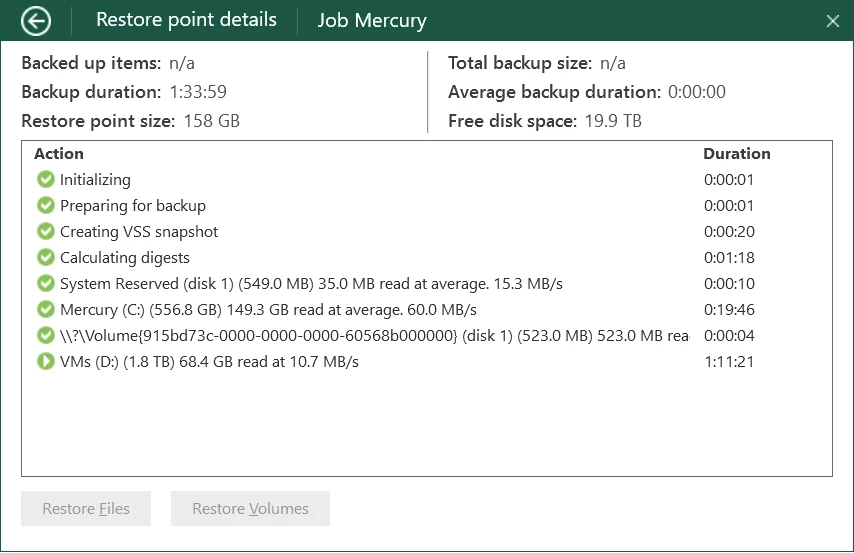
This can depend on many factors like the drive speed you mentioned, connection type, Antivirus exclusions which should be done, etc. and the target location for backups too.
You will not get the speeds you are “thinking” you will get. I use the agent on my laptop daily and yes, I do get faster speeds than this, but both my drives are NVMe.
Check the Veeam Calculators site to see if that can shed more details on this and this KB for AV - https://www.veeam.com/kb1999
At 1.8TB @perdrix52 ...that’s not really horrible. But as Chalid mentions...can you share more about your environment & the system you’re backing up? Are you using VBR Comm Ed or just VAW?
VAW - My memory was faulty - the other drives in that system are 15K drives but that one is an old Hitachi 2TB drive and actually 7200RPM.
I’m currently cloning it to a WD-Re 4TB drive and its going *really* slowly, so I suspect that something’s amiss even though HD Sentinel Pro thinks it is OK?
Lets wait and see.
PS Wish that VBR Community let you install on your own Linux system rather than wanting its own server.
VAW - My memory was faulty - the other drives in that system are 15K drives but that one is an old Hitachi 2TB drive and actually 7200RPM.
I’m currently cloning it to a WD-Re 4TB drive and its going *really* slowly, so I suspect that something’s amiss even though HD Sentinel Pro thinks it is OK?
Lets wait and see.
PS Wish that VBR Community let you install on your own Linux system rather than wanting its own server.
Sounds like a drive issue, so please let us know how you get on once cloned. It should perform better.
@perdrix52 - Ok, thanks for clarifying. Yeah...I certainly bet it’s your drive then & not Veeam. Only 7.2K is not much RPM there, and you do have a large drive so a bit over 1hr restore is what I’d expect tbh. Your other drive (C:) looks like it went way faster (60MB/s). And again..if it’s at 15K RPM, that would be why. I bet when you use your other disk after cloning, restore speed will be faster.
I use WD Black SATA drives. They have 5 year warranty and are 180-270 MB/s performance. I have been switching to Inland Performance SSD drives in my HP Z840. One 1gbps network, I can get 250 MB/s speeds in Veeam. 1gbps is 125 MB/s full duplex. Veeam saturates the 1 gigabit at 125 up and down. I am looking at Brostrend 2.5G Networking. An 8 port switch, 5 port switch and three 2.5G NICs are $160. They are highly rated devices.
I copied the old drive’s content to a new one - it took “forever” (over 48 hours for 2TB). It did eventually complete, and the data are intact (phew!).
The new drive works a lot better, averaging over 125MB/s during the backup - much better than the horrific 10MB/s).