
Question

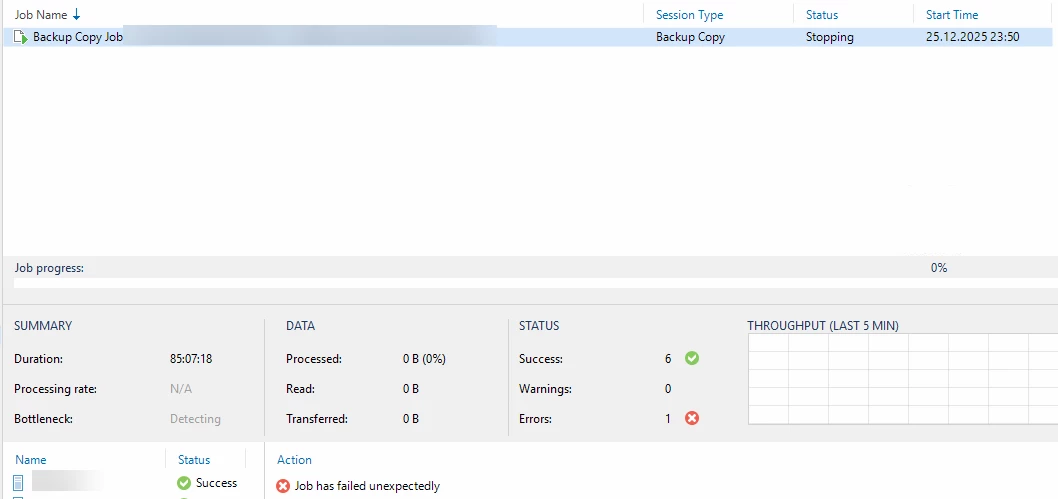
Urgent: Veeam Backup Copy Job in status stopping since 10 hours. Restarted Server with no success.

  • Dec 29, 2025 11:58 AM UTC
  • 6 comments
  • 187 views

Version: 12.3.2.

Problem: a copy job to a rotation drive (HDD) is running since 3 days. I stopped job and confirmed with yes, but since hours status in dashboard running jobs is “stopping”. I can disable job but not delete.


What I did: restart B&R services, reopen console. Restarted whole backup server. no success.


Thanks for any advices.
 

6 comments

wesmrt
Forum|alt.badge.img+4
  • Veeam MVP
  • Dec 29, 2025 12:08 PM UTC

You can try to follow all the steps on this KB: https://www.veeam.com/kb1727
If nothing works, then you will need to open a support case with Veeam.


coolsport00
Forum|alt.badge.img+23
  • Veeam Legend
  • Dec 29, 2025 12:18 PM UTC

Hi ​@stefano2 -

Yeah...about the only thing you haven't done as seen in the KB Wesley posted is attempt to stop the Job via PoSH. You've done pretty much everything else. I also recommend contacting Veeam Support as it sounds like some DB task will need to be performed.

Keep us posted. 


AndrePulia
Forum|alt.badge.img+9
  • Veeam Vanguard
  • Dec 29, 2025 12:41 PM UTC

​@stefano2 The first think I would recommend you to open a support ticket immediately, we are in a holiday season, so, thins use to be slower after usual, for sure follow the Weslay recommendation.


  • Author
  • New Here
  • Dec 29, 2025 12:48 PM UTC

Thanks for advices. I tried all - nothing is working. I opened a ticket.


Marcel.K
Forum|alt.badge.img+13
  • Veeam Legend
  • Dec 29, 2025 12:55 PM UTC

I had exactly this issue.

We have this behaviour since we switched from ms-sql to postgresql.

We have been used dump of configuration by veeam. Exlcuded psql from AV.

And added more CPU and memory of VBR.

The main driver was that VBR is trying to communicate over SSL and in hba conf was not set hostssl for communication , so port of psql.was overloaded. But still not fixed completely, from time to time is still the issue, so support case we have still opened ...


lukas.k
Forum|alt.badge.img+12
  • Influencer
  • Dec 29, 2025 1:37 PM UTC

Hi Stefano,

Just a quick hint: We don’t offer technical support in this forum. Since you wrote “urgent” in the title I’d recommend to open a Veeam support ticket before you open a ticket in this Community Hub - which is and will always be appreciated!

This might save time for you / your customer(s) and let us maybe participate on the solution that support offers - so please keep us posted.


Thank you and fingers crossed that your challenge gets resolved quickly.


Best regards

Lukas