How do I upload a script file to /var/lib/veeam/scripts using console?
I go to the Files tab and browse to the directory. I can edit, rename, delete files, create directories, but how do I simply upload a file!?
Thanks
LOL
Best answer by ddomask
@Jeronimo
Excuse my directness to others in the thread, but other answers are not as accurate / useful as they can be.
Two ways to do this:
SSH like others told, but I advise against this, way too finnicky
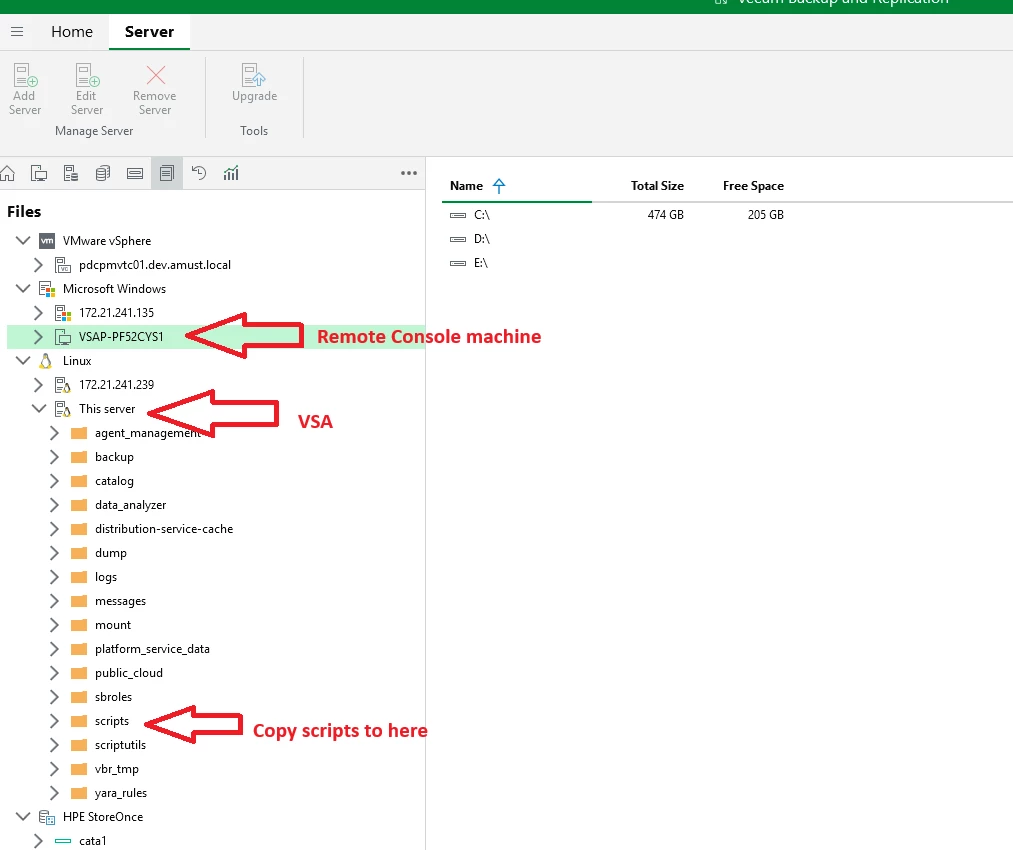
Use the Remote Console (see screenshots below) and do a File Copy (recommended)
However, please note that this only makes sense for pre-freeze / post-thaw scripts -- Pre / Post job scripts will be limited to only native PowerShell commands, as in current versions you cannot import / use the Veeam PowerShell module for pre/post job scripts on the VSA due to the locked down nature of the appliance.
We want to re-introduce the pre/post job script w/ Veeam PowerShell functionality at some point, but no ETA for the moment.
In Veeam v13, there isn't a dedicated "upload scripts" section in the console. Instead, you create your scripts on the Veeam Backup Server and then reference them within the job settings.
Open the Veeam Backup & Replication Console ==> Navigate to Home → Jobs ==> Right-click your backup job and select Edit ==> Go to Storage → Advanced ==> Select the Scripts tab.
@Jeronimo - yeah, as already stated..you are not able to do this with the VSA. If memory serves, I think Veeam was thinking about this behavior and somehow allowing upload in a future release, but I can’t recall definitively. Because of the the sole purpose of what the VSA entails, I wouldn’t count on that option anytime soon though, or maybe even ever. 🤷🏻♂️🙂
forsuch cases, I enable the SSH access and use WinSCP to transfer files to and from the VSA. After uploading scripts this way, you can use them in your jobs.
In Veeam v13, there isn't a dedicated "upload scripts" section in the console. Instead, you create your scripts on the Veeam Backup Server and then reference them within the job settings.
Open the Veeam Backup & Replication Console ==> Navigate to Home → Jobs ==> Right-click your backup job and select Edit ==> Go to Storage → Advanced ==> Select the Scripts tab.
Hope this helps!
Sure but the question was how to get them there in the first place.
The appliances are locked down, apparently that’s the reason why you cannot upload.
So you’d have to enable ssh to do a file transfer … which is kind of awkward since you can do all other operations but upload from the GUI.
Excuse my directness to others in the thread, but other answers are not as accurate / useful as they can be.
Two ways to do this:
SSH like others told, but I advise against this, way too finnicky
Use the Remote Console (see screenshots below) and do a File Copy (recommended)
However, please note that this only makes sense for pre-freeze / post-thaw scripts -- Pre / Post job scripts will be limited to only native PowerShell commands, as in current versions you cannot import / use the Veeam PowerShell module for pre/post job scripts on the VSA due to the locked down nature of the appliance.
We want to re-introduce the pre/post job script w/ Veeam PowerShell functionality at some point, but no ETA for the moment.
Excuse my directness to others in the thread, but other answers are not as accurate / useful as they can be.
Two ways to do this:
SSH like others told, but I advise against this, way too finnicky
Use the Remote Console (see screenshots below) and do a File Copy (recommended)
Okayyyy ty, yeah that makes more sense 😁 Local host filesystem of management machine is indeed shown in the tree, so you copy/paste from that. Gotcha 👌
forsuch cases, I enable the SSH access and use WinSCP to transfer files to and from the VSA. After uploading scripts this way, you can use them in your jobs.
In case anyone uses scp/sftp anyway, make sure to give the file the right permissions afterwards. I had to chmod g+rx otherwise it couldn't even read it in order to copy it over to the client during job..