Solved

Tape library will be removed and a new higher version Quantum Superloader 3 LTO -8 will be added

  • June 27, 2024
  • 5 comments
  • 117 views

Forum|alt.badge.img+1

Are there anything besides the tape that need to be preserved before removing the old tape library? What are the steps to add the new tape library?https://helpcenter.veeam.com/docs/backup/vsphere/connecting_tape_devices.html?ver=120

Following this the drive will automatically appear and how about the media? If the tapes are added to the tape library they will automatically appear in the media.

Last step will be to create a Tape job

Best answer by Chris.Childerhose

When you add the new library the media will be inventoried and added to the system so you will be good.

5 comments

Chris.Childerhose
Forum|alt.badge.img+21
  • Veeam Legend, Veeam Vanguard
  • Answer
  • June 28, 2024

When you add the new library the media will be inventoried and added to the system so you will be good.


Dynamic
Forum|alt.badge.img+13
  • Veeam Vanguard
  • June 29, 2024

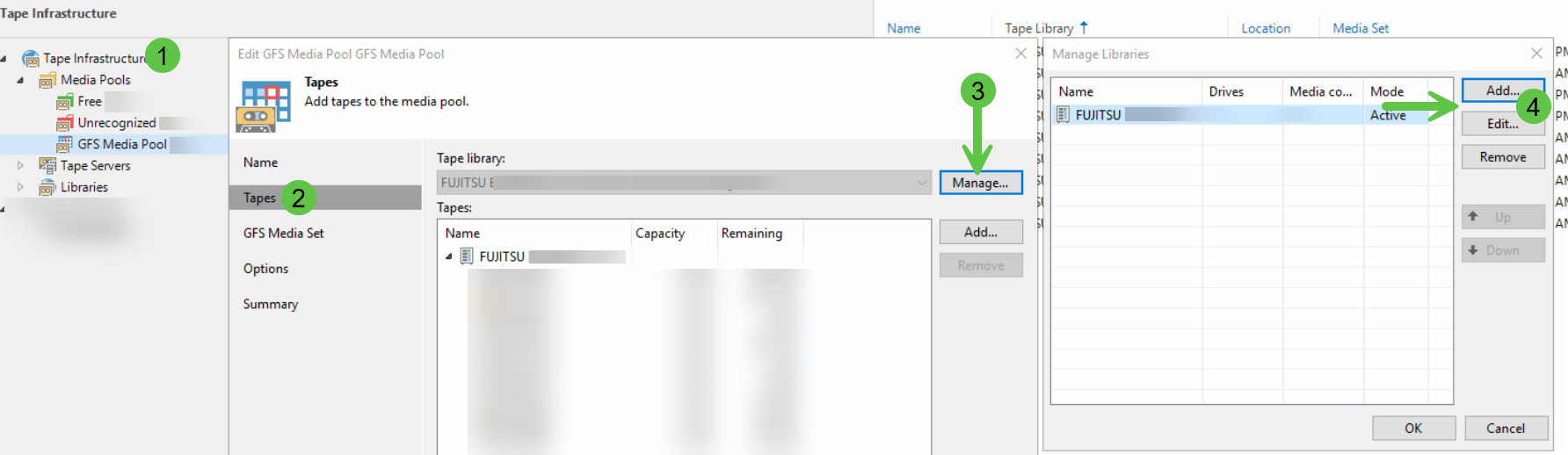
Hi there, if you have an existing job and so also a pool, maybe you have to add/edit the used library in you Media Pool as well. See attached screenshot for examble.

Had this to do a couple of weeks ago on a customer side, after they replaced their device due to a hardware error.


javichumellamo

Have you considered to convert old tapes archive to newer cartridges to keep them readable?

It’s tedious but in the case you want to restore an old tape, you will be in a big trouble if it’s not readable in new drive….


mateuszd
  • New Here
  • April 14, 2026

I migrated from one tape library model to another but stayed on LTO4.

I was hoping for a smooth migration of tapes (something along the lines of clicking on the tape/mediaset and selecting, reassign to different tape library). I followed the documentation describing the migration process of barcoded tapes.

What I actually had to do is remove all tapes, re-inventorize and catalog them on the new library - this is fine in a small environment like my homelab; however, I’m confused how this would be handled in a business environment that might have 1000s of tapes.

You can’t simply re-inventorize them all as it would distract the backup processes significantly, take hours/days and removal of those tapes from inventory comes with other consequences.

Have I done something wrong or do I misunderstand the tape library migration process?

Thanks


Chris.Childerhose
Forum|alt.badge.img+21

I migrated from one tape library model to another but stayed on LTO4.

I was hoping for a smooth migration of tapes (something along the lines of clicking on the tape/mediaset and selecting, reassign to different tape library).

What I actually had to do is remove all tapes, re-inventorize and catalog them on the new library - this is fine in a small environment like my homelab; however, I’m confused how this would be handled in a business environment that might have 1000s of tapes.

You can’t simply re-inventorize them all as it would distract the backup processes significantly, take hours/days and removal of those tapes from inventory comes with other consequences.

Have I done something wrong or do I misunderstand the tape library migration process?

Thanks

That is how it works with a new library, but if the tapes from the old are in the new it will inventory for you when added to Veeam.