


Question

SureBackup Configuration Problem

  • February 24, 2026
  • 6 comments
  • 32 views

NemanjaJanicic
Forum|alt.badge.img+1

Hi everyone,

I have a SureBackup issue and I’m trying to understand the IP selection behavior.

Setup

Repository server has two NICs:

Management NIC

  • 192.168.10.191

  • Has gateway

  • Domain profile

iSCSI NIC

  • 172.16.100.11

  • No gateway

  • No DNS

  • Used only for iSCSI to Synology

Problem

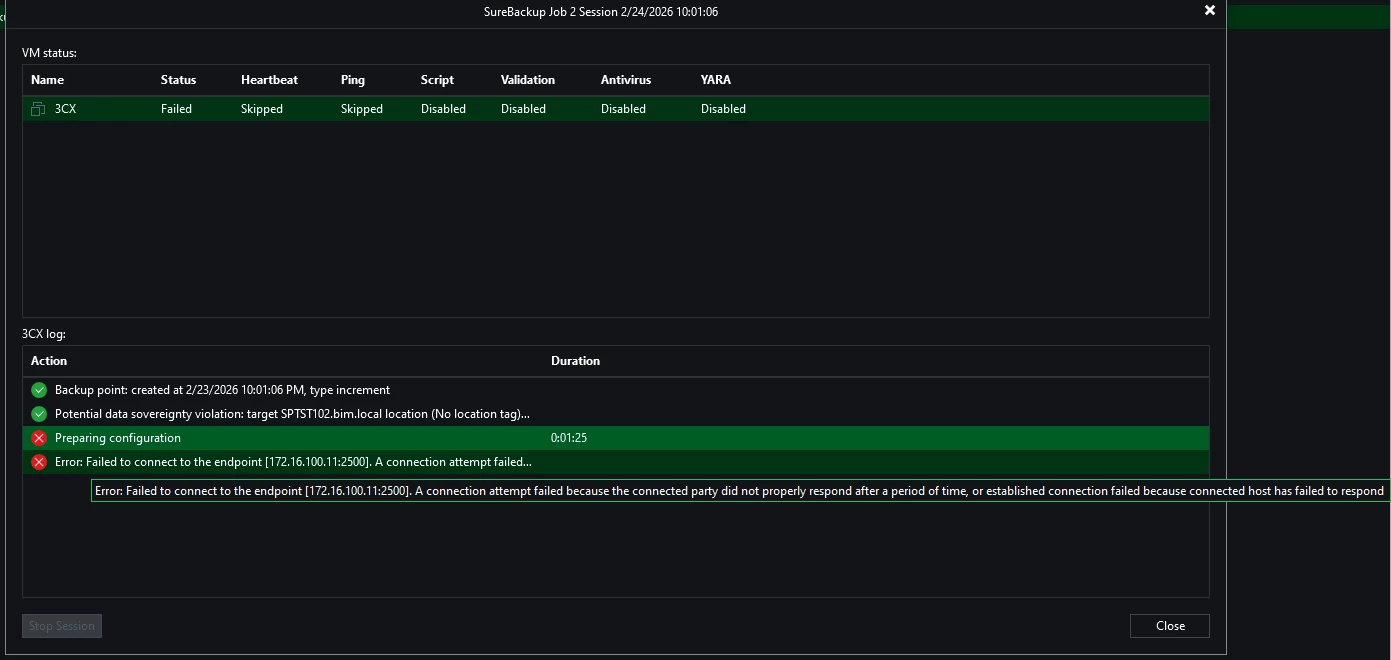
SureBackup fails with:


Failed to connect to the endpoint [172.16.100.11:2500]

Veeam is trying to connect to the iSCSI IP instead of the management IP.

What I verified

  • VBR can connect to 192.168.10.191:2500 → OK

  • VBR cannot reach 172.16.100.11 → expected

  • VeeamTransportSvc is running

  • Port 2500 is listening

  • Firewall rule for 2500 exists

  • iSCSI NIC has no gateway

  • Management NIC has lower metric

Windows DNS API returns

192.168.10.191
172.16.100.11

So management IP is first.



6 comments

CMF
Forum|alt.badge.img+8
  • Veeam Legend
  • February 24, 2026

Hi ​@NemanjaJanicic ,

Have you verified whether the hypervisor is able to connect to the repository? It uses the same mechanism as Instant Recovery, meaning the repository is mounted directly to the hypervisor so it can start the VMs from it.

Have you also checked your firewall to confirm which system is attempting to connect to this IP?

If you’re unable to identify the issue, it might be a good idea to open a support case.


Link State
Forum|alt.badge.img+11
  • Veeam Legend
  • February 24, 2026

Hi ​@NemanjaJanicic 


Try configure on veeam server  “Preferred Networks”

  • Enter the subnet for your Management network (e.g., 192.168.10.0/24).

  • Ensure the checkbox "Allow backup traffic over these networks only" is checked if you want to strictly prevent it from ever touching the 172.x.x.x range.

  • Move this network to the top of the list.

Unregister DNS on NIC ISCSI

  • Right-click the iSCSI NIC > Properties > IPv4 > Advanced > DNS tab.

  • Uncheck "Register this connection's addresses in DNS".


Veeam sometimes caches the IP list for a managed server.

Right-click your Repository server > Properties.
In the Name field, ensure you are using the FQDN or the Management IP (192.168.10.191), not a generic NetBIOS name that might resolve inconsistently.

Click through the wizard to the end. This triggers a "Discovery" process that updates the IP list Veeam holds in its configuration database.


Set NIC Management to 10 and iSCSI to 500


NemanjaJanicic
Forum|alt.badge.img+1
  • Author
  • Influencer
  • February 24, 2026

Hi ​@NemanjaJanicic 


Try configure on veeam server  “Preferred Networks”

  • Enter the subnet for your Management network (e.g., 192.168.10.0/24).

  • Ensure the checkbox "Allow backup traffic over these networks only" is checked if you want to strictly prevent it from ever touching the 172.x.x.x range.

  • Move this network to the top of the list.

Unregister DNS on NIC ISCSI

  • Right-click the iSCSI NIC > Properties > IPv4 > Advanced > DNS tab.

  • Uncheck "Register this connection's addresses in DNS".


Veeam sometimes caches the IP list for a managed server.

Right-click your Repository server > Properties.
In the Name field, ensure you are using the FQDN or the Management IP (192.168.10.191), not a generic NetBIOS name that might resolve inconsistently.

Click through the wizard to the end. This triggers a "Discovery" process that updates the IP list Veeam holds in its configuration database.


Set NIC Management to 10 and iSCSI to 500

Hey ​@Link State,

Already checked that before created this topic. Issue persist after those checks


Link State
Forum|alt.badge.img+11
  • Veeam Legend
  • February 24, 2026

Hi ​@NemanjaJanicic   Try adding a static route for the SCSCI network, assigning it the GW. 

route add -p  192.168.10.xxx mask “your mask”     “Your GW ip”


NemanjaJanicic
Forum|alt.badge.img+1
  • Author
  • Influencer
  • February 24, 2026

I resolve the issue, thank’s ​@Link State  and ​@CMF  for reaching out to help.
At the end it was Firewall policies problem, the communication between VLANs were not properly configured.


CMF
Forum|alt.badge.img+8
  • Veeam Legend
  • February 24, 2026

Great news ​@NemanjaJanicic . Hope everything is working fine now.

Regards

Chalid


