


Question

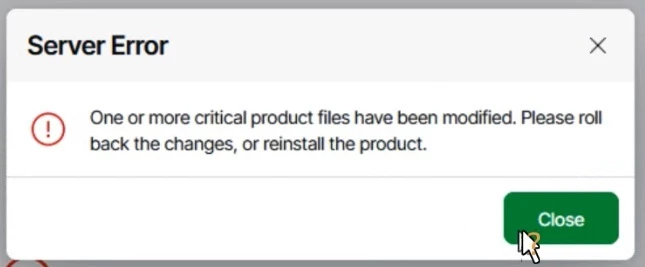
Server Error in Veeam one : One or more critical product files have been modified. Please roll back the changes, or reinstall the product.

  • March 24, 2026
  • 9 comments
  • 104 views

sumit.saini
Forum|alt.badge.img+1

Dear All

Greetings!!!

I fany one face this issue please let me know.
Server Error in Veeam one - One or more critical product files have been modified. Please roll back the changes, or reinstall the product.

After login into Web console of Veeam One i am getting this error message.

Running Version is : 13.0.1.6168
 

9 comments

Chris.Childerhose
Forum|alt.badge.img+21

Did you try rebooting the server?  That tends to work but I had this the other day and problems with my database so had to create a new one.  If those fail create a support ticket.


kciolek
Forum|alt.badge.img+4
  • Influencer
  • March 24, 2026

Like Chris mentioned try rebooting the server. If not open the case with support. 


Let us know how you make out! Good luck!


sumit.saini
Forum|alt.badge.img+1
  • Author
  • Comes here often
  • March 25, 2026

Dear ​@Chris.Childerhose ​@kciolek 

No luck after the restart. Yes, I have raised a support ticket with Veeam.

BR

Sumit


kciolek
Forum|alt.badge.img+4
  • Influencer
  • March 25, 2026

Curious, do you backup the Veeam One Server? You can do a restore to a point in time before the error message 

Hopefully support will get back to you soon and help.


Chris.Childerhose
Forum|alt.badge.img+21

Wait on support as my case with this error was a hotfix which I needed to apply again to ensure all files were the same version.  That fixed mine but see what they say.


  • New Here
  • April 13, 2026

This is what support came back with. 

If no operations are working, we would recommend a reinstall of the software to try to correct the issue. 

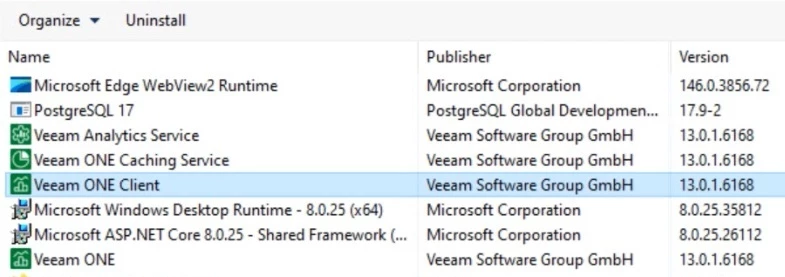
As a next step, please manually uninstall everything starting with 'Veeam' in 'Programs and Features' on the Veeam Server. Some of these components may request specific files for the uninstallation to complete, in which case, please compile a list of all files needed to uninstall all components so I can send them all to you at once.

If everything uninstalls successfully, please uninstall / disable any Antivirus software present on the Veeam Server ( including Windows Defender ), then retry the install. On step 6 ( https://helpcenter.veeam.com/docs/vbr/userguide/install_vbr_settings.html?ver=13), click 'Customize Settings', then on step 8 (https://helpcenter.veeam.com/docs/vbr/userguide/install_vbr_sql.html?ver=13), choose the type of SQL instance engine used for Veeam as your 'Database engine', leaving the default selection for 'SQL Server instance', but change the 'Database name' to some nonexistent database name ( such as 'VeeamBackup2' ). This will install the product under a blank / new database.

Assuming the install completes successfully, we can either:
1) Point back to the original database afterwards using the 'Veeam Configuration Database Connection Utility' ( https://helpcenter.veeam.com/docs/vbr/userguide/dbconfig_utility.html?ver=13 )
or
2) Restore the configuration database ( https://helpcenter.veeam.com/docs/vbr/userguide/vbr_config_restore.html?ver=13 ), selecting the new database we created ( 'VeeamBackup2' ) as the 'Target Database' ( step 6 ) so as to prevent overwriting your original database.

Seems there has to be a better way (I have 28 Veeam labeled programs on this server)


Chris.Childerhose
Forum|alt.badge.img+21

Well if that is what support said then you need to do it.  When you select VBR in the programs section it will remove 95% of things in one shot.  Just FYI.


kciolek
Forum|alt.badge.img+4
  • Influencer
  • April 14, 2026

Yes - would go with what support suggest. Unless you have a backup or replication target you can spin-up from before the issue. My Veeam One server is virtual, so I have a replica 


Chris.Childerhose
Forum|alt.badge.img+21

@vgaspar - I had this same issue with VONE recently and did exactly what Support told you to do, and it has addressed the issue.  It has not come back since so I would follow the suggestion and like I mentioned when you select “Veeam ONE” in the Add/Remove Programs it will remove most of the listed Veeam products.  There may be a few remaining you need to do manual but ensure you get them all removed and reboot before installing again.



