Question

Recovery Media

  • January 29, 2026
  • 8 comments
  • 21 views

Running Veeam agent for Linux, v. 6.3.2.1207_x86_64. OS is Mint MATE 22.  Been making weekly backups for a year or more, just now trying a test recovery on spare computer- loaded some files, ran b/u to ext. drive, deleted files.  Have Recovery Media on stick, using steps in user guide.  All good thru several menus until “Mount Local Disc” which brings up a menu “Select Local Disc” but there are no items from which to select.  Backup drive lights up, so recognized by system.  What am I missing?  

8 comments

coolsport00
Forum|alt.badge.img+21
  • Veeam Legend
  • January 30, 2026

The only reason I’ve had that (tho it’s been with Windows) was due to lack of a driver.

Have you tried creating a custom recovery media?

https://helpcenter.veeam.com/docs/agentforlinux/userguide/val_first_steps_iso.html?ver=13


Mohamed Ali
Forum|alt.badge.img+2
  • VUG Leader
  • January 30, 2026

  • Author
  • Not a newbie anymore
  • January 30, 2026

Thanks both for your responses.  Skating near the edge of my computer skills with this effort- will get back to it as time permits next week.  Also possible that I used the wrong file for the recovery stick.


coolsport00
Forum|alt.badge.img+21
  • Veeam Legend
  • January 30, 2026

Ok ​@Sailorsteve47 - keep us posted.


  • Author
  • Not a newbie anymore
  • January 31, 2026

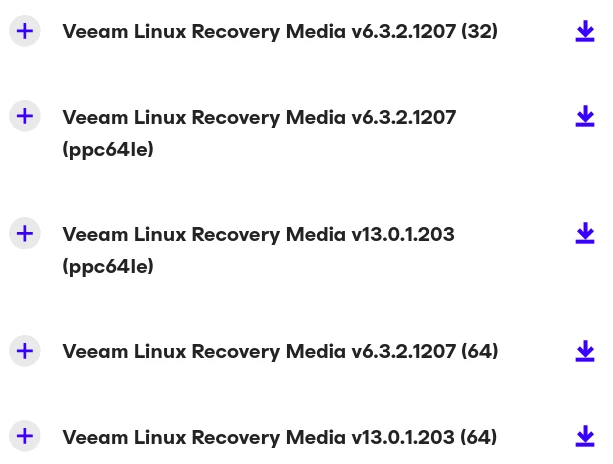
Back to square 1 today- checking for correct downloads for my Linux Mint OS (same d/l as ubuntu).  Backup app must be correct, as I’ve been running it for a year or more on 2 machines, both Linux Mint, no drama.  Next, checked the options for Recovery Media, see screen shot.  Used 4th on list for my 64-bit systems.  Confirmed d/l correct- second d/l today shows (1) next to it, meaning identical to the first one.

Followed the user guide from p.343, cookbook fashion.  On one-time boot (F12 on this OS) there was a cascade of error messages- as is typical, much too fast to read, but all then seemed ok until the glitch in my first post.  Any wisdom on this?


coolsport00
Forum|alt.badge.img+21
  • Veeam Legend
  • January 31, 2026

What is your question ​@Sailorsteve47 ? What ISO to download? It looks like the 2nd to last one in your screenshot, based on the version of VAL you said you have in your initial post.


  • Author
  • Not a newbie anymore
  • January 31, 2026

What is your question ​@Sailorsteve47 ? What ISO to download? It looks like the 2nd to last one in your screenshot, based on the version of VAL you said you have in your initial post.

Looks like we agree on the choice of ISO- just mentioned it in case I was missing something. Just to be sure, I downloaded it again, as mentioned.  The question is, why did the recovery procedure ask me to “Select Local Disk” from a list with no items on it.  No chance to proceed.

The cascade of error messages on starting the recovery might mean something, but went by too fast to read.  This sort of thing has occasionally happened to me (and others) but turned out to be false alarms.  Will try the restore again tomorrow, no time today.


coolsport00
Forum|alt.badge.img+21
  • Veeam Legend
  • February 1, 2026

Well...can’t really answer definitively why your disk isn’t showing to restore to. Again...only time I’ve experienced this is because a driver is needed. Whether you think having the driver isn’t warranted is irrelevant. You’re not seeing the drive to restore to so attempting any resolution is warranted to try to get it to show. 

Let me know how your attempt today goes.

Best.