Solved

MFA Login

  • April 28, 2026
  • 10 comments
  • 53 views

hs08
Forum|alt.badge.img+1
  • Comes here often

I enabled MFA for login and if I login from veeam server then I asked to enter the MFA every I open the console.

If i login from veeam console from my laptop then i’m only asked to enter the MFA when 1st time connect to the server. After that even i already reboot my laptop then i never asked to enter the MFA again.

Best answer by hs08

hello..

The veeam support say the token is valid until 24 hours from sucessfull login, so if we connect less than 24 hours then no MFA needed.

From the case details, I understand that you have queries regarding MFA.

This is a known behavior in Veeam Backup & Replication v13 related to how MFA login sessions are handled for remote console connections.

When you first log in from your laptop and complete MFA successfully, Veeam creates a secure session token for that device. Because of this, future logins may use the existing token and may not ask for MFA again until the token expires.

This is why MFA was requested the first time on your laptop, but not every time afterward. Rebooting the laptop does not clear this token, since it is stored by the Veeam Console application.

The token can remain valid for up to 24 hours from the last successful login

10 comments

Jason Orchard-ingram micro
Forum|alt.badge.img+2

I enabled MFA for login and if I login from veeam server then I asked to enter the MFA every I open the console.

If i login from veeam console from my laptop then i’m only asked to enter the MFA when 1st time connect to the server. After that even i already reboot my laptop then i never asked to enter the MFA again.

Double check the MFA is still enabled for that user

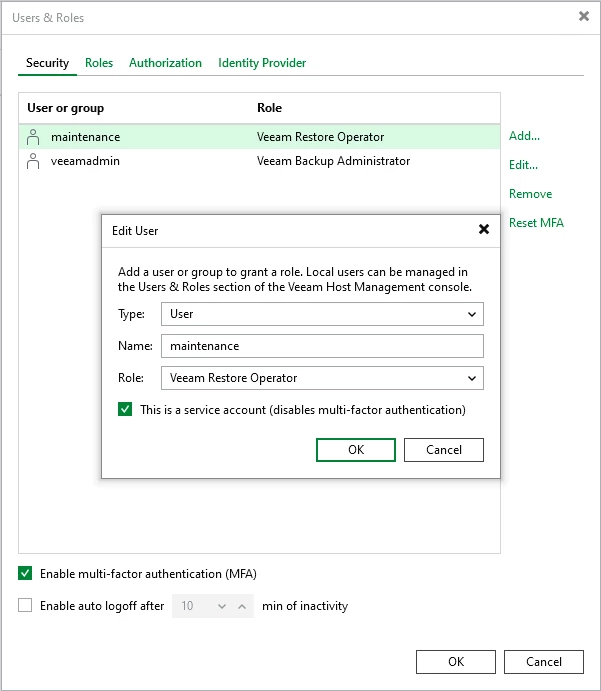
ALSO double check that you haven’t enabled
“This is a service account (disables two-factor authentication)” check box under edit user.


Chris.Childerhose
Forum|alt.badge.img+21

If it is enabled file a support ticket so they can investigate as I have seen this myself.


hs08
Forum|alt.badge.img+1
  • Author
  • Comes here often
  • April 28, 2026

@Jason Orchard-ingram micro yes the MFA still enabled, when i login directly from veeam server i asked to enter the MFA.


@Chris.Childerhose already open ticket to veeam support, will share here if the issue was solved.


Jason Orchard-ingram micro
Forum|alt.badge.img+2

@hs08 So just confirm I understand correctly, This is only happening when your login into your VBR server using the remote console to connect. EG non localhost login. 
Then your aren’t presented with MFA challenge 

if you login directly on the VBR server EG localhost, 
then you are presented with an MFA challenge 


Tommy O'Shea
Forum|alt.badge.img+5
  • Veeam Legend
  • April 28, 2026

I found this forum post which sounds similar to what you are describing.

Perhaps Veeam doesn’t consider the session finalized and therefore re-uses the still valid token. However, I’d open a support ticket and see what they say.


hs08
Forum|alt.badge.img+1
  • Author
  • Comes here often
  • April 28, 2026

@Jason Orchard-ingram micro your uderstanding is correct.

@Tommy O'Shea yes that simillar issuw with me.


hs08
Forum|alt.badge.img+1
  • Author
  • Comes here often
  • Answer
  • April 28, 2026

hello..

The veeam support say the token is valid until 24 hours from sucessfull login, so if we connect less than 24 hours then no MFA needed.

From the case details, I understand that you have queries regarding MFA.

This is a known behavior in Veeam Backup & Replication v13 related to how MFA login sessions are handled for remote console connections.

When you first log in from your laptop and complete MFA successfully, Veeam creates a secure session token for that device. Because of this, future logins may use the existing token and may not ask for MFA again until the token expires.

This is why MFA was requested the first time on your laptop, but not every time afterward. Rebooting the laptop does not clear this token, since it is stored by the Veeam Console application.

The token can remain valid for up to 24 hours from the last successful login


Chris.Childerhose
Forum|alt.badge.img+21

That is interesting and how long it is valid for. To me it should ask each time you run the console but nice to see why it doesn't.


Tommy O'Shea
Forum|alt.badge.img+5
  • Veeam Legend
  • April 29, 2026

@hs08, does this behavior change when you enable the setting to auto-logoff after a certain time of inactivity?


hs08
Forum|alt.badge.img+1
  • Author
  • Comes here often
  • April 29, 2026

@Tommy O'Shea yes i already enable auto logoff but like veeam support say the token is valid for 24 hours.