Question

Large Incremental (.vib) Backup Size for Single Machine


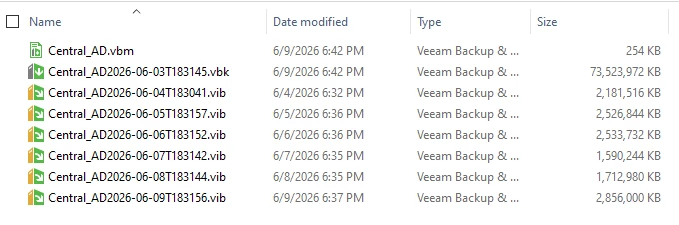
 Details: Files visible: Central_AD.vbm → metadata/config file

Central_AD2026-06-01...vbk → Full backup (~73 GB ✅ normal)

Central_AD2026-06-02...vib → ~2.4 GB

Central_AD2026-06-03...vib → ~2.6 GB

Central_AD2026-06-04...vib → ~2.1 GB

Central_AD2026-06-05...vib → ~2.5 GB

Central_AD2026-06-06...vib → ~2.5 GB

Central_AD2026-06-07...vib → ~1.5 GB

👉 These .vib files are incremental backups (daily changes only)

Hello Veeam Community,

I am using Veeam Agent for Microsoft Windows free for office use, with no big data exchange, and noticed that the incremental backup (.vib) files for a single machine are relatively large (around 1.5 GB to 5.6 GB per day), while the full backup is about 73 GB. Machine details: - Role: Active Directory server (Central_AD) - Backup type: Incremental (daily) I would like to understand:

1. Is this incremental size normal for this type of workload?

2. What factors could cause such daily change rates?

3. Are there recommended optimizations to reduce incremental backup size?

4. How can I identify which files or processes are contributing most to the changed data?

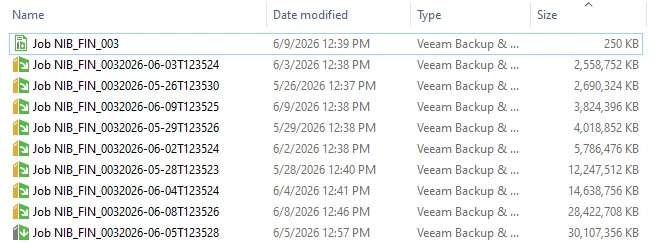
Attached is a sample of backup file sizes over several days.

Thank you.
 

10 comments

Tommy O'Shea
Forum|alt.badge.img+5
  • Veeam Legend
  • June 10, 2026

I wouldn’t say this kind of incremental size is abnormal. If I had to guess, I’d say that windows update could be downloading updates and they’re getting backed along with the rest of the server.

To decrease the incremental backup size, you could increase the compression level. However, this would affect your backup and restore size the higher you set the compression.


Forum|alt.badge.img+3
  • Experienced User
  • June 10, 2026

It’s very normal, I agree with Tommy.

However, keep in mind that any changes to existing data will result in the CBT mechanism seeing the block as “changed”, triggering the C in CBT.

That is, tons of files might get a minor update, only a few bytes even. But that means that the block the data resides on is changed.

Especially for an Active Directory server, the AD DB is going to be constantly updating with minor updates / changes, so you're going to have some churn.

The numbers you show look pretty normal, these are not unusual incremental sizes.

Compression change _may_ help, but I’m doubtful you’re going to see significant reduction. Test is, but I’m going to guess you’ll at best see a very minor improvement.


Tommy O'Shea
Forum|alt.badge.img+5
  • Veeam Legend
  • June 10, 2026

It’s very normal, I agree with Tommy.

However, keep in mind that any changes to existing data will result in the CBT mechanism seeing the block as “changed”, triggering the C in CBT.

That is, tons of files might get a minor update, only a few bytes even. But that means that the block the data resides on is changed.

Especially for an Active Directory server, the AD DB is going to be constantly updating with minor updates / changes, so you're going to have some churn.

The numbers you show look pretty normal, these are not unusual incremental sizes.

Compression change _may_ help, but I’m doubtful you’re going to see significant reduction. Test is, but I’m going to guess you’ll at best see a very minor improvement.

Thanks David, I was thinking something along those lines as well, but couldn’t figure out the best way to articulate it.


coolsport00
Forum|alt.badge.img+23
  • Veeam Legend
  • June 10, 2026

Hi ​@Esayas.T - welcome to the Community!

Can you share why you think 1-2GB Incremental is “large”? Do other Jobs have less Incremental size maybe? As shared by Tommy/David, this size is quite normal. And, for a DC, even moreso. Aside from any modifications within AD itself that may be happening, MS sends updates to Defender and Virus Definition files not just everyday, but at times multiple times throughout the day. Those changes are relatively small, but between them and AD & other OS changes, 1-2GB is no doubt easily achieved imo.

Hope that helps explain a bit.

Let us know if you have further questions.


wolff.mateus
Forum|alt.badge.img+12
  • Veeam Vanguard
  • June 10, 2026

This is a normal behavior.

In environments that we do not have so many changes is normal to get .vib on this size.


I can see that you are looking for this on repository side.

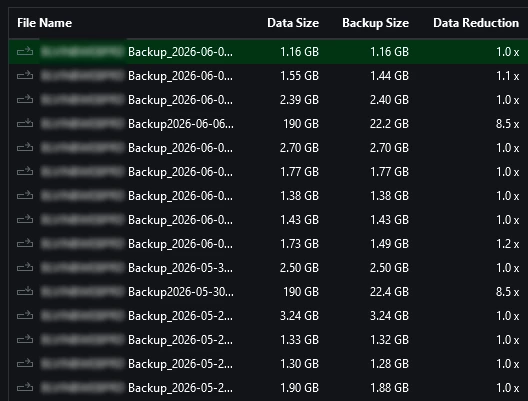
Try too look this on the Veeam side. Go to Backups menu and take the properties of this chain. Over there you can see other informations like the Data Reduction collun:


  • Author
  • Not a newbie anymore
  • June 11, 2026


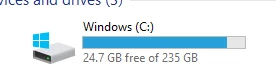
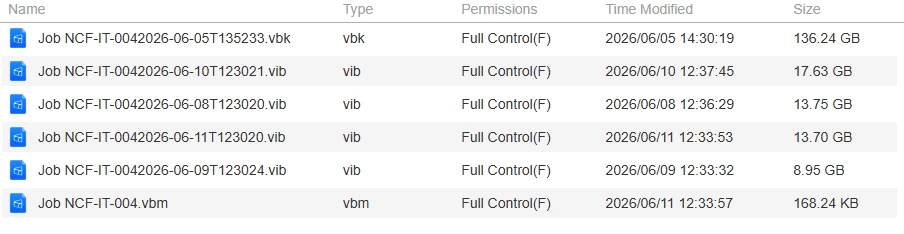
Hello, I appreciate all of your support. ​@wolff.mateus ​@Tommy O'Shea As always, ​@coolsport00 , I have a significant amount of space left on my computer's local disk. I am only requesting a backup by volume, not the entire disk. You mentioned that it is normal for a computer to back up this much data in a day. However, each day the size of the .vib file seems excessive. If I were to explain everything to you, how could such a large amount of data be backed up?


coolsport00
Forum|alt.badge.img+23
  • Veeam Legend
  • June 11, 2026

Hi ​@Esayas.T - honestly, it’s hard to say why exactly you get anywhere from 8-18GB of change data per day since I don’t know your environment; and evenso would still be difficult to fully explain. Veeam Agent backups are different than Veeam “image level” (i.e. VM) backups, so honestly..I can’t give a solid answer. As this site is moreso for “general assistance” and not actual Support, I advise you to contact Veeam Support for them to hopefully answer your question. You stated you are using the Free Edition, and with that...Support is really what Veeam calls best effort for your Edition of product. If they have time to answer, they will. 


Forum|alt.badge.img+3
  • Experienced User
  • June 11, 2026

@Esayas.T 

I think you’re confusing things a bit by showing multiple backups. As i see it from your screenshots, you’re showing three different backups:

Central_AD

JOB_NIB_FIN

JOB_NFC_IT

Going to guess the first one is your AD server, and this has already been explained, please see the first two posts -- if there are statements which are not clear for you, please ask on those specific statements so we can better advise.

For the other two jobs, the incremental size will depend heavily on the applications / workloads on those servers.

Tell us a bit more about the workloads (applications running on the servers) running on the last two jobs NIB_FIN and NFC_IT -- it may help to explain a bit more why the increments are bigger there.

But again, for the Central_AD job, 1-2 GiB for an increment is normal, this is changed block tracking catching changes to data on the server. 

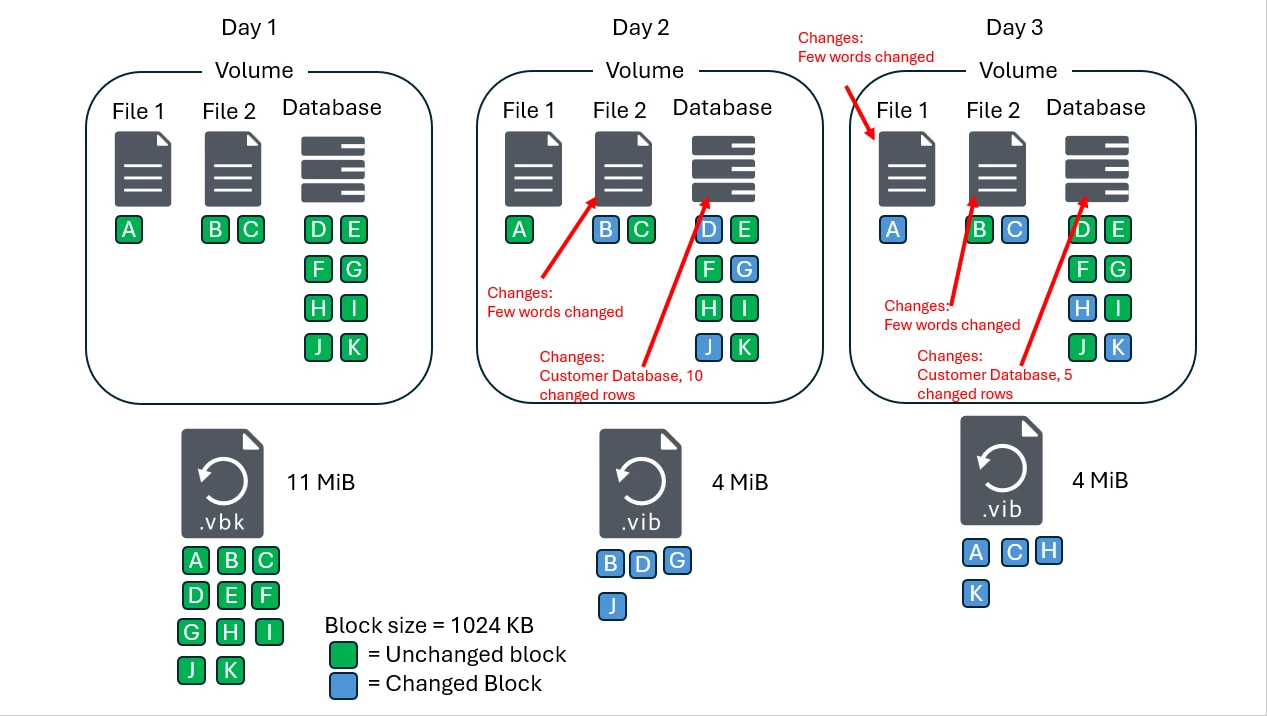
To repeat: Volume level backups work with blocks, not individual files. If a file gets updated even by a single byte, that means one of the blocks changes, and the entire block must be backed up by the increment:

In this example, assume a single volume on a server with 2 files and a database. Full Backup (VBK) has all the blocks. 

Blue blocks represent a block in which has changed -- for the file, it could be as simple as someone added a comment, added a few words, changed some text, doesn’t matter. If a single byte on the block is changed, the entire block gets backed up. 

Same for the database, maybe you only updated a single column for a row, maybe you added a few new rows, but the underlying block has changed on the storage, and must be backed up.

See why it matters a bit? More information is needed on what is actually running on these servers -- do not think about it as “what file changed?” just think about the activity. An Active Directory server will be constantly doing maintenance, logging data, etc. An SQL server will be very busy as well and produce a lot of changes.

I would ignore the Central_AD backup, that really looks very normal.

For your other server, more details needed.


Forum|alt.badge.img+3
  • Experienced User
  • June 11, 2026

I will also note, if you’re doing agent backups in File Mode (as opposed to volume), then if even a single change to any file is made, the entire file is included in the increment

So please consider that as well as you review this information, but as I get it you use Volume level backup, so we speak of blocks, not files.


coolsport00
Forum|alt.badge.img+23
  • Veeam Legend
  • June 11, 2026

Great additional explanation there David! 👍🏻