
Question

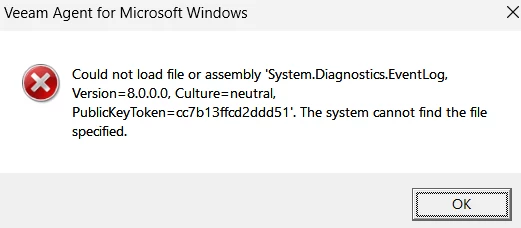
Just installed Agent for Windows 13, get "Could not load file or assembly 'system.diagnostics.eventlog,

  • February 22, 2026
  • 6 comments
  • 27 views

Trying to get Veeam Agent for Windows to run, installs without error using:
VeeamAgentWindows_13.0.1.1009.exe

I get the following error when trying to run anything…

Could not load file or assembly 'System.Diagnostics.EventLog, Version=8.0.0.0, Culture=neutral, PublicKeyToken=cc7b13ffcd2ddd51'. The system cannot find the file specified.

I installed .net 8.0.24, here’s the list of runtimes…

C:\>dotnet --list-runtimes
Microsoft.AspNetCore.App 8.0.24 [C:\Program Files\dotnet\shared\Microsoft.AspNetCore.App]
Microsoft.NETCore.App 8.0.24 [C:\Program Files\dotnet\shared\Microsoft.NETCore.App]
Microsoft.WindowsDesktop.App 8.0.24 [C:\Program Files\dotnet\shared\Microsoft.WindowsDesktop.App]

After installing the runtimes, I’ve removed the agent software, rebooted, reinstalled but the same issue continues.

Anybody have any ideas?
6 comments

  • Author
  • New Here
  • February 22, 2026

Installed on another system with new OS. (Win11 Pro)
This had no .net installed, so it installed it as part of the program install, runs fine.

So I removed all the .net instances on the first machine as well as Veeam agent, rebooted, reinstalled aganet, it needed to install .net and did so as part of the installation (I figured it would install the exact component needed) but still get the same error.


Chris.Childerhose
Forum|alt.badge.img+21
  • Veeam Legend, Veeam Vanguard
  • February 22, 2026

Check the logs here - %ProgramData%\Veeam\Endpoint Backup\Logs\

Otherwise I would suggest a support ticket to get to the bottom of this.


coolsport00
Forum|alt.badge.img+21
  • Veeam Legend
  • February 22, 2026

Looks like you’re on the right track ​@desertsailor according to these 2 posts I found on the error in:
https://learn.microsoft.com/en-us/answers/questions/1287135/(solved)-app-fails-with-could-not-load-file-or-ass

https://geekchamp.com/fix-could-not-load-file-or-assembly-or-one-of-its-dependencies-error/

See if the logs show anything more concrete as Chris suggests above. Something isn’t installing properly on the .Net side it appears.

Also...did you check the VAW v13 Sys Req’s?
https://helpcenter.veeam.com/docs/agentforwindows/userguide/system_requirements.html?ver=13

All the ancillary software installs (.Net Desktop, ASP.NET Core) need to be the same version. If you have any installed already and it’s a more recent version than VAW, Veeam will not install the version it has. And that means...if you didn’t/don’t have any of the other software required, Veeam will install it, but that would be a different version than what you have for the other software you already have. Make sense? All that to say..make sure all software is of equal version.

If it is...I don’t really have any other suggestion than Support.


  • Author
  • New Here
  • February 22, 2026

While troubleshooting I discovered that I couldn’t view any of my eventviewer logs, they’d crash mmc. I figured since it seemed to be an “eventlog” type function, I cleared out all the logs and got the eventviewer back up and running. Uninstalled and reinstalled the Veeam agent, still the same error. I’ll follow up on the VAW v13 Sys Req’s next. Thanks.


  • Author
  • New Here
  • February 22, 2026

All the system requirements are met, win11 25h2.

I’ll move towards a support ticket tomorrow. Thanks for all the input!


Chris.Childerhose
Forum|alt.badge.img+21
  • Veeam Legend, Veeam Vanguard
  • February 22, 2026

Let us know how it goes.



