Question

Help In reinstalling Veeam on standalone server

  • May 6, 2026
  • 6 comments
  • 32 views

I have Veeam 13 installed , I removed it and tried to install it again ,

I mounted the ISO and click setup , then got the below error message  
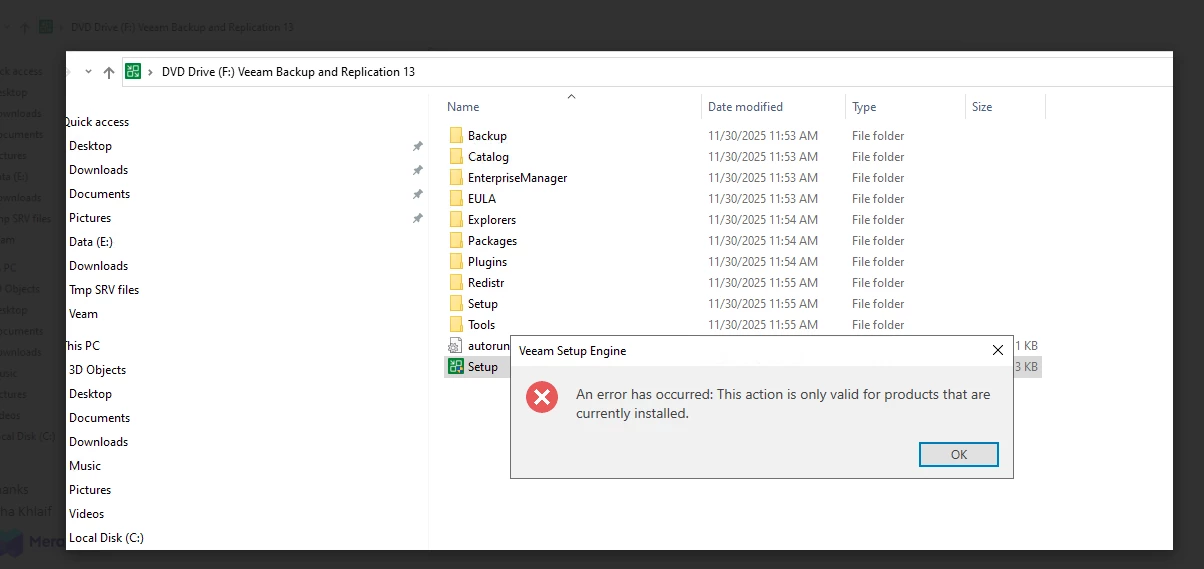
So any suggestions as seems still detect previous setup while i completely cleanup it


6 comments

lukas.k
Forum|alt.badge.img+13
  • Influencer
  • May 6, 2026

In general, I suggest the following steps:

  • Reboot the server, try again (if not already done)
  • Remove all Veeam folders in Program Files, Program Files (x86) and ProgramData manually
  • Remove potential regkeys (only second / third step)

Did the iso work before? I’ve seen several cases where the iso was corrupted, so you may want to download it again.


If all that doesn’t help, I suggest opening a Veeam support ticket.


Iams3le
Forum|alt.badge.img+13
  • May 6, 2026

I have not experienced this issue myself, but I will recommend following the steps shared by Lukas above and here is a similar issue below. 

… you may also find this link useful: https://www.reddit.com/r/Veeam/comments/1rtiuc8/veeam_installer_error_this_action_is_only_valid/. Lastly, this issue is not directly tied to your issue. Therefore, I will recommend that you double check if the installer is blocked because the ISO was downloaded from the internet.


coolsport00
Forum|alt.badge.img+22
  • Veeam Legend
  • May 6, 2026

Hi ​@TahaKhlaif - Welcome to the Community!

I’d try what ​@lukas.k suggested and comment back to see how you fair out. Sometimes re-install can be a bit of a challenge (there are several posts where folks have had issues; not just with v13, but v12, etc as well).

Let us know how it goes.


Chris.Childerhose
Forum|alt.badge.img+21

Also, what version of the ISO are you using for v13?  Did you use something different or newer the first time and now a slightly older version?  Check the Add/Remove Programs to ensure there are no more Veeam entries and if there are, remove them.  Then try the installation again.


coolsport00
Forum|alt.badge.img+22
  • Veeam Legend
  • May 6, 2026

I guess another thing to make sure ​@TahaKhlaif , is to verify you actually are using the VBR install ISO and not the Veeam Infrastrucutre Appliance (VIA) ISO. You said you are reinstalling, so I assume you’re using the same VBR ISO, but just something double-check.


kciolek
Forum|alt.badge.img+4
  • Influencer
  • May 6, 2026

verify you have the correct ISO ..by that I mean if you’re installing the Premium version (all 3) and only have the server installed it won’t work. That’s what I’ve experienced









