Solved

Failed to connect to agent EP The message recdeived was unexpected or badly formatted

  • January 12, 2026
  • 16 comments
  • 73 views

Using Veeam Backup and Repliaction 12, and running a file backup, receiving the following error, “Error: Failed to connect to agent: ‘VeeamServerName’, EP ‘VeeamServer IP Address:2502’. The message received was  unexpected or badly formatted.

Best answer by itcgtmt.com

Yes, we changed the intrusion detection and prevention back to prevention and added the ip address for our Veeam Server as a trusted IP and everything ran successfully last night


16 comments

Chris.Childerhose
Forum|alt.badge.img+21
  • Veeam Legend, Veeam Vanguard
  • January 12, 2026

What version of Veeam are you using?  Also did you check the logs - C:\ProgramData\Veeam\

Without further information you will need to contact Support and open a ticket.  I think this would be the best route to have them analyze the logs to determine the issue.


coolsport00
Forum|alt.badge.img+21
  • Veeam Legend
  • January 12, 2026

Aside from checking the logs and/or contacting Support as Chris suggests...have any changes been made to the Job? Environment? Network? Permissions to the source host change? Firewall or A/V changes or exceptions been made? Those are some things I’d check on.


  • Author
  • Not a newbie anymore
  • January 12, 2026

no change on the job, using veeam version 12.3.2.4165


coolsport00
Forum|alt.badge.img+21
  • Veeam Legend
  • January 12, 2026

Ok. Well..aside from checking the log location of the Job log, a case to Support is probably your best bet.


  • Author
  • Not a newbie anymore
  • January 12, 2026

can you direct me to the link to create a support ticket...thank you for your help


coolsport00
Forum|alt.badge.img+21
  • Veeam Legend
  • January 12, 2026

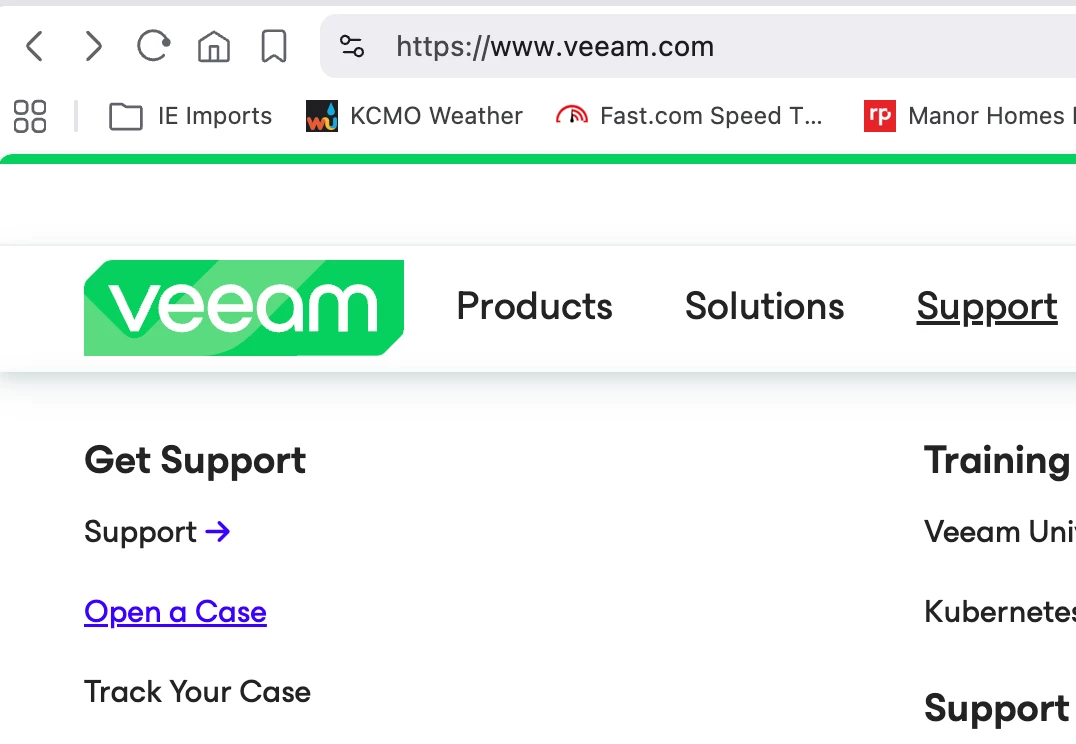
Go to veeam.com, hover your mouse on the Support tab, then click open a case:


You are then directed to login and proceed to open a case.


  • Author
  • Not a newbie anymore
  • January 12, 2026

thank you for your help


coolsport00
Forum|alt.badge.img+21
  • Veeam Legend
  • January 12, 2026

@itcgtmt.com - no problem...keep us posted


  • Author
  • Not a newbie anymore
  • January 15, 2026

looks as though our Meraki firewall that we put in a few weeks back is what is causing the issues, now we need to find out what is blocking it :)


coolsport00
Forum|alt.badge.img+21
  • Veeam Legend
  • January 15, 2026

Ah, ok..firewall. Glad you found it as being one of the culprits I suggested it could’ve been 😉

Keep us posted ​@itcgtmt.com 


  • Author
  • Not a newbie anymore
  • January 15, 2026

once we set our intrusion detection and prevention back to prevention and added the ip address of our VBR server as a trusted IP address, appears that backups are working. Will need to see this evening when they’re scheduled to run.


coolsport00
Forum|alt.badge.img+21
  • Veeam Legend
  • January 15, 2026

Nice! Ok...again...let us know.


Chris.Childerhose
Forum|alt.badge.img+21
  • Veeam Legend, Veeam Vanguard
  • January 15, 2026

once we set our intrusion detection and prevention back to prevention and added the ip address of our VBR server as a trusted IP address, appears that backups are working. Will need to see this evening when they’re scheduled to run.

Great to hear.  Once backups run be sure to come back to confirm things and select the best answer for your thread even if it is your own for others to see.


  • Author
  • Not a newbie anymore
  • Answer
  • January 16, 2026

Yes, we changed the intrusion detection and prevention back to prevention and added the ip address for our Veeam Server as a trusted IP and everything ran successfully last night



coolsport00
Forum|alt.badge.img+21
  • Veeam Legend
  • January 16, 2026

Glad to hear! Thanks for sharing your final resolution.


Chris.Childerhose
Forum|alt.badge.img+21
  • Veeam Legend, Veeam Vanguard
  • January 16, 2026

Great to hear you were able to resolve the issue.