Solved

Error when uninstall VBR 13

  • February 10, 2026
  • 5 comments
  • 35 views

Dear Veeam team,

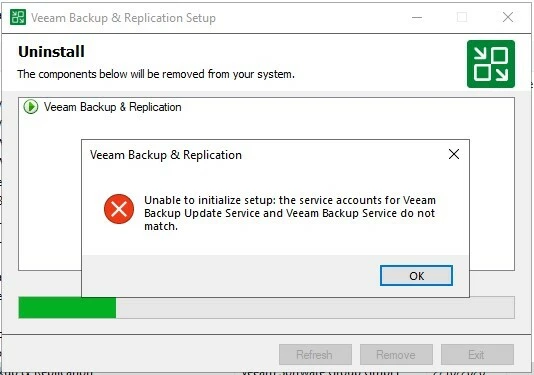
I am trying to uninstall VBR 13 but get stuck the issue below. I have checked both services: Veeam Backup Update Service and Veeam Backup Service. There is no Veeam Backup Service anymore.

Please advise me for this case
 

Best answer by Link State

Dear Veeam team,

I am trying to uninstall VBR 13 but get stuck the issue below. I have checked both services: Veeam Backup Update Service and Veeam Backup Service. There is no Veeam Backup Service anymore.

Please advise me for this case



Hi

Have you deleted the service accounts associated with the two services?

If so, you can recreate the accounts, reassign the startup logon, and try the uninstallation again.


Re-create the missing VB Service

sc create VeeamBackupSvc binPath= "C:\Program Files\Veeam\Backup and Replication\Backup\Veeam.Backup.Service.exe" start= auto


Set the SAME logon account

If the Update Service runs as Local System, run:

sc config VeeamBackupSvc obj= LocalSystem password= ""

If it runs as a domain or local user:

sc config VeeamBackupSvc obj= "DOMAIN\username" password= "password"

This is a known uninstallation issue in Veeam Backup & Replication 13. It occurs when service accounts stored in the configuration are inconsistent, even if one of those services no longer exists

5 comments

Link State
Forum|alt.badge.img+11
  • Veeam Legend
  • Answer
  • February 10, 2026

Dear Veeam team,

I am trying to uninstall VBR 13 but get stuck the issue below. I have checked both services: Veeam Backup Update Service and Veeam Backup Service. There is no Veeam Backup Service anymore.

Please advise me for this case


Hi

Have you deleted the service accounts associated with the two services?

If so, you can recreate the accounts, reassign the startup logon, and try the uninstallation again.


Re-create the missing VB Service

sc create VeeamBackupSvc binPath= "C:\Program Files\Veeam\Backup and Replication\Backup\Veeam.Backup.Service.exe" start= auto


Set the SAME logon account

If the Update Service runs as Local System, run:

sc config VeeamBackupSvc obj= LocalSystem password= ""

If it runs as a domain or local user:

sc config VeeamBackupSvc obj= "DOMAIN\username" password= "password"

This is a known uninstallation issue in Veeam Backup & Replication 13. It occurs when service accounts stored in the configuration are inconsistent, even if one of those services no longer exists


  • Author
  • New Here
  • February 11, 2026

Thank you for your comment

It works now, I am very appreciated


Link State
Forum|alt.badge.img+11
  • Veeam Legend
  • February 11, 2026

Thank you for your comment

It works now, I am very appreciated

Please mark the best answer. Thank you for your feedback.


  • Author
  • New Here
  • February 11, 2026

Yes I marked

Could you please advise me one more issue.

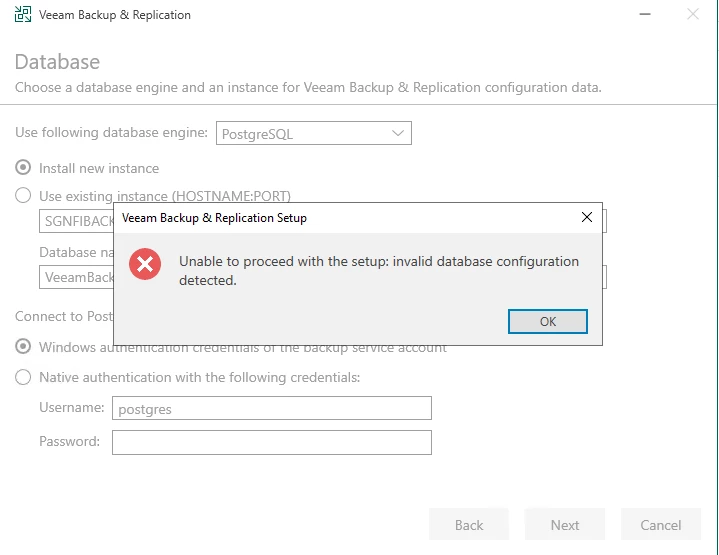
I tried to install new instance and get the error as the picture.

Thank you


Link State
Forum|alt.badge.img+11
  • Veeam Legend
  • February 11, 2026

Yes I marked

Could you please advise me one more issue.

I tried to install new instance and get the error as the picture.

Thank you

Did you install Postgress manually? 

[guide] v12.1 Beta: How to Install PostgreSQL 15.4 & VBR 12.1 & EM + Malware Detect Extension to Monitor | Veeam Community Resource Hub