Answer

Cannot find layout information for disk

  • June 19, 2025
  • 11 comments
  • 1024 views

Marcel.K
Forum|alt.badge.img+9

Hello,

do you have hints, where could be the issue with VM backup job without AAP, on vSphere:
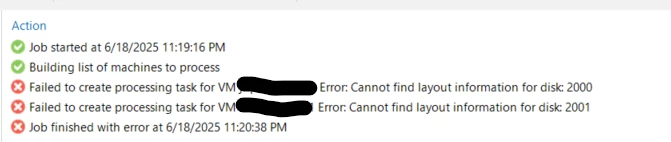
 

[18.06.2025 23:20:05.172]    <01> [000E]   Error (3)    Task failed.
[18.06.2025 23:20:05.172]    <01> [000E]   Error (3)    Cannot find layout information for disk: 2000 (System.Exception)
[18.06.2025 23:20:05.172]    <01> [000E]   Error (3)       at Veeam.Backup.Core.SanPlugin.CViStorageIntegrationProxyBuilder.GetDiskLayoutExForDisk(CVm vm, CVirtualDisk virtualDisk)
[18.06.2025 23:20:05.172]    <01> [000E]   Error (3)       at Veeam.Backup.Core.SanPlugin.CViStorageIntegrationProxyBuilder.GetVmDisksLunsInfo(CViVmContext viVmContext, VmEntry vmEntry)
[18.06.2025 23:20:05.172]    <01> [000E]   Error (3)       at Veeam.Backup.Core.SanPlugin.CViStorageIntegrationProxyBuilder.BuildSanProxyForBOSS(CViVmContext viVmContext, CViProxyResourceDesc[] sourceProxyResourceDescs, CViBrtProxyResourceDesc targetProxysDesc, VmEntry vmEntry)
[18.06.2025 23:20:05.172]    <01> [000E]   Error (3)       at Veeam.Backup.Core.SanPlugin.CViStorageIntegrationTaskResourceBuilder.BuildSourceProxyResources(CViVmContext viVmContext, CBackupTaskSession taskSession, CProxyVmCache proxyVmCache)
[18.06.2025 23:20:05.172]    <01> [000E]   Error (3)       at Veeam.Backup.Core.CViTaskResourceBuilder.BuildSourceProxyResources(CViVmContext viVmContext, CBackupTaskSession taskSession, IReadOnlyList`1 allProxies, CProxyVmCache proxyVmCache)
[18.06.2025 23:20:05.172]    <01> [000E]   Error (3)       at Veeam.Backup.Core.CViTaskResourceBuilder.BuildDiskResources(CResourcesContainer resources, CBackupTaskSession taskSession, VmEntry vmEntry, IViReplicaVmSpec vmSpec, CViVmContext viVmContext, IReadOnlyList`1 allProxies, CProxyVmCache proxyVmCache)
[18.06.2025 23:20:05.172]    <01> [000E]   Error (3)       at Veeam.Backup.Core.CViTaskResourceBuilder.CreateResourceData(CViVmContext viVmContext, CBackupTaskSession taskSession, IViReplicaVmSpec vmSpec, Guid objectId, Boolean useVss, IReadOnlyList`1 allProxies, CProxyVmCache proxyVmCache)
[18.06.2025 23:20:05.172]    <01> [000E]   Error (3)       at Veeam.Backup.Core.CViTaskBuilder.CreateViVmTasks(CViTaskBuilderEntry entry, CVcdTaskInfo vcdTaskInfo, IViReplicaVmSpecBuilder vmSpecBuilder, IInitialTaskCreator initialTaskCreator, IReadOnlyList`1 allProxies, CProxyVmCache proxyVmCache)
[18.06.2025 23:20:05.188]    <01> [000E]   Error (3)    Cannot find layout information for disk: 2000 (System.Exception)

Best answer by Marcel.K

Thank you very much

issue was with automation of deployment VM, where was used wrong storage policy and VMs were not powered on.

In vCenter is echo for this VM: “VM Storage Policy Compliance: Noncompliant”

after fixing that, everything is working properly

11 comments

MarcoLuvisi
Forum|alt.badge.img+6
  • VUG Leader
  • June 19, 2025

Hello ​@Marcel.K 

this is first time to see this error ?
It’s a new job or an old job working fine until yesterday ?

Are VM migrated from other hypervisor ?


Marcel.K
Forum|alt.badge.img+9
  • Author
  • Veeam Legend
  • June 19, 2025

This is old job, no migration, but it was fully restored.


MarcoLuvisi
Forum|alt.badge.img+6
  • VUG Leader
  • June 19, 2025

Chris.Childerhose
Forum|alt.badge.img+21

A support case for this one would be the best route.  I don't think any of us would be ideal to help with this one.


coolsport00
Forum|alt.badge.img+21
  • Veeam Legend
  • June 19, 2025

A support case for this one would be the best route.  I don't think any of us would be ideal to help with this one.

Agreed 👍🏻


kira.bezhanova
Forum|alt.badge.img+3

I think I had a similar issue at some point in time, do not remember the exact error, it looked guest related, but was coming from vSphere, restarting management agents on the host helped: https://knowledge.broadcom.com/external/article/320280/restarting-the-management-agents-in-esxi.html


Tommy O'Shea
Forum|alt.badge.img+5
  • Veeam Legend
  • June 19, 2025

I too ran into this issue a while back. I opened a case with Veeam support, and they asked me to check to see if any ISO or CD/DVD drive was attached. At the time it wasn’t, and I said I’d open a case with vmware support. I can’t find the vmware support ticket however.

The R&D forums link that ​@MarcoLuvisi shared is a very good thing to check. I have definitely run into errors when vms have drives that are not whole numbers. Rounding them up to the nearest GB fixed errors for me in the past.


Forum|alt.badge.img+3
  • Comes here often
  • June 19, 2025

>CViStorageIntegrationProxyBuilder

Looks like issues with proxy fetching data for Backup from Storage Snapshot.

As a quick temporary workaround, try disabling Backup from Storage Snapshot if it’s feasible for these systems. 

I would suggest a Veeam Support case like others have, regrettably this issue will require a bit of investigation likely. A few things you _might_ try, but I’m not confident will help:

  1. Rescan vCenter in VBR
  2. (If really using Storage Integration for Backup for Storage Snapshot) Rescan the storage system as well, please note carefully if there are any warnings or errors
  3. Reboot proxies and rescan

I must be honest I don’t expect these to solve the issue but worth a shot as maybe or at least maybe will reveal issue with Proxies or communication to vSphere/storage, but it’s worth noting in your case these steps and the results of the step. (Note the date and time you performed the steps also, it will help Support find the rescans in the logs easier)


MarkBoothman
Forum|alt.badge.img+7
  • Influencer
  • June 20, 2025

If you edit the VM do the virtual disk show as number with a lot of decimal points?


e.g. instead of say 200 GB it shows 200.8777237232 or something similar?


If so try adjusting the disk size to a rounded up number.


coolsport00
Forum|alt.badge.img+21
  • Veeam Legend
  • June 20, 2025

A lotta good suggeestions here...most which I forgot about 😂


Marcel.K
Forum|alt.badge.img+9
  • Author
  • Veeam Legend
  • Answer
  • August 12, 2025

Thank you very much

issue was with automation of deployment VM, where was used wrong storage policy and VMs were not powered on.

In vCenter is echo for this VM: “VM Storage Policy Compliance: Noncompliant”

after fixing that, everything is working properly