Answer

can't use non "administrator" account for connecting to Hyper-V host

  • April 16, 2024
  • 13 comments
  • 3256 views

I’m sure I’m overlooking something obvious -- 

Veeam is running on a Windows 2022 server on the domain.

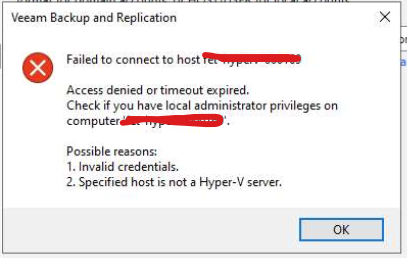
When adding my non-domain Hyper-V host (Windows 2022) to the Veeam managed servers, the only credentials that work are hostname\administrator. Any other account on the Hyper-V host with full administrative rights is failing with --

“Failed to connect to host XX.XX.XX.XX

Access denied or timeout expired.

Check if you you have local administrator privileges on computer ‘XX.XX.XX.XX’.

Possible reasons.

1. Invalid credentials.

2. Specified host is not a Hyper-V server.” 

I’d prefer to disable the .\administrator account on the Hyper-V host, so I’d love to know what I need to do to get my non .\administrator accounts working with Veeam. 

Thanks, 

Chris 
Best answer by coolsport00

Hi @cdmoore1972 -

This is a known issue & is not Veeam-related, but a Microsoft security measure.

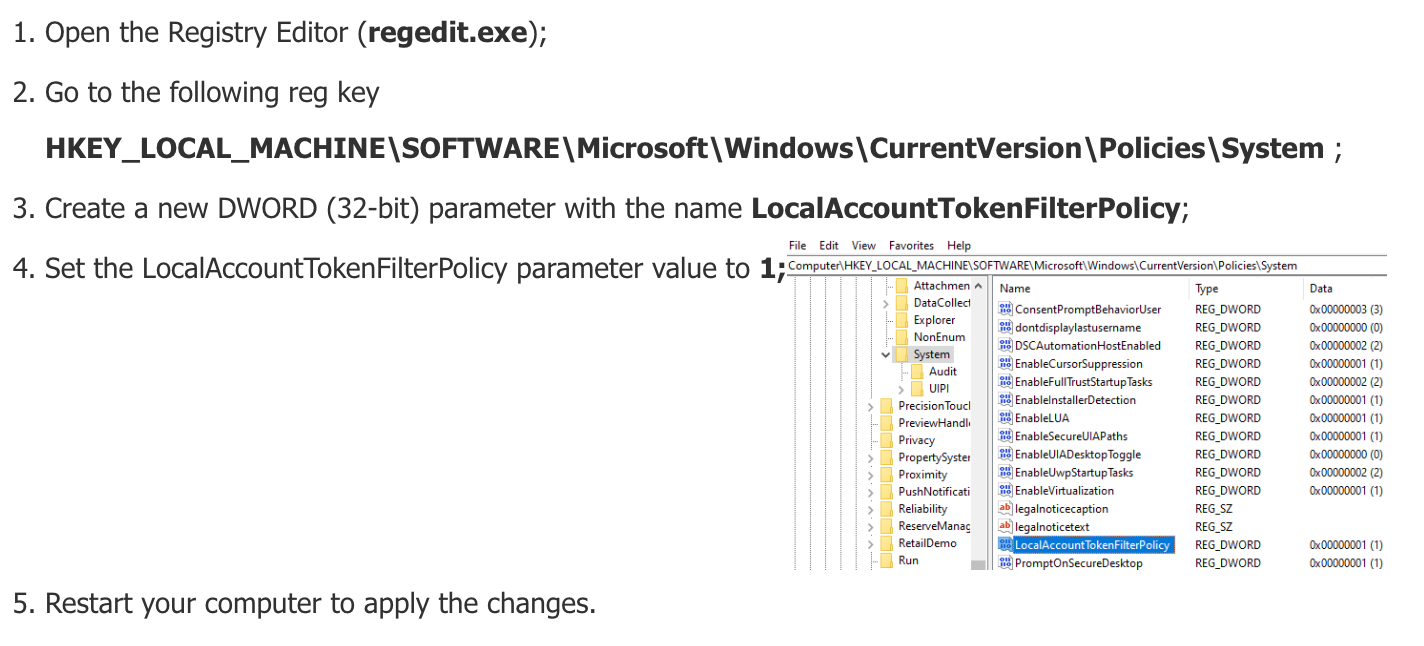
The error you’re receiving doesn’t occur with Domain accounts. It occurs only with local accounts; even with local admin accounts. The problem occurs due to remote UAC restrictions. To mitigate the issue, do the following:


After you perform the above, go back to your Veeam server and test your credentials again, using the local account format: hostname\username. It should then be successful.

Let me know.

13 comments

wesmrt
Forum|alt.badge.img+4
  • Veeam MVP
  • April 16, 2024

A user with administrator access should work.
This server has UAC enabled? If so, disabled to have a try.


coolsport00
Forum|alt.badge.img+21
  • Veeam Legend
  • Answer
  • April 16, 2024

Hi @cdmoore1972 -

This is a known issue & is not Veeam-related, but a Microsoft security measure.

The error you’re receiving doesn’t occur with Domain accounts. It occurs only with local accounts; even with local admin accounts. The problem occurs due to remote UAC restrictions. To mitigate the issue, do the following:


After you perform the above, go back to your Veeam server and test your credentials again, using the local account format: hostname\username. It should then be successful.

Let me know.


  • Author
  • Not a newbie anymore
  • April 16, 2024

A user with administrator access should work.
This server has UAC enabled? If so, disabled to have a try.

Disabled UAC on the Hyper-V host, rebooted the host, but still can only connect Veeam to the Hyper-V host with the hostname\administrators account.

Chris 


Chris.Childerhose
Forum|alt.badge.img+21

Is the non-administrator account you are trying to use part of the Local Administrators group?  Ensure that is the case.


coolsport00
Forum|alt.badge.img+21
  • Veeam Legend
  • April 16, 2024

A user with administrator access should work.
This server has UAC enabled? If so, disabled to have a try.

Disabled UAC on the Hyper-V host, rebooted the host, but still can only connect Veeam to the Hyper-V host with the hostname\administrators account.

Chris 

@cdmoore1972 - did you try the process I shared?


  • Author
  • Not a newbie anymore
  • April 16, 2024

Hi @cdmoore1972 -

This is a known issue & is not Veeam-related, but a Microsoft security measure.

The error you’re receiving doesn’t occur with Domain accounts. It occurs only with local accounts; even with local admin accounts. The problem occurs due to remote UAC restrictions. To mitigate the issue, do the following:


After you perform the above, go back to your Veeam server and test your credentials again, using the local account format: hostname\username. It should then be successful.

Let me know.

We have a winner. 

Thanks a bunch. 


coolsport00
Forum|alt.badge.img+21
  • Veeam Legend
  • April 16, 2024

Glad to hear it resolved the issue 😊


  • New Here
  • May 24, 2024

Sadly I was hoping this would fix my issue, but I found in regedit that the entry was already set to 1.


Are there any next steps?


Chris.Childerhose
Forum|alt.badge.img+21

Sadly I was hoping this would fix my issue, but I found in regedit that the entry was already set to 1.


Are there any next steps?


The account you are using is it local admin on the Hyper-v server?  You may need a support case for this one.


coolsport00
Forum|alt.badge.img+21
  • Veeam Legend
  • May 24, 2024

The only “main” fixes we’ve come across here in the Community are:

  1. Is the account in the local Admins group?
  2. Is UAC disabled?
  3. Is registry configured?
  4. Are you using hostname\username (for non-domain joined Hosts)
  5. Is firewall disabled, and/or rules set?
  6. Do you have A/V exclusions in place?
  7. Is your Host fully updated?
  8. Have you rebooted your Host? (yes, this actually was a resolution some time ago for a user)

If you’ve done all those things and are still having issues, then as Chris suggested, a case with Veeam Support is needed.

Best.


Hi @cdmoore1972 -

This is a known issue & is not Veeam-related, but a Microsoft security measure.

The error you’re receiving doesn’t occur with Domain accounts. It occurs only with local accounts; even with local admin accounts. The problem occurs due to remote UAC restrictions. To mitigate the issue, do the following:


After you perform the above, go back to your Veeam server and test your credentials again, using the local account format: hostname\username. It should then be successful.

Let me know.

this works for me, even without reboot server!

but additionally u need to open those ports on host:

445, 135, 6160, 6162, 6163, 2500-3300, 49152-65535

Veeam 12.1.2.172

Windows Server 2022 V21h2 (OS Build 20348.2655)


thanks amigo


coolsport00
Forum|alt.badge.img+21
  • Veeam Legend
  • August 20, 2024

@christian_elias - no problem...glad what I shared helped you out. 


Chris.Childerhose
Forum|alt.badge.img+21

Great to hear the suggestion worked to address your issue. 👍