
Solved

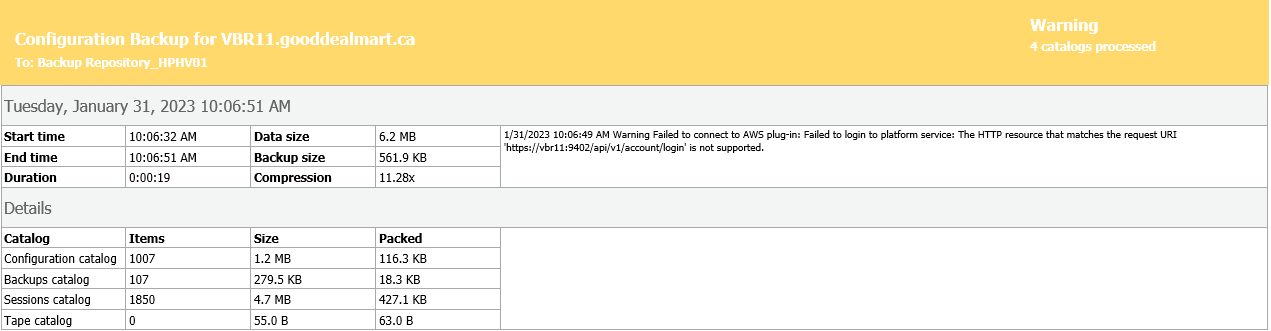
Backup Configuration job warning after upgrade to VBR12 RTM

  • January 31, 2023
  • 38 comments
  • 10539 views

Show first post

38 comments

regnor
Forum|alt.badge.img+14
  • Veeam MVP
  • February 18, 2023

I just did update my lab from RTM to GA, and the warning no longer appears. So solved in my case.


  • New Here
  • March 7, 2023

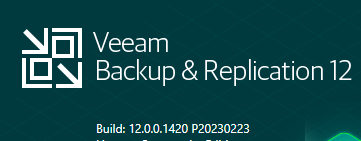
I am receiving the “Failed to connect to AWS plug-in” warning even though I upgraded using the GA ISO. I am on build 12.0.0.1420.

In version 12.0.0.1420 I also have this warning.


Mildur
Forum|alt.badge.img+12
  • Influencer
  • March 7, 2023

Hello


If you still see the warning, you can uninstall the aws plugin on your backup server. A new plugin version will soon be provided with the new version of Veeam Backup for AWS.

Best,

Fabian


  • New Here
  • April 14, 2023

Just wanted to mention that this issue is being encountered with a client of mine that was upgraded to the v12 GA release.  Looking at manually running the plug-in installers over again from the install media and seeing if that does the trick.


  • New Here
  • April 17, 2023

Same here. Build 12.0.0 1420 P20230223

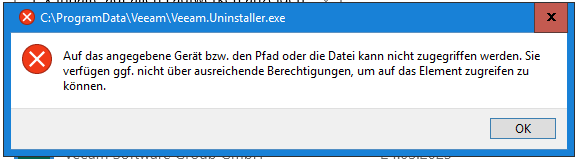
Unfortunately, I’m not able to uninstall AWS-Plugin:

“C:\ProgramData\Veeam\Veeam.Uninstaller.exe
Auf das angegebene Gerät bzw. den Pfad oder die Datei kann nicht zugegriffen werden. Sie verfügen ggf. nicht über ausreichende Berechtigungen, um auf das Element zugreifen zu können.”


Mildur
Forum|alt.badge.img+12
  • Influencer
  • April 17, 2023

Hi Lennart


Please update the AWS plugin to the newest version (12.0.6.956). You can download the plugin on our download page
https://www.veeam.com/backup-replication-vcp-download.html.


Best,

Fabian


  • New Here
  • April 21, 2023

I am getting the “Warning Failed to connect to AWS plug-in” and “Warning Failed to connect to GCP plug-in” error from my Configuration Backup job too.

I am on:


This server was an in-place upgrade from V11.

I did not/do not have the AWS or GCP plugins installed.


dips
Forum|alt.badge.img+7
  • On the path to Greatness
  • April 22, 2023

I am getting the “Warning Failed to connect to AWS plug-in” and “Warning Failed to connect to GCP plug-in” error from my Configuration Backup job too.

I am on:


This server was an in-place upgrade from V11.

I did not/do not have the AWS or GCP plugins installed.

Hi @clowg have you tried installing the AWS and GCP plugins?


  • New Here
  • April 23, 2023

No I havent - I don’t need them.

Are you saying you HAVE TO install them to get rid of this error in the log?


Mildur
Forum|alt.badge.img+12
  • Influencer
  • April 24, 2023

You can also update to the newest patch and check again if you see the error. We solved over 100 known issues with that patch.

https://www.veeam.com/kb4420


  • New Here
  • April 27, 2023

I installed the latest patch release, and am still getting the errors in the Config Backup job log:


27/04/2023 10:00:31 AM Warning Failed to connect to AWS plug-in: Failed to login to platform service: No connection could be made because the target machine actively refused it X.X.X.X:9402


27/04/2023 10:00:26 AM Warning Failed to connect to GCP plug-in: Failed to login to platform service: No connection could be made because the target machine actively refused it X.X.X.X:9403


  • New Here
  • May 14, 2023

Found the result AWS Service was not running on the Server


  • New Here
  • May 14, 2023

I found that after another reboot of the VBR 12 server the AWS & GCP errors have gone away :)